LibreOffice 3.3.3 Released

LibreOffice has just released LibreOffice v3.3.3.
http://www.libreoffice.org

LibreOffice is a comprehensive, professional-quality productivity suite that you can download and install for free. There is a large base of satisfied LibreOffice users worldwide, and it’s available in more than 30 languages and for all major operating systems, including Microsoft Windows, Mac OS X and Linux (Debian, Ubuntu, Fedora, Mandriva, Suse, …).

Regards,
Roger Lacroix
Capitalware Inc.

Linux, macOS (Mac OS X), Open Source, Windows Comments Off on LibreOffice 3.3.3 Released

Mozilla Firefox 5.0 Released

Mozilla Firefox has just released Mozilla Firefox v5.0.
http://www.mozilla.com/firefox/

Mozilla Firefox is a free and open source web browser descended from the Mozilla Application Suite and managed by Mozilla Corporation. To display web pages, Firefox uses the Gecko layout engine, which implements most current web standards in addition to several features that are intended to anticipate likely additions to the standards

Regards,
Roger Lacroix
Capitalware Inc.

Linux, macOS (Mac OS X), Open Source, Windows Comments Off on Mozilla Firefox 5.0 Released

Setting up communication between 2 queue managers

Defining the MQ objects (channels and queues) for each queue manager is very straightforward, the trick is making sure the user matches the names of the channels for each queue manager. To setup communication between 2 queue managers, each queue manager requires a minimum of 1 send channel, 1 transmission queue and 1 receiver channel.

The testing section of this blog requires that the MQ samples be installed.

In this example, the following queue managers are used:
– MQA1 is a queue manager residing on a AIX server
– MQL1 is a queue manager residing on a Linux server

In this example, the following hostnames are used:
– aix_server is the hostname of the AIX server
– linux_server is the hostname of the Linux server

Defining the channels and queues for each queue manager

Step #1: On the AIX server, create a file called mqa1_aix.mqsc and copy the following MQSC commands into the file:

*
* MQSC commands for queue manager: MQA1
*
* Define a local queue for testing:
DEFINE QLOCAL(TEST.AIX.QL) REPLACE

* Define a remote queue for testing:
DEFINE QREMOTE(TEST.LINUX.QR) +
       RNAME(TEST.LINUX.QL) +
       RQMNAME(MQL1) +
       XMITQ(MQL1) +
       REPLACE

* Define a transmission queue for the sender channel:
DEFINE QLOCAL(MQL1) +
       USAGE(XMITQ) +
       TRIGGER +
       TRIGTYPE(FIRST) +
       TRIGDATA(' ') +
       PROCESS(' ') +
       INITQ('SYSTEM.CHANNEL.INITQ') +
       REPLACE

* Define a sender channel:
DEFINE CHANNEL(MQA1.MQL1) +
       CHLTYPE(SDR) +
       TRPTYPE(TCP) +
       CONNAME('linux_server(1414)') +
       XMITQ(MQL1) +
       REPLACE

* Define a receiver channel:
DEFINE CHANNEL(MQL1.MQA1) +
       CHLTYPE(RCVR) +
       TRPTYPE(TCP) +
       REPLACE
*
*** End of commands ***

Step #2: On the AIX server, run the runmqsc to process the MQSC commands contained in the MQSC file:

runqmsc MQA1 < mqa1_aix.mqsc > mqa1_aix.mqsc.out

Check the bottom of the mqa1_aix.mqsc.out file for any errors.

Step #3: On the Linux server, create a file called mql1_linux.mqsc and copy the following MQSC commands into the file:

*
* MQSC commands for queue manager: MQL1
*
* Define a local queue for testing:
DEFINE QLOCAL(TEST.LINUX.QL) REPLACE

* Define a remote queue for testing:
DEFINE QREMOTE(TEST.AIX.QR) +
       RNAME(TEST.AIX.QL)  +
       RQMNAME(MQA1) +
       XMITQ(MQA1) +
       REPLACE

* Define a transmission queue for the sender channel:
DEFINE QLOCAL(MQA1) +
       USAGE(XMITQ) +
       TRIGGER +
       TRIGTYPE(FIRST) +
       TRIGDATA(' ') +
       PROCESS(' ') +
       INITQ('SYSTEM.CHANNEL.INITQ') +
       REPLACE

* Define a sender channel:
DEFINE CHANNEL(MQL1.MQA1) +
       CHLTYPE(SDR) +
       TRPTYPE(TCP) +
       CONNAME('aix_server(1414)') +
       XMITQ(MQA1) +
       REPLACE

* Define a receiver channel:
DEFINE CHANNEL(MQA1.MQL1) +
       CHLTYPE(RCVR) +
       TRPTYPE(TCP) +
       REPLACE
*
*** End of commands ***

Step #4: On the Linux server, run the runmqsc to process the MQSC commands contained in the MQSC file:

runqmsc MQL1 < mql1_linux.mqsc > mql1_linux.mqsc.out

Check the bottom of the mql1_linux.mqsc.out file for any errors.

Step #5: On the AIX server, run the following runmqsc command:

echo 'START CHANNEL(MQA1.MQL1)' | runqmsc MQA1

Make sure the the channel successfully starts.

Step #6: On the Linux server, run the following runmqsc command:

echo 'START CHANNEL(MQL1.MQA1)' | runqmsc MQL1

Make sure the the channel successfully starts.

Testing the setup

Step #7: Sending a message from queue manager MQA1 to queue manager MQL1. On the AIX server, run the following command (press Enter on a blank line to terminate amqsput):

/opt/mqm/samp/bin/amqsput TEST.LINUX.QR MQA1
this is a test message  <Enter>
<Enter>

Step #8: On the Linux server, run the following amqsget to retrieve the message:

/opt/mqm/samp/bin/amqsget TEST.LINUX.QL MQL1

Did amqsget output the “test message” ?

Step #9: Sending a message from queue manager MQL1 to queue manager MQA1. On the Linux server, run the following command (press Enter on a blank line to terminate amqsput):

/opt/mqm/samp/bin/amqsput TEST.AIX.QR MQL1
this is a test message #2  <Enter>
<Enter>

Step #10: On the AIX server, run the following amqsget to retrieve the message:

/opt/mqm/samp/bin/amqsget TEST.AIX.QL MQA1

Did amqsget output the “test message” ?

If you have successfully completed the above 10 steps, then you have setup communication between 2 queue managers.

Regards,
Roger Lacroix
Capitalware Inc.

IBM i (OS/400), IBM MQ, Linux, Unix, Windows, z/OS Comments Off on Setting up communication between 2 queue managers

Ubuntu 11.04 Released

Ubuntu has just released Ubuntu v11.04.
http://www.ubuntu.com/

Super-fast, easy to use and free, the Ubuntu operating system powers millions of desktops, netbooks and servers around the world. Ubuntu does everything you need it to. It’ll work with your existing PC files, printers, cameras and MP3 players. And it comes with thousands of free apps.

Regards,
Roger Lacroix
Capitalware Inc.
Linux, Open Source, Operating Systems Comments Off on Ubuntu 11.04 Released

WebSphere MQ FixPack 7.0.1.5 Released

IBM has just released FixPack 7.0.1.5 for WebSphere MQ.
http://www.ibm.com/support/docview.wss?rs=171&uid=swg27006037

Regards,
Roger Lacroix
Capitalware Inc.

IBM i (OS/400), IBM MQ, Linux, Unix, Windows Comments Off on WebSphere MQ FixPack 7.0.1.5 Released

New: MQRC2-GUI v1.0.1 and MQRC2 v1.1.1

Capitalware Inc. would like to announce the official release of MQRC2-GUI v1.0.1 and MQRC2 v1.1.1.

    Updates for MQRC2-GUI v1.0.1:

  • Added code to perform better number checking for Reason Code and AMQ Message Number fields
  • Fixed an issue with reason codes 2424 to 2539 and 6100 to 6129
    Updates for MQRC2 v1.1.1:

  • Fixed an issue with reason codes 2424 to 2539 and 6100 to 6129

For more information on MQRC2-GUI or MQRC2, please go to:
https://www.capitalware.com/mqrc2_overview.html

Regards,
Roger Lacroix
Capitalware Inc.

C, Capitalware, IBM i (OS/400), IBM MQ, Java, Linux, Open Source, Unix, Windows, z/OS Comments Off on New: MQRC2-GUI v1.0.1 and MQRC2 v1.1.1

MQFM: Submit your code changes

I am in the process of updating the open source project MQ File Mover (MQFM). I would like everyone who has modified MQFM source code to submit their changes (now), for the upcoming release. It will be far easier to merge the changes before the next release than after the release.

Please submit any and all MQFM code changes to support@capitalware.biz ASAP.

Regards,
Roger Lacroix
Capitalware Inc.

Capitalware, IBM i (OS/400), IBM MQ, Java, Linux, macOS (Mac OS X), MQ File Mover, Open Source, Unix, Windows Comments Off on MQFM: Submit your code changes

New: PyMQI v1.2 – Python interface to WebSphere MQ

PyMQI allows users to connect Python applications to WebSphere MQ queue managers.

It can be used to develop test harnesses for WebSphere MQ based systems, for rapid prototyping of WebSphere MQ applications, for development of administrative GUIs or for mainstream MQ application development.

PyMQI has been used in production environments for several years on Linux, Windows, Solaris and AIX with queue managers running on Linux, Windows, Solarix, AIX, HP-UX and z/OS mainframe. Supported WebSphere MQ versions are 5.0, 5.1, 5.3, 6.0 and 7.0.

New features in v1.2:

– Added support for MQ 7.0-style publish/subscribe
– Added support for creating and parsing of MQRFH2 headers
– Added new constants in the CMQZC.py module
– Added new structures – MQSRO, MQSD, MQTM, MQTMC2
– PyMQI now supports byte strings
– New MQ verb – MQSUB
– Simplified establishing connections to queue managers
– Added means for checking whether a client application is connected to a queue manager

For more information about PyMQI, please go to:
http://packages.python.org/pymqi/

Regards,
Roger Lacroix
Capitalware Inc.

IBM MQ, Linux, macOS (Mac OS X), Open Source, Unix, Windows Comments Off on New: PyMQI v1.2 – Python interface to WebSphere MQ

Oracle drops OpenOffice

Oracle is dropping OpenOffice and returning it to a community-based open source project. Oracle will no longer offer a commercial version of Open Office.
http://arstechnica.com/open-source/news/2011/04/oracle-gives-up-on-ooo-after-community-forks-the-project.ars

Interesting. Oracle won the battle for OpenOffice but lost the war and now concedes defeat. It was a nice David and Goliath story. It is good to see David win a few.

Long live LibreOffice. 🙂
http://www.libreoffice.org

Regards,
Roger Lacroix
Capitalware Inc.

Linux, macOS (Mac OS X), Open Source, Windows Comments Off on Oracle drops OpenOffice

New: MQRC2-GUI v1.0.0

Capitalware Inc. would like to announce the official release of MQRC2-GUI v1.0.0.

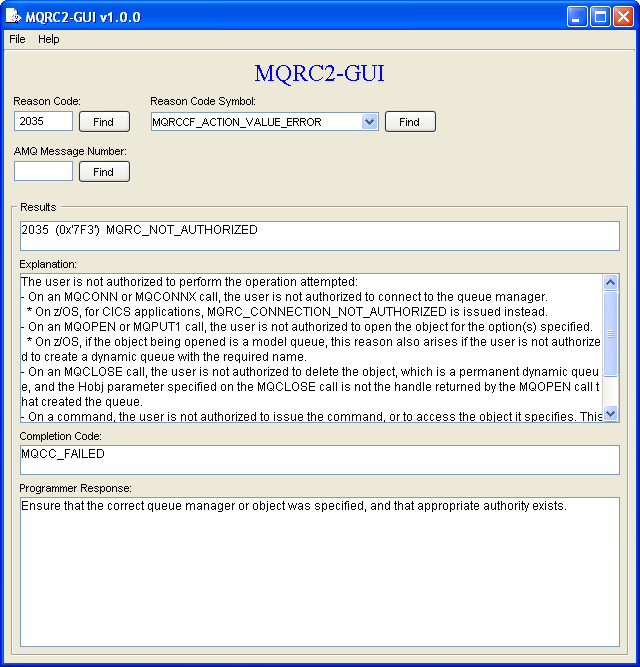
MQRC2-GUI is an application that can interpret an MQ reason code number (i.e. 2035), MQ reason code symbol (i.e. MQRC_OBJECT_IN_USE) or AMQ message number (i.e. AMQ4005) and display the relevant information from the WebSphere MQ Messages manual.

MQRC2-GUI requires Java Runtime Environment (JRE) 1.4 or higher and can run on any platform that has a JRE or JDK installed.

For more information on MQRC2-GUI, please go to:
https://www.capitalware.com/mqrc2_overview.html

Regards,
Roger Lacroix
Capitalware Inc.

Capitalware, IBM MQ, Java, Open Source Comments Off on New: MQRC2-GUI v1.0.0