
AdoptOpenJDK project is moving to the Eclipse Foundation.
https://blog.adoptopenjdk.net/2020/06/adoptopenjdk-to-join-the-eclipse-foundation/
The new Eclipse project name will be Eclipse Adoptium.
Regards,
Roger Lacroix
Capitalware Inc.
AdoptOpenJDK project is moving to the Eclipse Foundation.
https://blog.adoptopenjdk.net/2020/06/adoptopenjdk-to-join-the-eclipse-foundation/
The new Eclipse project name will be Eclipse Adoptium.
Regards,
Roger Lacroix
Capitalware Inc.
Here is some IBM MQ information from IBM Developer that you might find interesting:
Regards,
Roger Lacroix
Capitalware Inc.
IBM has just released Raspberry Pi edition of IBM MQ Advanced for Developers.
I gotta figure out how to get some play time with this release of MQ. 🙂
Regards,
Roger Lacroix
Capitalware Inc.
IBM has just released Fix Pack 8.0.0.15 for IBM MQ
https://www.ibm.com/support/pages/node/6220286
Regards,
Roger Lacroix
Capitalware Inc.
On StackOverflow, someone asked a question about determining when a queue’s current depth is the same as maximum depth. They were trying to do it from a script. While this is probably possible (I’m not a sed and/or awk guy), it seemed to me that they are trying to squeeze a fully blown up balloon into a wine bottle.
IMHO, it would seem far, far simpler to just run a Java/MQ/PCF application to get both the current and maximum depths and compare the values. Here is a simple Java/MQ/PCF program that will request all queues with a queue depth greater than zero and then compare the current depth to the maximum depth and output a message if needed.
You can download the source code from here.
import java.io.IOException;
import java.text.SimpleDateFormat;
import java.util.Date;
import java.util.Hashtable;

import com.ibm.mq.MQException;
import com.ibm.mq.MQQueueManager;
import com.ibm.mq.constants.CMQC;
import com.ibm.mq.constants.CMQCFC;
import com.ibm.mq.headers.MQDataException;
import com.ibm.mq.headers.pcf.PCFMessage;
import com.ibm.mq.headers.pcf.PCFMessageAgent;

/**
 * Program Name
 *  MQCurrentDepthMonitor01
 *
 * Description
 *  This java class issues a PCF "inquire queue" request message for all ("*") local queues
 *  with a queue depth greater than 0 (zero) of a remote queue manager and
 *  (1) output an error message if current depth is the same as max depth or
 *  (2) output a warning message if current depth is within 90% of max depth or
 *  (3) output an info message if current depth is within 50% of max depth.
 *
 * Sample Command Line Parameters
 *  -m MQA1 -h 127.0.0.1 -p 1414 -c TEST.CHL -u UserID -x Password
 *
 * @author Roger Lacroix
 */
public class MQCurrentDepthMonitor01
{
   private static final SimpleDateFormat  LOGGER_TIMESTAMP = new SimpleDateFormat("yyyy/MM/dd HH:mm:ss.SSS");

   private Hashtable<String,String> params;
   private Hashtable<String,Object> mqht;
   private String qMgrName;

   public MQCurrentDepthMonitor01()
   {
      super();
      params = new Hashtable<String,String>();
      mqht = new Hashtable<String,Object>();
   }

   /**
    * Make sure the required parameters are present.
    * @return true/false
    */
   private boolean allParamsPresent()
   {
      boolean b = params.containsKey("-h") && params.containsKey("-p") &&
                  params.containsKey("-c") && params.containsKey("-m") &&
                  params.containsKey("-u") && params.containsKey("-x");
      if (b)
      {
         try
         {
            Integer.parseInt((String) params.get("-p"));
         }
         catch (NumberFormatException e)
         {
            b = false;
         }
      }

      return b;
   }

   /**
    * Extract the command-line parameters and initialize the MQ HashTable.
    * @param args
    * @throws IllegalArgumentException
    */
   private void init(String[] args) throws IllegalArgumentException
   {
      int port = 1414;
      if (args.length > 0 && (args.length % 2) == 0)
      {
         for (int i = 0; i < args.length; i += 2)
         {
            params.put(args[i], args[i + 1]);
         }
      }
      else
      {
         throw new IllegalArgumentException();
      }

      if (allParamsPresent())
      {
         qMgrName = (String) params.get("-m");

         try
         {
            port = Integer.parseInt((String) params.get("-p"));
         }
         catch (NumberFormatException e)
         {
            port = 1414;
         }

         mqht.put(CMQC.CHANNEL_PROPERTY, params.get("-c"));
         mqht.put(CMQC.HOST_NAME_PROPERTY, params.get("-h"));
         mqht.put(CMQC.PORT_PROPERTY, new Integer(port));
         mqht.put(CMQC.USER_ID_PROPERTY, params.get("-u"));
         mqht.put(CMQC.PASSWORD_PROPERTY, params.get("-x"));

         // I don't want to see MQ exceptions at the console.
         MQException.log = null;
      }
      else
      {
         throw new IllegalArgumentException();
      }
   }

   /**
    * Handle connecting to the queue manager, issuing PCF command then
    * looping through PCF response messages and disconnecting from
    * the queue manager.
    */
   private void doPCF()
   {
      MQQueueManager qMgr = null;
      PCFMessageAgent agent = null;
      PCFMessage   request = null;
      PCFMessage[] responses = null;

      try
      {
         qMgr = new MQQueueManager(qMgrName, mqht);
         MQCurrentDepthMonitor01.logger("successfully connected to "+ qMgrName);

         agent = new PCFMessageAgent(qMgr);
         MQCurrentDepthMonitor01.logger("successfully created agent");

         // https://www.ibm.com/support/knowledgecenter/en/SSFKSJ_9.1.0/com.ibm.mq.ref.adm.doc/q087800_.htm
         request = new PCFMessage(CMQCFC.MQCMD_INQUIRE_Q);

         /**
          * You can explicitly set a queue name like "TEST.Q1" or
          * use a wild card like "TEST.*"
          */
         request.addParameter(CMQC.MQCA_Q_NAME, "*");

         // Add parameter to request only local queues
         request.addParameter(CMQC.MQIA_Q_TYPE, CMQC.MQQT_LOCAL);

         // Add parameter to request only queue name, current depth and max depth
         request.addParameter(CMQCFC.MQIACF_Q_ATTRS, new int [] {
                                                                  CMQC.MQCA_Q_NAME,
                                                                  CMQC.MQIA_CURRENT_Q_DEPTH,
                                                                  CMQC.MQIA_MAX_Q_DEPTH
                                                                });

         // Add filter to only return responses with a queue depth greater than 0 (zero)
         // i.e. non-zero queue depth
         request.addFilterParameter(CMQC.MQIA_CURRENT_Q_DEPTH, CMQCFC.MQCFOP_GREATER, 0);

         responses = agent.send(request);

//         MQCurrentDepthMonitor01.logger("responses.length="+responses.length);

         String name;
         int curDepth = -1;
         int maxDepth = -1;

         for (int i = 0; i < responses.length; i++)
         {
            if ( ((responses[i]).getCompCode() == CMQC.MQCC_OK) &&
                 ((responses[i]).getParameterValue(CMQC.MQCA_Q_NAME) != null) )
            {
               name = responses[i].getStringParameterValue(CMQC.MQCA_Q_NAME);
               if (name != null)
                  name = name.trim();

               curDepth = responses[i].getIntParameterValue(CMQC.MQIA_CURRENT_Q_DEPTH);
               maxDepth = responses[i].getIntParameterValue(CMQC.MQIA_MAX_Q_DEPTH);

//               MQCurrentDepthMonitor01.logger("Name="+name + " : curDepth="+curDepth + " : maxDepth="+maxDepth);

               if (curDepth == maxDepth)
                  MQCurrentDepthMonitor01.logger("ERROR: Name="+name + " : current depth equals max depth ["+maxDepth+"]");
               else if (curDepth >= (maxDepth * 0.9))
                  MQCurrentDepthMonitor01.logger("Warning: Name="+name + " : current depth ["+curDepth+"] is within 90% of max depth ["+maxDepth+"]");
               else if (curDepth >= (maxDepth * 0.5))
                  MQCurrentDepthMonitor01.logger("Info: Name="+name + " : current depth ["+curDepth+"] is within 50% of max depth ["+maxDepth+"]");
            }
         }
      }
      catch (MQException e)
      {
         MQCurrentDepthMonitor01.logger("CC=" +e.completionCode + " : RC=" + e.reasonCode);
      }
      catch (IOException e)
      {
         MQCurrentDepthMonitor01.logger("IOException:" +e.getLocalizedMessage());
      }
      catch (MQDataException e)
      {
         MQCurrentDepthMonitor01.logger("MQDataException:" +e.getLocalizedMessage());
      }
      finally
      {
         try
         {
            if (agent != null)
            {
               agent.disconnect();
               MQCurrentDepthMonitor01.logger("disconnected from agent");
            }
         }
         catch (MQDataException e)
         {
            MQCurrentDepthMonitor01.logger("CC=" +e.completionCode + " : RC=" + e.reasonCode);
         }

         try
         {
            if (qMgr != null)
            {
               qMgr.disconnect();
               MQCurrentDepthMonitor01.logger("disconnected from "+ qMgrName);
            }
         }
         catch (MQException e)
         {
            MQCurrentDepthMonitor01.logger("CC=" +e.completionCode + " : RC=" + e.reasonCode);
         }
      }
   }

   /**
    * A simple logger method
    * @param data
    */
   public static void logger(String data)
   {
      String className = Thread.currentThread().getStackTrace()[2].getClassName();

      // Remove the package info.
      if ( (className != null) && (className.lastIndexOf('.') != -1) )
         className = className.substring(className.lastIndexOf('.')+1);

      System.out.println(LOGGER_TIMESTAMP.format(new Date())+" "+className+": "+Thread.currentThread().getStackTrace()[2].getMethodName()+": "+data);
   }

   public static void main(String[] args)
   {
      MQCurrentDepthMonitor01 mqlqs = new MQCurrentDepthMonitor01();

      try
      {
         mqlqs.init(args);
         mqlqs.doPCF();
      }
      catch (IllegalArgumentException e)
      {
         MQCurrentDepthMonitor01.logger("Usage: java MQCurrentDepthMonitor01 -m QueueManagerName -h host -p port -c channel -u UserID -x Password");
         System.exit(1);
      }

      System.exit(0);
   }
}
Regards,
Roger Lacroix
Capitalware Inc.
Mark Taylor of IBM has published a blog item called MQ API Exits – FAQ which details a variety of questions (and answers) that Mark has received over the last several months.
https://marketaylor.synology.me/?p=700
I have also added Mark’s blog (category: IBM MQ) as a widget on the sidebar of my blog.
Regards,
Roger Lacroix
Capitalware Inc.
Did you know that Microsoft added a network packet sniffer called Packet Monitor or Pktmon to Windows 10 October 2018 Update?
Lawrence Abrams from BleepingComputer wrote about the Pktmon here:
https://www.bleepingcomputer.com/news/microsoft/windows-10-quietly-got-a-built-in-network-sniffer-how-to-use/
Regards,
Roger Lacroix
Capitalware Inc.
IBM has just released Fix Pack 9.0.0.10 for IBM MQ V9.0 LTS
https://www.ibm.com/support/pages/node/6189795?myns=swgws&mynp=OCSSYHRD
Regards,
Roger Lacroix
Capitalware Inc.
Capitalware Inc. would like to announce a new ‘Licensed As Free’ product called: World Clocks.
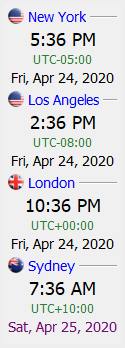
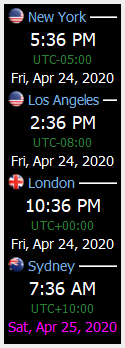
World Clocks application allows the user to quickly view the time and date from various time zones from around the world. World Clocks can display as many time zones that will fit on the user’s display.
| Vertical layout (default) | |
| Normal Mode (default) | Dark Mode |
 |
 |
| Horizontal layout |
Normal Mode (default)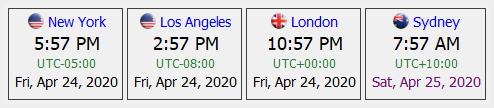 |
Dark Mode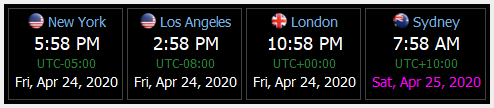 |
World Clocks is available for Windows, Linux and macOS (Mac OS X).
For more information about World Clocks, please go to:
https://www.capitalware.com/wc_overview.html
Enjoy.
Regards,
Roger Lacroix
Capitalware Inc.
 IBM MQ WebSphere MQ IBM Developer Messaging Blog T.Rob’s Store and Forward Mark Taylor’s Blog Lyns Random Thoughts Leif Davidsen’s Blog Colin Paice on MQ StackOverflow MQ Questions StackOverflow MQTT Questions