Linux Help! Anyone, Anyone

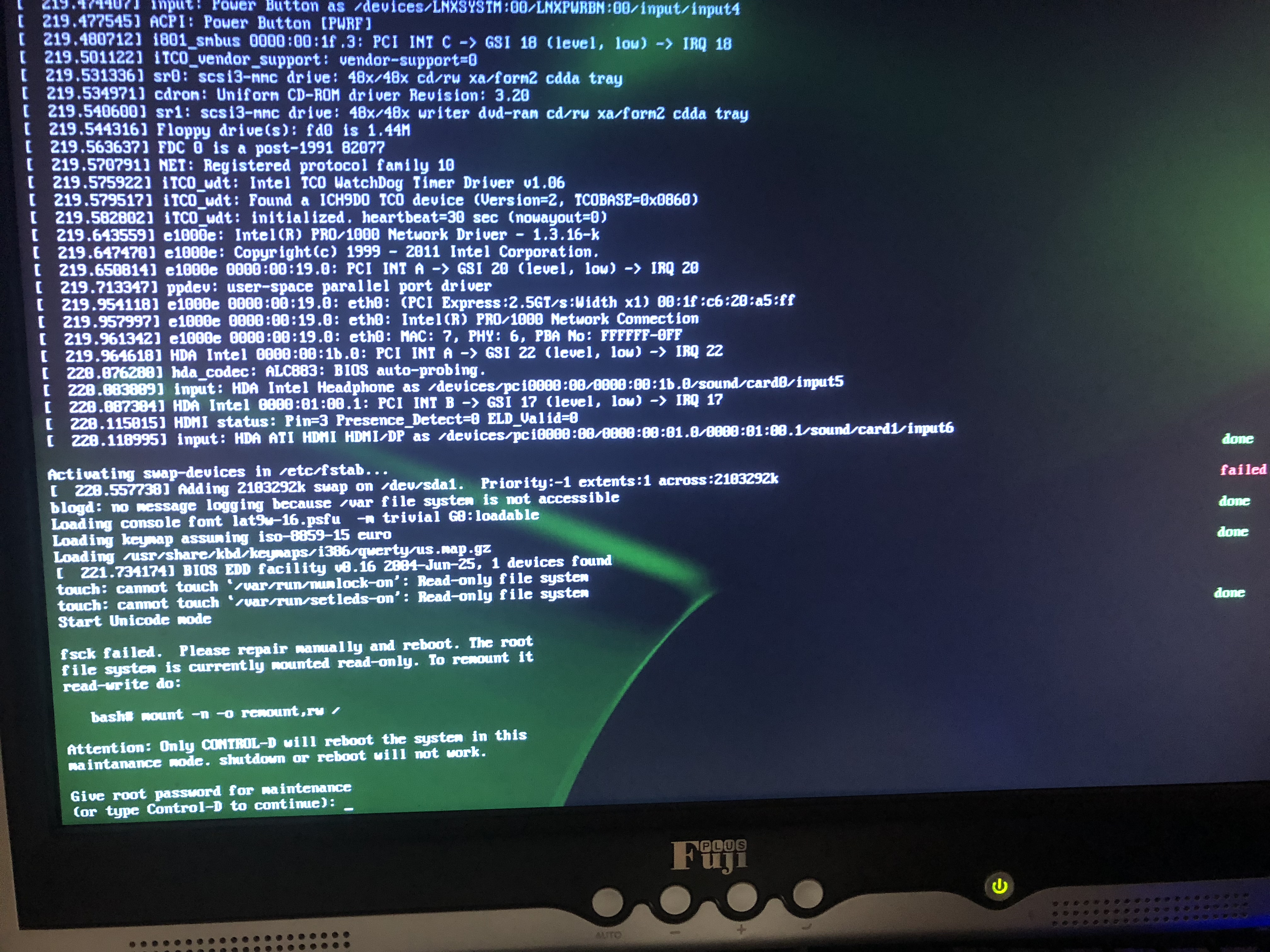
Attention Linux SysAdmin gurus. I could use your Linux expertise. I have an X86-64 bit PC with SLES 11 SP2 64-bit installed. It has been running great for many years. When I turned it on this afternoon and it failed to boot with what looks like a hard drive issue.

Click to see a larger/readable image:


The PC only has 1 hard drive. One of the messages I see says that /var is not available. /var is not on a separate hard drive because it only has one hard drive.

It says to manually repair it. How do I do that? (I’m not a Linux SysAdmin.)

I would prefer to fix it, if possible. I can buy a new hard drive, install it but I just don’t want to go through the whole process of installing Linux, MQ, etc..

Help.

Regards,
Roger Lacroix
Capitalware Inc.

Linux 4 Comments

IBM MQ v8.0 End of Service Date

The end of service date for IBM MQ v8.0 on distributed platforms (Linux, Unix, Windows and IBM i) is April 30, 2020. The IBM MQ Software lifecycle page is at:
http://www-01.ibm.com/common/ssi/ShowDoc.wss?docURL=/common/ssi/rep_ca/4/897/ENUS918-054/index.html

Regards,
Roger Lacroix
Capitalware Inc.
IBM i (OS/400), IBM MQ, Linux, Unix, Windows 2 Comments

Creating A JMS (MQRFH2) Message in non-JMS Java Application

This is the third post regarding JMS (MQRFH2) messages in non-JMS application. The previous 2 are:

If you want to create JMS messages then the simplest solution is to use the IBM MQ classes for JMS. In case you didn’t know, you can run MQ/JMS applications in stand-alone mode rather than using a J2EE server (i.e. WAS, WebLogic, JBoss, etc..). Here are 2 links from the MQ Knowledge Center to get you started:

There are cases where people don’t want to create a JMS application to put JMS messages to an MQ queue. IBM doesn’t have any really good Java coding samples that demonstrate the creation of an JMS message using the MQRFH2 class. In this blog posting, I’ll show you a fully functioning non-JMS Java example that creates a JMS messages using the MQRFH2 class.

You can download the source code from here.

import java.io.IOException;
import java.text.SimpleDateFormat;
import java.util.Date;
import java.util.Hashtable;

import com.ibm.mq.MQException;
import com.ibm.mq.MQMessage;
import com.ibm.mq.MQPutMessageOptions;
import com.ibm.mq.MQQueue;
import com.ibm.mq.MQQueueManager;
import com.ibm.mq.constants.CMQC;
import com.ibm.mq.headers.MQRFH2;

/**
 * Program Name
 *  MQTest71
 *
 * Description
 *  This java class will connect to a remote queue manager with the
 *  MQ setting stored in a HashTable and put a JMS message
 * (aka MQRFH2 message) on a queue.
 *
 * Sample Command Line Parameters
 *  -m MQA1 -h 127.0.0.1 -p 1414 -c TEST.CHL -q TEST.Q1 -u UserID -x Password
 *
 * @author Roger Lacroix
 */
public class MQTest71
{
   private static final SimpleDateFormat  LOGGER_TIMESTAMP = new SimpleDateFormat("yyyy/MM/dd HH:mm:ss.SSS");

   private Hashtable<String,String> params;
   private Hashtable<String,Object> mqht;
   private String qMgrName;
   private String outputQName;

   /**
    * The constructor
    */
   public MQTest71()
   {
      super();
      params = new Hashtable<String,String>();
      mqht = new Hashtable<String,Object>();
   }

   /**
    * Make sure the required parameters are present.
    * @return true/false
    */
   private boolean allParamsPresent()
   {
      boolean b = params.containsKey("-h") && params.containsKey("-p") &&
                  params.containsKey("-c") && params.containsKey("-m") &&
                  params.containsKey("-q") &&
                  params.containsKey("-u") && params.containsKey("-x");
      if (b)
      {
         try
         {
            Integer.parseInt((String) params.get("-p"));
         }
         catch (NumberFormatException e)
         {
            b = false;
         }
      }

      return b;
   }

   /**
    * Extract the command-line parameters and initialize the MQ HashTable.
    * @param args
    * @throws IllegalArgumentException
    */
   private void init(String[] args) throws IllegalArgumentException
   {
      int port = 1414;
      if (args.length > 0 && (args.length % 2) == 0)
      {
         for (int i = 0; i < args.length; i += 2)
         {
            params.put(args[i], args[i + 1]);
         }
      }
      else
      {
         throw new IllegalArgumentException();
      }

      if (allParamsPresent())
      {
         qMgrName = (String) params.get("-m");
         outputQName = (String) params.get("-q");

         try
         {
            port = Integer.parseInt((String) params.get("-p"));
         }
         catch (NumberFormatException e)
         {
            port = 1414;
         }

         mqht.put(CMQC.CHANNEL_PROPERTY, params.get("-c"));
         mqht.put(CMQC.HOST_NAME_PROPERTY, params.get("-h"));
         mqht.put(CMQC.PORT_PROPERTY, new Integer(port));
         mqht.put(CMQC.USER_ID_PROPERTY, params.get("-u"));
         mqht.put(CMQC.PASSWORD_PROPERTY, params.get("-x"));

         // I don't want to see MQ exceptions at the console.
         MQException.log = null;
      }
      else
      {
         throw new IllegalArgumentException();
      }
   }

   /**
    * Connect, open queue, write a message, close queue and disconnect.
    *
    */
   private void testSend()
   {
      MQQueueManager qMgr = null;
      MQQueue queue = null;
      String msgData = "This is a test message from MQTest71";
      int openOptions = CMQC.MQOO_OUTPUT + CMQC.MQOO_FAIL_IF_QUIESCING;
      MQPutMessageOptions pmo = new MQPutMessageOptions();

      try
      {
         qMgr = new MQQueueManager(qMgrName, mqht);
         MQTest71.logger("successfully connected to "+ qMgrName);

         queue = qMgr.accessQueue(outputQName, openOptions);
         MQTest71.logger("successfully opened "+ outputQName);

         MQMessage sendmsg = new MQMessage();

         // Set the RFH2 Values
         MQRFH2 rfh2 = new MQRFH2();
         rfh2.setEncoding(CMQC.MQENC_NATIVE);
         rfh2.setCodedCharSetId(CMQC.MQCCSI_INHERIT);
         rfh2.setFormat(CMQC.MQFMT_STRING);
         rfh2.setFlags(0);
         rfh2.setNameValueCCSID(1208);

         /**
          * First, set the 'Message Service Domain' value.
          * Valid values for mcd.Msd are:
          * jms_none, jms_text, jms_bytes, jms_map, jms_stream & jms_object
          */
         rfh2.setFieldValue("mcd", "Msd", "jms_text");

         /**
          * Set the destination JMS queue name.
          */
         rfh2.setFieldValue("jms", "Dst", "queue:///"+outputQName);

         /**
          * Set user values.
          */
         rfh2.setFieldValue("usr", "SomeNum", 123);
         rfh2.setFieldValue("usr", "SomeText", "TEST");

         // Set the MQRFH2 structure to the message
         rfh2.write(sendmsg);

         // Write message data
         sendmsg.writeString(msgData);

         // Set MQMD values
         sendmsg.messageId = CMQC.MQMI_NONE;
         sendmsg.correlationId = CMQC.MQCI_NONE;
         sendmsg.messageType = CMQC.MQMT_DATAGRAM;
         // IMPORTANT: Set the format to MQRFH2 aka JMS Message.
         sendmsg.format = CMQC.MQFMT_RF_HEADER_2;

         // put the message on the queue
         queue.put(sendmsg, pmo);
         MQTest71.logger("Message Data>>>" + msgData);
      }
      catch (MQException e)
      {
         MQTest71.logger("CC=" +e.completionCode + " : RC=" + e.reasonCode);
      }
      catch (IOException e)
      {
         MQTest71.logger("IOException:" +e.getLocalizedMessage());
      }
      finally
      {
         try
         {
            if (queue != null)
            {
               queue.close();
               MQTest71.logger("closed: "+ outputQName);
            }
         }
         catch (MQException e)
         {
            MQTest71.logger("CC=" +e.completionCode + " : RC=" + e.reasonCode);
         }
         try
         {
            if (qMgr != null)
            {
               qMgr.disconnect();
               MQTest71.logger("disconnected from "+ qMgrName);
            }
         }
         catch (MQException e)
         {
            MQTest71.logger("CC=" +e.completionCode + " : RC=" + e.reasonCode);
         }
      }
   }

   /**
    * A simple logger method
    * @param data
    */
   public static void logger(String data)
   {
      String className = Thread.currentThread().getStackTrace()[2].getClassName();

      // Remove the package info.
      if ( (className != null) && (className.lastIndexOf('.') != -1) )
         className = className.substring(className.lastIndexOf('.')+1);

      System.out.println(LOGGER_TIMESTAMP.format(new Date())+" "+className+": "+Thread.currentThread().getStackTrace()[2].getMethodName()+": "+data);
   }

   /**
    * main line
    * @param args
    */
   public static void main(String[] args)
   {
      MQTest71 write = new MQTest71();

      try
      {
         write.init(args);
         write.testSend();
      }
      catch (IllegalArgumentException e)
      {
         MQTest71.logger("Usage: java MQTest71 -m QueueManagerName -h host -p port -c channel -q QueueName -u UserID -x Password");
         System.exit(1);
      }

      System.exit(0);
   }
}

As I said above, you can download the source code from here.

There are some things to note:

  • The order of items written to the MQMessage is very important. The MQRFH2 must be FIRST followed by the application’s message data.
  • A JMS message needs BOTH an ‘mcd’ and ‘jms’ folders.
  • The application MUST set the MQMD Format field of the message to CMQC.MQFMT_RF_HEADER_2 otherwise it is left to its default value (blank), hence, it will NOT be a JMS message.
  • If the application needs to set their own properties, then you store them in the ‘usr’ folder.

If you follow my instructions and/or use my sample Java program above then you will be able to create JMS messages in a non-JMS Java application.

Regards,
Roger Lacroix
Capitalware Inc.

IBM i (OS/400), IBM MQ, IBM MQ Appliance, Java, JMS, Linux, macOS (Mac OS X), Programming, Unix, Windows, z/OS 2 Comments

Handling A JMS (MQRFH2) Message in non-JMS Java Application

In the post ‘JMS (MQRFH2) Message But The User Sees Garbage‘, I wrote about how to properly view a JMS message (aka MQRFH2 message) on an MQ queue. I mentioned in the posting that non-JMS applications can be coded to deal with JMS messages. So in this posting, I’ll show you code for handling both styles of JMS messages with a non-JMS Java application.

1. JMS Message as a MQRFH2 Message
To get the JMS message as an MQRFH2 message, you need to set the MQGMO options field to include MQGMO_PROPERTIES_FORCE_MQRFH2.

MQGetMessageOptions gmo = new MQGetMessageOptions();
gmo.options = CMQC.MQGMO_PROPERTIES_FORCE_MQRFH2 + CMQC.MQGMO_FAIL_IF_QUIESCING + CMQC.MQGMO_NO_WAIT;
MQMessage receiveMsg = new MQMessage();

queue.get(receiveMsg, gmo);

if (CMQC.MQFMT_RF_HEADER_2.equals(receiveMsg.format))
{
   receiveMsg.seek(0);
   MQRFH2 rfh2 = new MQRFH2(receiveMsg);

   int strucLen = rfh2.getStrucLength();
   int encoding = rfh2.getEncoding();
   int CCSID    = rfh2.getCodedCharSetId();
   String format= rfh2.getFormat();
   int flags    = rfh2.getFlags();
   int nameValueCCSID = rfh2.getNameValueCCSID();

   String[] folderStrings = rfh2.getFolderStrings();
   for (String folder : folderStrings)
      System.out.println("Folder: "+folder);

   if (CMQC.MQFMT_STRING.equals(format))
   {
      String msgStr = receiveMsg.readStringOfByteLength(receiveMsg.getDataLength());
      System.out.println("Data: "+msgStr);
   }
   else
   {
      byte[] b = new byte[receiveMsg.getDataLength()];
      receiveMsg.readFully(b);
      System.out.println("Data: "+new String(b));
   }
}
else if (CMQC.MQFMT_STRING.equals(receiveMsg.format))
{
   String msgStr = receiveMsg.readStringOfByteLength(receiveMsg.getMessageLength());
   System.out.println("Data: "+msgStr);
}
else
{
   byte[] b = new byte[receiveMsg.getMessageLength()];
   receiveMsg.readFully(b);
   System.out.println("Data: "+new String(b));
}

2. JMS Message as an MQ Message with Named Properties
To get the JMS message as an MQ message with Named Properties, you need to set the MQGMO options field to include MQGMO_PROPERTIES_IN_HANDLE.

MQGetMessageOptions gmo = new MQGetMessageOptions();
gmo.options = CMQC.MQGMO_PROPERTIES_IN_HANDLE + CMQC.MQGMO_FAIL_IF_QUIESCING + CMQC.MQGMO_NO_WAIT;
MQMessage receiveMsg = new MQMessage();

queue.get(receiveMsg, gmo);

Enumeration<String> props = receiveMsg.getPropertyNames("%");
if (props != null)
{
   while (props.hasMoreElements())
   {
      String propName = props.nextElement();
      Object o = receiveMsg.getObjectProperty(propName);
      System.out.println("Property: Name="+propName+" : Value="+o);
   }
}

if (CMQC.MQFMT_STRING.equals(receiveMsg.format))
{
   String msgStr = receiveMsg.readStringOfByteLength(receiveMsg.getMessageLength());
   System.out.println("Data: "+msgStr);
}
else
{
   byte[] b = new byte[receiveMsg.getMessageLength()];
   receiveMsg.readFully(b);
   System.out.println("Data: "+new String(b));
}

There are many embedded message structures in MQ. Here is a list (most of them): MQCIH, MQDEAD, MQDH, MQIIH, MQRFH, MQRFH2, MQHSAP, SMQBAD, MQRMH, MQXMIT, MQTM and MQWIH.

The big thing to remember is that MQGMO option of MQGMO_PROPERTIES_* only applies to JMS messages (aka MQRFH2 messages). It does not apply to other embedded message structures. It is just one of those quirks in MQ that you just need to remember.

Regards,
Roger Lacroix
Capitalware Inc.

HPE NonStop, IBM i (OS/400), IBM MQ, IBM MQ Appliance, Java, JMS, Linux, macOS (Mac OS X), Programming, Unix, Windows, z/OS 2 Comments

SQLite v3.23.1 Released

D. Richard Hipp has just released SQLite v3.23.1.
http://www.sqlite.org/news.html

SQLite is a software library that implements a self-contained, serverless, zero-configuration, transactional SQL database engine. SQLite is the most widely deployed SQL database engine in the world. The source code for SQLite is in the public domain.

Regards,
Roger Lacroix
Capitalware Inc.

C, Database, IBM i (OS/400), Linux, macOS (Mac OS X), Open Source, Programming, Unix, Windows, z/OS Comments Off on SQLite v3.23.1 Released

JMS (MQRFH2) Message But The User Sees Garbage

I swear at least once a month I read about someone complaining that they are seeing garbage (unreadable) output when they try to read their JMS (aka MQRFH2) message in IBM MQ.

The user will put a message to a queue with their JMS application then try and read it with a non-JMS tool and immediately start complaining that they are seeing weird and/or garbage output or ‘what happened to my message data’.

First off, if you are going to put a JMS message to a queue then use a JMS application or a tool that understands JMS messages but do NOT use non-JMS tools and the start whining about seeing weird and/or garbage output. Nobody cares that you are new to MQ. Use Google to help you understand the issue or read the MQ Knowledge Center or go to MQ Technical Conference which is super cheap and has lots of great MQ sessions.

In MQ terminology, a JMS message means that it is formatted as an MQRFH2 message. If you are new to MQ, then read and read and read the Overview for MQRFH2 page until you completely understand it and yes I am being serious.

So what am I talking about? The user will put a message to a queue with their JMS application and then use the sample MQ application like amqsget or amqsbcg (which are both non-JMS applications) and start complaining.

When the user runs amqsget, it will look like:

Sample AMQSGET0 start
message <RFH ☻>
no more messages
Sample AMQSGET0 end

Or when the user will runs amqsbcg, it will look like:

****Message descriptor****

  StrucId  : 'MD  '  Version : 2
  Report   : 0  MsgType : 8
  Expiry   : -1  Feedback : 0
  Encoding : 273  CodedCharSetId : 1208
  Format : 'MQHRF2  '
  Priority : 4  Persistence : 1
  MsgId : X'414D51204D5157543120202020202020673AC65A243D0D02'
  CorrelId : X'000000000000000000000000000000000000000000000000'
  BackoutCount : 0
  ReplyToQ       : '                                                '
  ReplyToQMgr    : 'MQWT1                                           '
  ** Identity Context
  UserIdentifier : 'tester      '
  AccountingToken :
   X'16010515000000FAE66C00D5EA80C2BF2341ACEE03000000000000000000000B'
  ApplIdentityData : '                                '
  ** Origin Context
  PutApplType    : '28'
  PutApplName    : 'MQTestJMS11                 '
  PutDate  : '20180405'    PutTime  : '16463591'
  ApplOriginData : '    '

  GroupId : X'000000000000000000000000000000000000000000000000'
  MsgSeqNumber   : '1'
  Offset         : '0'
  MsgFlags       : '0'
  OriginalLength : '-1'

****   Message      ****

 length - 203 of 203 bytes

00000000:  5246 4820 0000 0002 0000 0098 0000 0111 'RFH .......ÿ....'
00000010:  0000 04B8 4D51 5354 5220 2020 0000 0000 '....MQSTR   ....'
00000020:  0000 04B8 0000 0020 3C6D 6364 3E3C 4D73 '....... <mcd><Ms'
00000030:  643E 6A6D 735F 7465 7874 3C2F 4D73 643E 'd>jms_text</Msd>'
00000040:  3C2F 6D63 643E 2020 0000 004C 3C6A 6D73 '</mcd>  ...L<jms'
00000050:  3E3C 4473 743E 7175 6575 653A 2F2F 2F54 '><Dst>queue:///T'
00000060:  4553 542E 5131 3C2F 4473 743E 3C54 6D73 'EST.Q1</Dst><Tms'
00000070:  3E31 3532 3239 3436 3739 3539 3036 3C2F '>1522946795906</'
00000080:  546D 733E 3C44 6C76 3E32 3C2F 446C 763E 'Tms><Dlv>2</Dlv>'
00000090:  3C2F 6A6D 733E 2020 4E69 6365 2073 696D '</jms>  Nice sim'
000000A0:  706C 6520 7465 7374 2E20 5469 6D65 2069 'ple test. Time i'
000000B0:  6E20 276D 7327 2069 7320 202D 3E20 3135 'n 'ms' is  -> 15'
000000C0:  3232 3934 3637 3935 3839 34             '22946795894     '

If the user simply ran a JMS application then the message payload would be:

Nice simple test. Time in 'ms' is -> 1522946795894

Which I’m 99.99% sure that is what they actually wanted to see.

So, why the difference? A JMS (aka MQRFH2) message is MEANT for a JMS application and not for a non-JMS application. Secondly, did you read Overview for MQRFH2 page that I mentioned above. Third, guess what, a non-JMS application can understand a JMS (aka MQRFH2) message IF it has been coded to do so. Note: amqsget and amqsbcg have not been coded to understand a JMS message.

Coded you say – yup. The non-JMS consumer (getter) application has 2 ways of receiving the JMS application. The default is for the application to receive the message as an MQRFH2 message. The other way is to receive the message (as a string) with Named Properties.

How you say? The MQGMO structure (or MQGetMessageOptions class for Java & .NET) has a field called ‘options’. You can add (OR) either MQGMO_PROPERTIES_IN_HANDLE or MQGMO_PROPERTIES_FORCE_MQRFH2 option to that field. Read here for more details.

Ok, so let me show you the same message above using MQ Visual Edit, first with the MQGMO options set to MQGMO_PROPERTIES_FORCE_MQRFH2 (screen-shots 1, 2 & 3) and then with the MQGMO options set to MQGMO_PROPERTIES_IN_HANDLE (screen-shots 4, 5, 6 & 7).

In MQ Visual Edit, to change how it handles receiving the messages, click File -> Preferences and select the MQ General icon. On the window, you will see:

For the first screen-shots below, I have it set to “Show message properties as an MQRFH2 structure in message body” which means MQ Visual Edit is setting the MQGMO options value to MQGMO_PROPERTIES_FORCE_MQRFH2.

Screen-shot #1 shows that the MQMD Format of the message is ‘MQHRF2’:

Screen-shot #2 shows the message payload in HEX format:

Screen-shot #3 shows the message properly formatted for MQRFH2:

Now switching MQ Visual Edit’s Preferences to “Show message properties as Named Properties“:

Which means MQ Visual Edit is setting the MQGMO options value to MQGMO_PROPERTIES_IN_HANDLE. Hence, the exact same message will be displayed follows:

Screen-shot #4 shows that the MQMD Format of the message is ‘MQSTR’ (string):

Screen-shot #5 shows the message payload in HEX format:

Screen-shot #6 shows the message payload as:

Screen-shot #7 shows that all the values from the MQRFH2 folders are now Named Properties:

So, I have shown you the EXACT same JMS (aka MQRFH2) message 4 different ways. i.e. amqsget, amqsbcg and 2 ways in MQ Visual Edit. So, it is not MQ that is giving the user weird and/or garbage output but rather it is the application that is not understanding the format of the message.

Bottom-line, when dealing with JMS (aka MQRFH2) messages, either use a JMS application to consume the messages or use a tool that understands a JMS message. Hence, there will be a lot less complaining/whining about weird and/or garbage output.

Regards,
Roger Lacroix
Capitalware Inc.

IBM i (OS/400), IBM MQ, IBM MQ Appliance, Java, JMS, Linux, macOS (Mac OS X), MQ Batch Toolkit, MQ Visual Browse, MQ Visual Edit, Programming, Unix, Windows, z/OS Comments Off on JMS (MQRFH2) Message But The User Sees Garbage

Tic-Toc: WebSphere MQ v7.5 End of Service Date

The end of service date for WebSphere MQ v7.5 on distributed platforms (Linux, Unix, Windows and IBM i) is April 30, 2018. The official announcement can be found here:
http://www.ibm.com/support/docview.wss?uid=swg3t453863g97713d77

    Summary for MQ End of Service Dates:

  • WebSphere MQ v7.5 is April 30, 2018.
  • WebSphere MQ v7.1 was April 30, 2017.
  • WebSphere MQ v7.0.1 was September 30, 2015.
  • WebSphere MQ v7.0.0 was April 30, 2015.
  • WebSphere MQ v6.0 was September 30, 2012.
  • WebSphere MQ v5.3 was September 28, 2007.

Note: IBM v8.0 and v9.0 do not yet have an end of service dates.

So, in less than 30 days, if you want support from IBM for MQ then you better be on one of the following releases of IBM MQ:

  • IBM MQ v8.0
  • IBM MQ v9.0 LTS
  • IBM MQ v9.0 CD

Regards,
Roger Lacroix
Capitalware Inc.

IBM i (OS/400), IBM MQ, Linux, Unix, Windows 2 Comments

OpenBSD v6.3 Released

Theo de Raadt has just released OpenBSD v6.3.
http://www.openbsd.org/63.html

The OpenBSD project produces a FREE, multi-platform 4.4BSD-based UNIX-like operating system. Our efforts emphasize portability, standardization, correctness, proactive security and integrated cryptography.

Regards,
Roger Lacroix
Capitalware Inc.

Open Source, Operating Systems Comments Off on OpenBSD v6.3 Released

SQLite v3.23.0 Released

D. Richard Hipp has just released SQLite v3.23.0.
http://www.sqlite.org/news.html

SQLite is a software library that implements a self-contained, serverless, zero-configuration, transactional SQL database engine. SQLite is the most widely deployed SQL database engine in the world. The source code for SQLite is in the public domain.

Regards,
Roger Lacroix
Capitalware Inc.

C, Database, IBM i (OS/400), Linux, macOS (Mac OS X), Open Source, Programming, Unix, Windows, z/OS Comments Off on SQLite v3.23.0 Released

Easy Disaster Recovery with IBM MQ Advanced 9.0.5

Mark Campbell has posted a new blog item on disaster recovery with MQ Advanced 9.0.5 over at developerWorks:
https://developer.ibm.com/messaging/2018/03/23/easy-disaster-recovery-ibm-mq-advanced-9-0-5/

Regards,
Roger Lacroix
Capitalware Inc.

IBM MQ, IBM MQ Appliance, Linux, Unix, Windows Comments Off on Easy Disaster Recovery with IBM MQ Advanced 9.0.5