IBM’s MQ Light

I just found out about IBM’s new messaging product called MQ Light. IBM has made available an “alpha release” for Windows and Linux.
https://www.ibmdw.net/messaging/mq-light/

IBM® MQ Light provides a messaging runtime that developers can install, configure, and use to write applications in just a few minutes. MQ Light aims to enable developers to quickly create scalable and responsive applications. In a typical example, you might have an application that accepts web requests. MQ Light can provide messaging that enables the web request handlers to offload work to worker processes using a queue, so they can return to handle the next request immediately.

The MQ Concepts and API is located at:
https://www.ibmdw.net/messaging/mq-light/mq-light-concepts-api/

I’m trying understand where MQ Light fits into IBM’s big picture. Is it an MQTT implementation or something based on AMQP. So, I’m guessing that we would need some sort of bridge to have communication between MQ Light and WebSphere MQ (that’s just a guess).

Regards,
Roger Lacroix
Capitalware Inc.

IBM MQ, Java, Linux, Programming, Windows Comments Off on IBM’s MQ Light

OpenBSD Needs Help with Funding

OpenBSD will shut down if it cannot raise funds.
http://marc.info/?l=openbsd-misc&m=138972987203440&w=2

If you use OpenBSD or want to help out, please go to OpenBSD’s donations page and donate some money.

Regards,
Roger Lacroix
Capitalware Inc.

General, Open Source, Operating Systems Comments Off on OpenBSD Needs Help with Funding

Avoid Building a Certificate Management Center of Mediocrity

A live Q&A on “Avoid Building a Certificate Management Center of Mediocrity” with MQ security guru T.Rob Wyatt of IoPT Consulting will be held on Tuesday, January 28 at 11:00 AM EDT.

Here is the link to register for this live Q&A session:
https://secure2.wispubs.com/gwc_qa_register/home?id=93bf57de-8c25-4beb-80be-198256560810

Regards,
Roger Lacroix
Capitalware Inc.

Education, IBM MQ, Security Comments Off on Avoid Building a Certificate Management Center of Mediocrity

Free IBM e-book: Application Release and Deployment For Dummies

IBM is giving away free copies of the e-book: Application Release and Deployment For Dummies
https://www14.software.ibm.com/webapp/iwm/web/signup.do?source=swg-rtl-sd-wp&S_PKG=ov19195&ce=ISM0056&ct=swg&cmp=ibmsocial&cm=h&cr=crossbrand&ccy=us

This book defines the basics of application release and deployment, and provides best practices for implementation with resources for a deeper dive.

Regards,
Roger Lacroix
Capitalware Inc.

E-Book, Education, Programming Comments Off on Free IBM e-book: Application Release and Deployment For Dummies

Merry Christmas and Happy New Year

I would like to wish everyone a Merry Christmas, Happy Hanukkah, Happy Kwanzaa, etc… and a Happy New Year. 🙂

Regards,
Roger Lacroix
Capitalware Inc.

General Comments Off on Merry Christmas and Happy New Year

Fedora 20 Released

Fedora Project Contributors has just released Fedora v20.
http://docs.fedoraproject.org/en-US/Fedora/20/html/Release_Notes/index.html

Fedora is a Linux-based operating system, a suite of software that makes your computer run. You can use the Fedora operating system to replace or to run alongside of other operating systems such as Microsoft Windows or Mac OS X. The Fedora operating system is 100% free of cost for you to enjoy and share.

Regards,
Roger Lacroix
Capitalware Inc.

Linux, Open Source, Operating Systems Comments Off on Fedora 20 Released

A Must Read for IT Managers!!

Mike Hadlow has posted an excellent blog item that every IT Manager should (must) read:
http://mikehadlow.blogspot.co.uk/2013/12/are-your-programmers-working-hard-or.html

Regards,
Roger Lacroix
Capitalware Inc.

Education, General, Programming Comments Off on A Must Read for IT Managers!!

The Perfect Cup of Coffee

At first I thought this article ‘Over-Engineering the Perfect Mug of Coffee‘ at Slashdot was a joke but it is real. Since coffee fuels my programming, I’m seriously thinking of getting one through the KickStarter project or maybe I’ll ask Santa for it. 🙂

The company that will be creating the mugs is called Joevo. The KickStarter project for the ‘The Temperfect Mug‘ can found here.

Regards,
Roger Lacroix
Capitalware Inc.

General Comments Off on The Perfect Cup of Coffee

Compress, Encrypt and Upload Files with Universal File Mover (How To #10)

As I mentioned in this blog posting, I use a UFM Workflow to perform a daily backup of selected directories, encrypt the compressed files then upload the encrypted files to a remote server.

In this blog posting, I will show you how to create a UFM Workflow that will compress the contents of 3 directories (and sub-directories), encrypt the 3 zip files and then use Sftp to upload the 3 files to a remote server. This example is designed for a Windows desktop PC but it could easily be modified for Linux, Mac OS X, Unix, etc.

Step #1: On the Windows PC in the UFM install directory, create a file called ufm_zip_enc_ftp.xml and copy the following into the file:

<?xml version="1.0" encoding="ISO-8859-1"?>
<!DOCTYPE UFM_Workflow SYSTEM "UFM_Workflow.dtd">
<UFM_Workflow>
  <Global>
    <Property name="UploadDir" value="G:\Upload" />
  </Global>

  <Actions>
    <Delete>
      <File dir="${UploadDir}">*</File>
    </Delete>

    <Zip todir="${UploadDir}" tofile="data.zip">
      <File>E:\Data</File>
    </Zip>

    <Zip todir="${UploadDir}" tofile="eclipse_wk.zip">
      <File>F:\eclipse\workspace</File>
    </Zip>

    <Zip todir="${UploadDir}" tofile="VSData.zip">
      <File>F:\VSData</File>
    </Zip>

    <EncryptFile todir="${UploadDir}"
              tofile="data.enc"
              keysize="256"
              passphrase="decrypt_this_NSA..1..can't_touch_this!!">
      <File>${UploadDir}\data.zip</File>
    </EncryptFile>

    <EncryptFile todir="${UploadDir}"
              tofile="eclipse_wk.enc"
              keysize="256"
              passphrase="decrypt_this_NSA..2..can't_touch_this!!">
      <File>${UploadDir}\eclipse_wk.zip</File>
    </EncryptFile>

    <EncryptFile todir="${UploadDir}"
              tofile="VSData.enc"
              keysize="256"
              passphrase="decrypt_this_NSA..3..can't_touch_this!!">
      <File>${UploadDir}\VSData.zip</File>
    </EncryptFile>

    <SFtp xmlfile="sftp_upload.xml" />

  </Actions>
</UFM_Workflow>

So lets review the 8 actions in the UFM Workflow.

  • The 1st action is a Delete Action to cleanup any files from a previous run.
  • The 2nd action compresses the contents of the E:\Data directory and sub-directories and write the zip file to the G:\Upload directory.
  • The 3rd action compresses the contents of the F:\eclipse\workspace directory and sub-directories and write the zip file to the G:\Upload directory.
  • The 4th action compresses the contents of the F:\VSData directory and sub-directories and write the zip file to the G:\Upload directory.
  • The 5th action encrypts the data.zip using AES 256-bit encryption and stores the file in the G:\Upload directory.
  • The 6th action encrypts the eclipse_wk.zip using AES 256-bit encryption and stores the file in the G:\Upload directory.
  • The 7th action encrypts the VSData.zip using AES 256-bit encryption and stores the file in the G:\Upload directory.
  • The 8th action uploads the 3 encrypted files to a remote server using Sftp.

Step #2: On the Windows PC, in the sftp directory, create a file called sftp_upload.xml and copy the following into the file:

<?xml version="1.0" encoding="ISO-8859-1"?>
<!DOCTYPE UFM_SFtp SYSTEM "UFM_SFtp.dtd">
<UFM_SFtp>

  <Hostname>10.10.10.10</Hostname>
  <UserID>MyUserID</UserID>
  <Password>mypwd</Password>

  <SFtpCmds>

    <Put remotedir="secureDir">
      <File dir="G:\Upload">*.enc</File>
    </Put>

  </SFtpCmds>

</UFM_SFtp>

Step #3: On the Windows PC, start UFM to run the Workflow:

./ufm.sh ufm_zip_enc_ftp.xml

UFM will start, compress the selected directories, encrypt the compressed files and then upload the files to a remote server.

The last item is to create a Window’s Task Scheduler entry and have the UFM Workflow run everyday at a particular time.
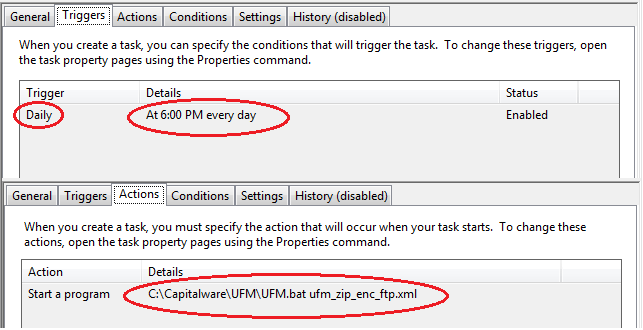
This blog demonstrates how easy it is to backup selected directories to a remote server. Hopefully, this will motive people to do daily backups of their important files.

Regards,
Roger Lacroix
Capitalware Inc.

Capitalware, IBM i (OS/400), IBM MQ, Java, Linux, macOS (Mac OS X), Open Source, Universal File Mover, Unix, Windows Comments Off on Compress, Encrypt and Upload Files with Universal File Mover (How To #10)

SupportPac MO72 v7.5 Released

WebSphere MQ Development, IBM United Kingdom Laboratories has released version 7.5 of SupportPac MO72.
http://www.ibm.com/support/docview.wss?uid=swg24007769

    Changes:

  • Updated to be compatible with V7.5 client tables.

SupportPac MO72 is a command line tool for issuing MQSC commands to a queue manager or client.

Regards,
Roger Lacroix
Capitalware Inc.

IBM MQ, Linux, Unix, Windows Comments Off on SupportPac MO72 v7.5 Released