
IBM has just released Fix Pack 9.1.0.12 for IBM MQ V9.1 LTS:
https://www.ibm.com/support/pages/downloading-ibm-mq-91012
Regards,
Roger Lacroix
Capitalware Inc.
IBM has just released Fix Pack 9.1.0.12 for IBM MQ V9.1 LTS:
https://www.ibm.com/support/pages/downloading-ibm-mq-91012
Regards,
Roger Lacroix
Capitalware Inc.
My current ASUS ZenBook Pro 15.6” laptop and desktop PC still work reasonable well but they cannot be upgraded to Windows 11 Pro. Sad but true (I only purchased them back in 2019).
Picking out a new desktop PC is easy because I simply tell Alan at Mega Computers what I want but for the laptop, it is much harder to get everything I want (and at a reasonable price).
I wanted to get another ASUS ZenBook Pro 15.6” laptop, the current specs were fine, nothing killer, but the reviews of the current model were not all that glowing. I decided to look at other ASUS models (and yes, I prefer ASUS laptops because I have never had any issues with them!).
After a bunch of searches and several days contemplating it, I decided to go with a monster laptop: ASUS ROG Zephyrus G15 15.6″ Gaming Laptop. Its a little more than I wanted to pay but I did get beast of a machine!!
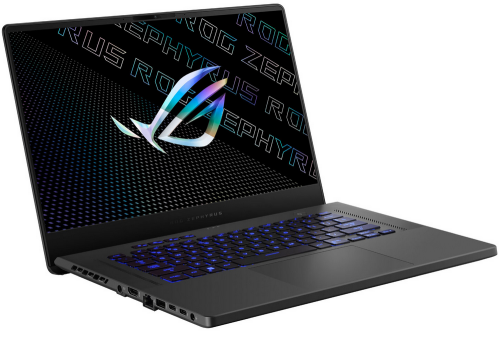
Here are the ASUS ROG Zephyrus G15 15.6″ specs:
– 15.6″ 2560×1440
– AMD Ryzen 9 6900HS
– 32GB RAM DDR5
– 1TB SSD
– NVIDIA GeForce RTX 3070 Ti
– HDMI, USB-C, USB 3.1 ports & LAN port
– Wireless Wi-Fi 6E(802.11ax)
– Windows 11 Pro
As I said earlier, ordering a desktop PC is really easy. Last week, I sent an email to Alan at Mega Computers with the following specs:
– Intel Core i9-12900K 16-Core 5.2GHz
– ASUS Prime Z690-A motherboard
– ADATA XPG Lancer 64GB of DDR5 RAM
– Kingston Fury Rengeade M.2 PCIe 4.0 500GB SSD
– Kingston Fury Rengeade M.2 PCIe 4.0 2TB SSD
– LG WH16NS40 16x Blu-Ray Writer & 16x DVD Writer SATA
– Cougar MX330-G Glass Window Gaming Mid Tower Case
– No video card
– Windows 11 Pro
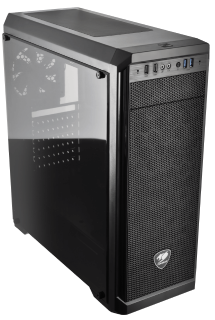
I’m not a gamer, so I don’t need a fancy video card. I can use the onboard graphics that comes with the ASUS motherboard.
I don’t need new monitors because a year ago I replaced my 2 Samsung SA450 monitors with 2 new ASUS ProArt 27″ PA278QV monitors. They each have a resolution of 2560×1440 and the view/display are just gorgeous!!
And I don’t need a new keyboard either. Last winter I bought a new Redragon K551 MITRA Backlit Mechanical Keyboard with Blue Switches. It is old school style ‘clicky’ keyboard. I love it.
Now comes the pain of installing everything on both the desktop PC and the laptop. That’s the part I’m not looking forward to. 🙁 So, many applications/programs to install (on 2 machines). Plus now I have to learn where things were moved to under Windows 11 (vs Windows 10).
Regards,
Roger Lacroix
Capitalware Inc.
IBM has just released Fix Pack 9.3.0.1 for IBM MQ V9.3 LTS:
https://www.ibm.com/support/pages/downloading-ibm-mq-9301
Regards,
Roger Lacroix
Capitalware Inc.
Oracle has just released Java 19.
Java Platform, Standard Edition (Java SE) lets you develop and deploy Java applications on desktops and servers, as well as in today’s demanding embedded environments. Java offers the rich user interface, performance, versatility, portability, and security that today’s applications require.
Regards,
Roger Lacroix
Capitalware Inc.
IBM has just announced IBM MQ for z/OS 9.3:
https://www.ibm.com/common/ssi/ShowDoc.wss?docURL=/common/ssi/rep_ca/1/897/ENUS222-131/index.html
Or in a PDF file:
https://www.ibm.com/downloads/cas/US-ENUS222-131-CA/name/US-ENUS222-131-CA.PDF
IBM MQ for z/OS 9.3 became available for electronic download on July, 15, 2022.
Regards,
Roger Lacroix
Capitalware Inc.
IBM has just released Fix Pack 9.2.0.6 for IBM MQ V9.2 LTS:
https://www.ibm.com/support/pages/downloading-ibm-mq-9206
Regards,
Roger Lacroix
Capitalware Inc.
A couple of days ago, I posted a Java/PCF program that would create a IBM MQ channel. So, if you require creating a channel via Java/PCF then you probably will need to delete a channel via Java/PCF.
If you are used to deleting an IBM MQ channel using runmqsc command then the following simple Java/PCF program will delete a IBM MQ channel based on the following runmqsc command:
DELETE CHL('TEST.CHL')
You can download the source code from here.
import java.io.IOException;
import java.text.SimpleDateFormat;
import java.util.Date;
import java.util.Hashtable;

import com.ibm.mq.MQException;
import com.ibm.mq.MQQueueManager;
import com.ibm.mq.constants.CMQC;
import com.ibm.mq.constants.MQConstants;
import com.ibm.mq.headers.MQDataException;
import com.ibm.mq.headers.pcf.PCFException;
import com.ibm.mq.headers.pcf.PCFMessage;
import com.ibm.mq.headers.pcf.PCFMessageAgent;

/**
 * Program Name
 *  MQDeleteChannel01
 *
 * Description
 *  This java class issues a PCF "delete channel" request message to delete a channel.
 *
 *  This PCF code is equivalent to issuing the runmqsc command of:
 *     DELETE CHL('TEST.CHL')
 *
 * Sample Command Line Parameters
 *  -m MQA1 -z Channel_Name_to_be_deleted -h 127.0.0.1 -p 1414 -c TEST.CHL -u UserID -x Password
 *
 * @author Roger Lacroix
 */
public class MQDeleteChannel01
{
   private static final SimpleDateFormat  LOGGER_TIMESTAMP = new SimpleDateFormat("yyyy/MM/dd HH:mm:ss.SSS");

   private Hashtable<String,String> params;
   private Hashtable<String,Object> mqht;

   public MQDeleteChannel01()
   {
      super();
      params = new Hashtable<String,String>();
      mqht = new Hashtable<String,Object>();
   }

   /**
    * Make sure the required parameters are present.
    * @return true/false
    */
   private boolean allParamsPresent()
   {
      boolean b = params.containsKey("-h") && params.containsKey("-p") &&
                  params.containsKey("-c") && params.containsKey("-m") &&
                  params.containsKey("-z") &&
                  params.containsKey("-u") && params.containsKey("-x");
      if (b)
      {
         try
         {
            Integer.parseInt((String) params.get("-p"));
         }
         catch (NumberFormatException e)
         {
            b = false;
         }
      }

      return b;
   }

   /**
    * Extract the command-line parameters and initialize the MQ HashTable.
    * @param args
    * @throws IllegalArgumentException
    */
   private void init(String[] args) throws IllegalArgumentException
   {
      int port = 1414;
      if (args.length > 0 && (args.length % 2) == 0)
      {
         for (int i = 0; i < args.length; i += 2)
         {
            params.put(args[i], args[i + 1]);
         }
      }
      else
      {
         throw new IllegalArgumentException();
      }

      if (allParamsPresent())
      {
         try
         {
            port = Integer.parseInt((String) params.get("-p"));
         }
         catch (NumberFormatException e)
         {
            port = 1414;
         }

         mqht.put(CMQC.CHANNEL_PROPERTY, params.get("-c"));
         mqht.put(CMQC.HOST_NAME_PROPERTY, params.get("-h"));
         mqht.put(CMQC.PORT_PROPERTY, new Integer(port));
         mqht.put(CMQC.USER_ID_PROPERTY, params.get("-u"));
         mqht.put(CMQC.PASSWORD_PROPERTY, params.get("-x"));

         // I don't want to see MQ exceptions at the console.
         MQException.log = null;
      }
      else
      {
         throw new IllegalArgumentException();
      }
   }

   /**
    * Handle connecting to the queue manager, issuing PCF command then
    * disconnect from the queue manager.
    */
   private void doPCF()
   {
      String qMgrName = (String) params.get("-m");
      String chlName  = (String) params.get("-z");

      MQQueueManager qMgr = null;
      PCFMessageAgent agent = null;
      PCFMessage   request = null;

      try
      {
         qMgr = new MQQueueManager(qMgrName, mqht);
         logger("successfully connected to "+ qMgrName);

         agent = new PCFMessageAgent(qMgr);
         logger("successfully created agent");

         // https://www.ibm.com/docs/en/ibm-mq/latest?topic=formats-mqcmd-delete-channel-delete-channel

         request = new PCFMessage(MQConstants.MQCMD_DELETE_CHANNEL);

         // Specify the channel name to be deleted.
         request.addParameter(MQConstants.MQCACH_CHANNEL_NAME, chlName);

         agent.send(request);

         logger("successfully deleted channel: " + chlName);
      }
      catch (PCFException pcfe)
      {
         if (pcfe.reasonCode == MQConstants.MQRC_UNKNOWN_OBJECT_NAME)
            logger("Error: The channel '" + chlName+ "' does not exists on the queue manager '" + qMgrName + "'.");
         else
            logger("CC=" +pcfe.completionCode +  " [" + MQConstants.lookupCompCode(pcfe.completionCode) + "] : RC=" + pcfe.reasonCode + " ["+MQConstants.lookupReasonCode(pcfe.reasonCode)+"]");
      }
      catch (MQException e)
      {
         logger("CC=" +e.completionCode +  " [" + MQConstants.lookupCompCode(e.completionCode) + "] : RC=" + e.reasonCode + " ["+MQConstants.lookupReasonCode(e.reasonCode)+"]");
      }
      catch (IOException e)
      {
         logger("IOException:" +e.getLocalizedMessage());
      }
      catch (MQDataException e)
      {
         logger("MQDataException:" +e.getLocalizedMessage());
      }
      catch (Exception e)
      {
         logger("Exception:" +e.getLocalizedMessage());
      }
      finally
      {
         try
         {
            if (agent != null)
            {
               agent.disconnect();
               logger("disconnected from agent");
            }
         }
         catch (MQDataException e)
         {
            logger("CC=" +e.completionCode + " : RC=" + e.reasonCode);
         }

         try
         {
            if (qMgr != null)
            {
               qMgr.disconnect();
               logger("disconnected from "+ qMgrName);
            }
         }
         catch (MQException e)
         {
            logger("CC=" +e.completionCode + " : RC=" + e.reasonCode);
         }
      }
   }

   /**
    * A simple logger method
    * @param data
    */
   public static void logger(String data)
   {
      String className = Thread.currentThread().getStackTrace()[2].getClassName();

      // Remove the package info.
      if ( (className != null) && (className.lastIndexOf('.') != -1) )
         className = className.substring(className.lastIndexOf('.')+1);

      System.out.println(LOGGER_TIMESTAMP.format(new Date())+" "+className+": "+Thread.currentThread().getStackTrace()[2].getMethodName()+": "+data);
   }

   public static void main(String[] args)
   {
      MQDeleteChannel01 mqcq = new MQDeleteChannel01();

      try
      {
         mqcq.init(args);
         mqcq.doPCF();
      }
      catch (IllegalArgumentException e)
      {
         logger("Usage: java MQDeleteChannel01 -m QueueManagerName -z Channel_Name_to_be_deleted -h host -p port -c channel -u UserID -x Password");
         System.exit(1);
      }

      System.exit(0);
   }
}
Regards,
Roger Lacroix
Capitalware Inc.
A couple of weeks ago, I posted a Java/PCF Program to Create an IBM MQ Queue. So, today I thought I would create a Java/PCF program to create an IBM MQ SVRCONN channel
If you are used to creating an IBM MQ channel using runmqsc command then the following simple Java/PCF program will create a IBM MQ channel based on the following runmqsc command:
DEFINE CHL('ABC.CHL') MAXMSGL(10485760) SCYEXIT('C:\Capitalware\MQCCI\mqcci(CCI)') SCYDATA('mqcci.ini')
Note: For the channel security exit, I used Capitalware’s MQ Channel Connection Inspector (MQCCI) product. MQCCI is a solution that allows a company to track and/or audit what information a client application or remote queue manager is exchanging with the queue manager when a connection is made.
You can download the source code from here.
import java.io.IOException;
import java.text.SimpleDateFormat;
import java.util.Date;
import java.util.Hashtable;

import com.ibm.mq.MQException;
import com.ibm.mq.MQQueueManager;
import com.ibm.mq.constants.CMQC;
import com.ibm.mq.constants.MQConstants;
import com.ibm.mq.headers.MQDataException;
import com.ibm.mq.headers.pcf.PCFException;
import com.ibm.mq.headers.pcf.PCFMessage;
import com.ibm.mq.headers.pcf.PCFMessageAgent;

/**
 * Program Name
 *  MQCreateChannel01
 *
 * Description
 *  This java class issues a PCF "create channel" request message that will create a SVRCONN channel
 *  specifying max message length & channel security exit.
 *  For the channel security exit, I used Capitalware's MQ Channel Connection Inspector (MQCCI) product.
 *  MQCCI is a solution that allows a company to track and/or audit what information a client application
 *  or remote queue manager is exchanging with the queue manager when a connection is made.
 *
 *  This PCF code is equivalent to issuing the runmqsc command of:
 *     DEFINE CHL('ABC.CHL') MAXMSGL(10485760) SCYEXIT('C:\Capitalware\MQCCI\mqcci(CCI)') SCYDATA('mqcci.ini')
 *
 * Sample Command Line Parameters
 *  -m MQA1 -z TEST.CHL -h 127.0.0.1 -p 1414 -c TEST.CHL -u UserID -x Password
 *
 * @author Roger Lacroix
 */
public class MQCreateChannel01
{
   private static final SimpleDateFormat  LOGGER_TIMESTAMP = new SimpleDateFormat("yyyy/MM/dd HH:mm:ss.SSS");

   private Hashtable<String,String> params;
   private Hashtable<String,Object> mqht;

   public MQCreateChannel01()
   {
      super();
      params = new Hashtable<String,String>();
      mqht = new Hashtable<String,Object>();
   }

   /**
    * Make sure the required parameters are present.
    * @return true/false
    */
   private boolean allParamsPresent()
   {
      boolean b = params.containsKey("-h") && params.containsKey("-p") &&
                  params.containsKey("-c") && params.containsKey("-m") &&
                  params.containsKey("-z") &&
                  params.containsKey("-u") && params.containsKey("-x");
      if (b)
      {
         try
         {
            Integer.parseInt((String) params.get("-p"));
         }
         catch (NumberFormatException e)
         {
            b = false;
         }
      }

      return b;
   }

   /**
    * Extract the command-line parameters and initialize the MQ HashTable.
    * @param args
    * @throws IllegalArgumentException
    */
   private void init(String[] args) throws IllegalArgumentException
   {
      int port = 1414;
      if (args.length > 0 && (args.length % 2) == 0)
      {
         for (int i = 0; i < args.length; i += 2)
         {
            params.put(args[i], args[i + 1]);
         }
      }
      else
      {
         throw new IllegalArgumentException();
      }

      if (allParamsPresent())
      {
         try
         {
            port = Integer.parseInt((String) params.get("-p"));
         }
         catch (NumberFormatException e)
         {
            port = 1414;
         }

         mqht.put(CMQC.CHANNEL_PROPERTY, params.get("-c"));
         mqht.put(CMQC.HOST_NAME_PROPERTY, params.get("-h"));
         mqht.put(CMQC.PORT_PROPERTY, new Integer(port));
         mqht.put(CMQC.USER_ID_PROPERTY, params.get("-u"));
         mqht.put(CMQC.PASSWORD_PROPERTY, params.get("-x"));

         // I don't want to see MQ exceptions at the console.
         MQException.log = null;
      }
      else
      {
         throw new IllegalArgumentException();
      }
   }

   /**
    * Handle connecting to the queue manager, issuing PCF command then
    * disconnect from the queue manager.
    */
   private void doPCF()
   {
      String qMgrName = (String) params.get("-m");
      String chlName    = (String) params.get("-z");

      MQQueueManager qMgr = null;
      PCFMessageAgent agent = null;
      PCFMessage   request = null;

      try
      {
         qMgr = new MQQueueManager(qMgrName, mqht);
         logger("successfully connected to "+ qMgrName);

         agent = new PCFMessageAgent(qMgr);
         logger("successfully created agent");

         // https://www.ibm.com/docs/en/ibm-mq/latest?topic=formats-change-copy-create-channel

         request = new PCFMessage(MQConstants.MQCMD_CREATE_CHANNEL);

         // Specify the channel name to be created.
         request.addParameter(MQConstants.MQCACH_CHANNEL_NAME, chlName);

         // Add parameter to set channel type to be a SVRCONN channel
         request.addParameter(MQConstants.MQIACH_CHANNEL_TYPE, MQConstants.MQCHT_SVRCONN);

         // Add parameter to set the max message length to be 10MB
         request.addParameter(MQConstants.MQIACH_MAX_MSG_LENGTH, 10 * 1024 * 1024);

         // Add parameter to set the channel security exit name
         request.addParameter(MQConstants.MQCACH_SEC_EXIT_NAME, "C:\\Capitalware\\MQCCI\\mqcci(CCI)");

         // Add parameter to set the data parameter for channel security exit
         request.addParameter(MQConstants.MQCACH_SEC_EXIT_USER_DATA, "mqcci.ini");

         agent.send(request);

         logger("successfully created channel: " + chlName);
      }
      catch (PCFException pcfe)
      {
         if (pcfe.reasonCode == MQConstants.MQRCCF_OBJECT_ALREADY_EXISTS)
            logger("Error: The channel '" + chlName+ "' already exists on the queue manager '" + qMgrName + "'.");
         else
            logger("CC=" +pcfe.completionCode +  " [" + MQConstants.lookupCompCode(pcfe.completionCode) + "] : RC=" + pcfe.reasonCode + " ["+MQConstants.lookupReasonCode(pcfe.reasonCode)+"]");
      }
      catch (MQException e)
      {
         logger("CC=" +e.completionCode +  " [" + MQConstants.lookupCompCode(e.completionCode) + "] : RC=" + e.reasonCode + " ["+MQConstants.lookupReasonCode(e.reasonCode)+"]");
      }
      catch (IOException e)
      {
         logger("IOException:" +e.getLocalizedMessage());
      }
      catch (MQDataException e)
      {
         logger("MQDataException:" +e.getLocalizedMessage());
      }
      catch (Exception e)
      {
         logger("Exception:" +e.getLocalizedMessage());
      }
      finally
      {
         try
         {
            if (agent != null)
            {
               agent.disconnect();
               logger("disconnected from agent");
            }
         }
         catch (MQDataException e)
         {
            logger("CC=" +e.completionCode + " : RC=" + e.reasonCode);
         }

         try
         {
            if (qMgr != null)
            {
               qMgr.disconnect();
               logger("disconnected from "+ qMgrName);
            }
         }
         catch (MQException e)
         {
            logger("CC=" +e.completionCode + " : RC=" + e.reasonCode);
         }
      }
   }

   /**
    * A simple logger method
    * @param data
    */
   public static void logger(String data)
   {
      String className = Thread.currentThread().getStackTrace()[2].getClassName();

      // Remove the package info.
      if ( (className != null) && (className.lastIndexOf('.') != -1) )
         className = className.substring(className.lastIndexOf('.')+1);

      System.out.println(LOGGER_TIMESTAMP.format(new Date())+" "+className+": "+Thread.currentThread().getStackTrace()[2].getMethodName()+": "+data);
   }

   public static void main(String[] args)
   {
      MQCreateChannel01 mqcq = new MQCreateChannel01();

      try
      {
         mqcq.init(args);
         mqcq.doPCF();
      }
      catch (IllegalArgumentException e)
      {
         logger("Usage: java MQCreateChannel01 -m QueueManagerName -z Channel_Name -h host -p port -c channel -u UserID -x Password");
         System.exit(1);
      }

      System.exit(0);
   }
}
Regards,
Roger Lacroix
Capitalware Inc.
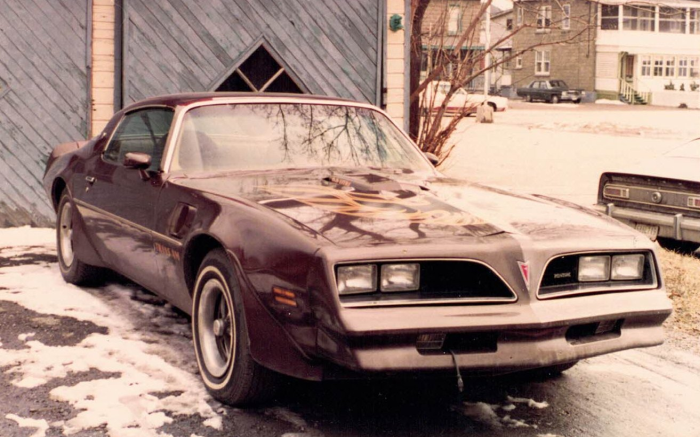
I have been a GM guy for a long, long time. My first ride was a used 1977 Pontiac Trans Am.
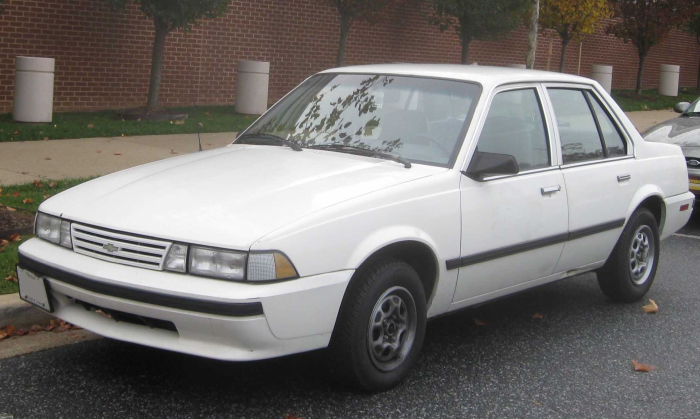
In the 90’s, I had a used 4 door 1989 Chevy Cavalier. I used it to go back and forth to work with (great on gas).
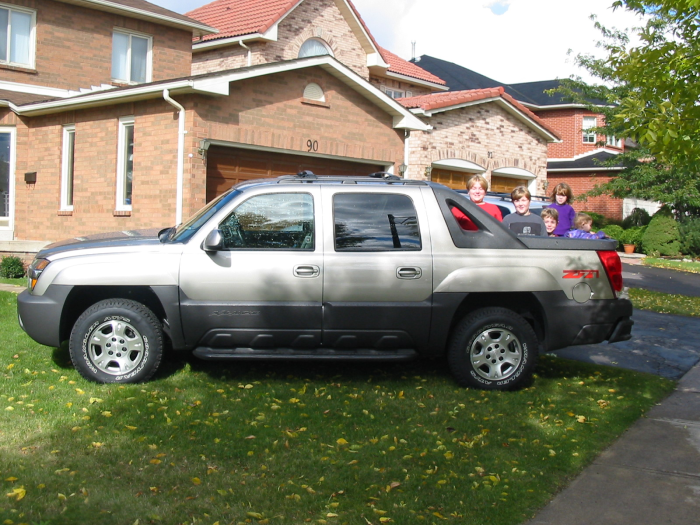
In September 2003, I bought a brand new 2003 Chevy Avalanche. Back in the day, GM used to run “change” ads because of the versatility of the Avalanche. I had it for 11 years and it was a great vehicle. And yes, those are my kids in the bed of the truck that many of you met over the years at various conferences.
In the Summer of 2014, I decided to trade it in and get a new Chevy Avalanche. I found out that the production of the Chevy Avalanche ended in 2013 and the dealer could not find any new Chevy Avalanches in Ontario (Canada).
So, I looked around at the different trucks/SUVs that were available and decided to get a new 2014 Jeep Wrangler Sahara – Black out edition.
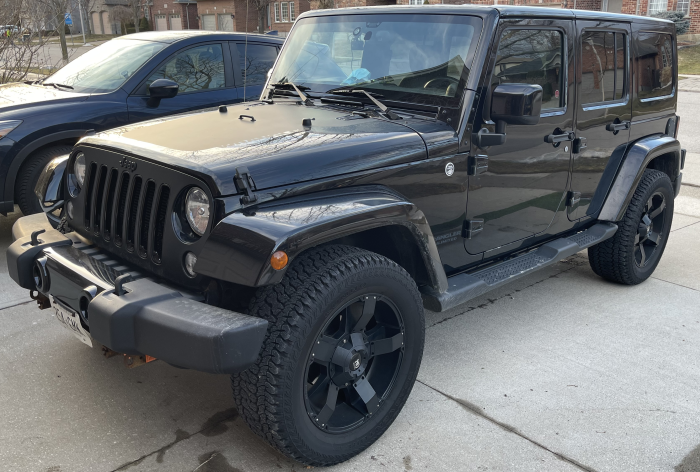
Yes, I know it is not a GM product but it was the coolest looking truck I could find.
So now to the point of my story.
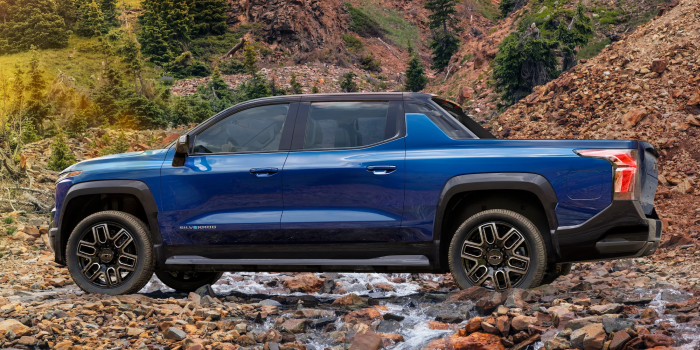
Suddenly, I’m see ads for 2024 Chevy Silverado EV. At first, oh that’s cool. But I started to look closer, hey wait a minute, that’s not a Silverado, that’s an Avalanche!!! It even has a similar marketing tag line and VERY similar styling.
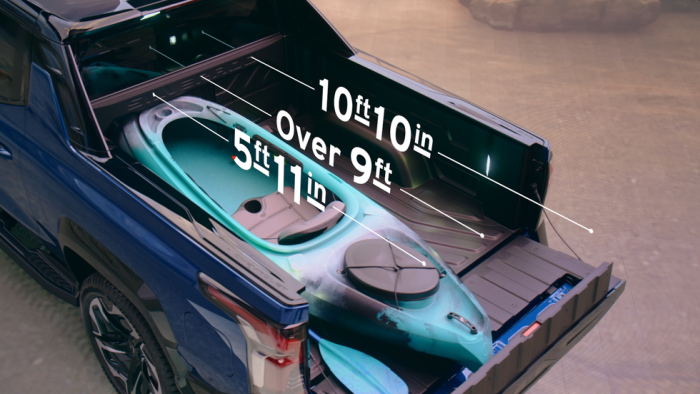
And the multi-flex midgate:
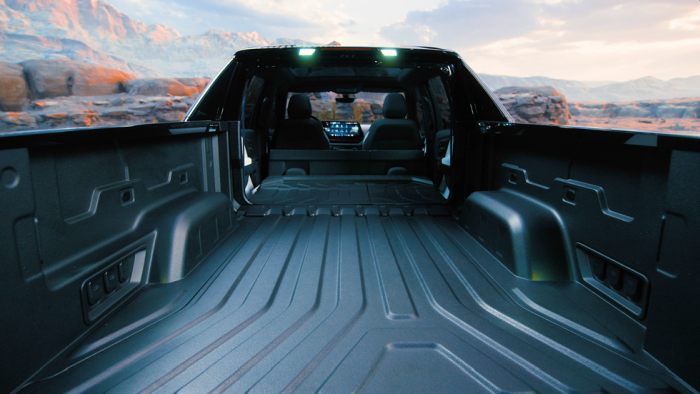
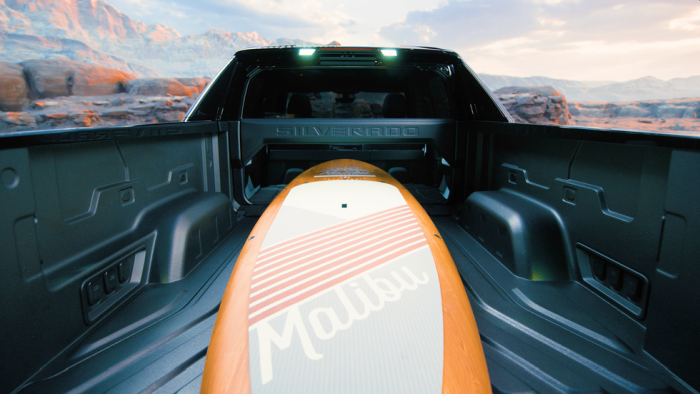
So, WTF GM?! Why did you call it Chevy Silverado EV?! It should have been called Chevy Avalanche EV!!!!
It really bugs me that the marketing people don’t know the history of the company they work for. Or was it some dumbass executive who thought it would be a great idea and copy Ford with their F150 Lighting naming convention!! Really GM, that is all you got in the tank? Either you don’t know where you come from or you just copy other ICE manufacturers? Sad. Truly sad.
Every Chevy Avalanche owner I ever talked to, loved their Avalanche. So, you clearly missed an opportunity bring them all back home!!! Dumb. Dumb. Dumb.
If it looks like a duck, swims like a duck, and quacks like a duck, then it probably is a duck. Hence, the Chevy Silverado EV looks like an Avalanche, has many features of an Avalanche then you should have called it Chevy Avalanche EV! Right!!
Regards,
Roger Lacroix
 IBM MQ WebSphere MQ IBM Developer Messaging Blog T.Rob’s Store and Forward Mark Taylor’s Blog Lyns Random Thoughts Leif Davidsen’s Blog Colin Paice on MQ StackOverflow MQ Questions StackOverflow MQTT Questions