New: MQ Visual Browse v1.6.2

Capitalware Inc. would like to announce the official release of MQ Visual Browse v1.6.2. This is a FREE upgrade for ALL licensed users of MQ Visual Browse. MQ Visual Browse allows users to view messages in a queue of a WebSphere MQ (formally MQSeries) queue manager and presents the data in a simplified format similar to a database utility or spreadsheet program.

For more information about MQ Visual Browse go to:
https://www.capitalware.com/mqvb_overview.html

    Changes for MQ Visual Browse v1.6.2:

  • Added an Open button to ‘List of Queues’ window. The user can select 1 or more queues to be opened at once.
  • Updated docs (English only)

Regards,
Roger Lacroix
Capitalware Inc.

Capitalware, IBM MQ, Java, Linux, macOS (Mac OS X), MQ Visual Browse, Unix, Windows Comments Off on New: MQ Visual Browse v1.6.2

Football Week # 14

Well, week # 13 was interesting. Small Sliding scale picks were 8-8 and Fibonacci Sliding scale picks were 10-6. Like I said, Fibonacci Sliding scale picks have potential – maybe next year I’ll start using them. 🙂

Small Sliding scale picks for week #14 (least probable to most probable):

U1   San Diego Chargers              at      Pittsburgh Steelers    F6.0
F2   Baltimore Ravens                at      Washington Redskins    F1.0
F3   New York Jets        F2.5       at      Jacksonville Jaguars
F4   Detroit Lions                   at      Green Bay Packers      F6.5
F5   New Orleans Saints              at      New York Giants        F5.5
F6   Tennessee Titans                at      Indianapolis Colts     F5.5
F7   Chicago Bears        F3.0       at      Minnesota Vikings
F8   Atlanta Falcons      F3.5       at      Carolina Panthers
F9   Miami Dolphins                  at      San Francisco 49ers    F10.0
U10  St. Louis Rams                  at      Buffalo Bills          F3.0
F11  Dallas Cowboys                  at      Cincinnati Bengals     F3.0
F12  Kansas City Chiefs              at      Cleveland Browns       F5.0
F13  Arizona Cardinals               at      Seattle Seahawks       F10.0
F14  Philadelphia Eagles             at      Tampa Bay Buccaneers   F7.0
F15  Denver Broncos       F10.0      at      Oakland Raiders
U16  Houston Texans                  at      New England Patriots   F4.0

Fibonacci Sliding scale picks for week #14 (least probable to most probable):

U1   San Diego Chargers              at      Pittsburgh Steelers    F6.0
F2   Detroit Lions                   at      Green Bay Packers      F6.5
F3   Tennessee Titans                at      Indianapolis Colts     F5.5
U4   St. Louis Rams                  at      Buffalo Bills          F3.0
F5   Kansas City Chiefs              at      Cleveland Browns       F5.0
F6   New York Jets        F2.5       at      Jacksonville Jaguars
F7   New Orleans Saints              at      New York Giants        F5.5
F8   Denver Broncos       F10.0      at      Oakland Raiders
F9   Baltimore Ravens                at      Washington Redskins    F1.0
F10  Atlanta Falcons      F3.5       at      Carolina Panthers
F11  Dallas Cowboys                  at      Cincinnati Bengals     F3.0
F12  Chicago Bears        F3.0       at      Minnesota Vikings
F13  Arizona Cardinals               at      Seattle Seahawks       F10.0
U14  Houston Texans                  at      New England Patriots   F4.0
F15  Philadelphia Eagles             at      Tampa Bay Buccaneers   F7.0
F16  Miami Dolphins                  at      San Francisco 49ers    F10.0

Enjoy. 🙂 As they say in the stock market, past perform is no indication of future performance.

Regards,
Roger Lacroix

Football 1 Comment

Impact 2013

I just received an email from IBM regarding being a sponsor at Impact 2013:
http://www-01.ibm.com/software/websphere/events/impact/

Note: Impact 2013 will be held at The Venetian in Las Vegas, NV on April 28 – May 2, 2013.

From an MQ point of view, does anyone find Impact useful? Now I said “MQ” and not “WebSphere”. Inquiring minds want to know. 🙂 IBM is expecting 6000 people at Impact 2013 but how many are interested only in MQ – 600-700 people (maybe less)? I’m not trying to be negative just realistic. IBM has a million products under the WebSphere umbrella and the vast majority of people use WAS.

I used to be a sponsor at the original Transaction & Messaging Conference and at the first Impact 2007. I found at Impact 2007 which had about 4200 people, 80% of the attendees were not interested in MQ. So, it was hard to justify the humungous price increase to be a sponsor at Impact. The last Transaction & Messaging Conference (2006) cost me $3700 USD to be a sponsor and IBM wants $17000 USD ($14000 for early-bird) to be a sponsor at Impact 2013. That’s quadrupole (4x) the amount and there is absolutely no way there will be quadrupole (4x) the MQ people at the Impact 2013 (compared to the last T&M Conference). So, what is a little company to do? 🙁

I wish IBM would bring back Transaction & Messaging Conference to North America. I have told many IBM people over the years that I would be the first in line to put my money where my mouth is!!! Is anyone at IBM listening to the little guy?

Regards,
Roger Lacroix
Capitalware Inc.

Education, IBM i (OS/400), IBM MQ, Linux, Unix, Windows, z/OS Comments Off on Impact 2013

Football (NFL) Spreads

I’m not really interested in Fantasy Football leagues (or other Fantasy sport leagues) but back in the early 90’s, I joined an NFL football pool when I was working at a bank (and I’m still in the pool). I thought I could apply some AI to the concept of picking my weekly picks. 🙂 Everybody’s got to have a hobby!! 🙂

My approach was, I don’t care who is playing, who is hurt, etc.. but rather there is favoritism/bias in the odds-makers approach to picking teams/setting the odds and the opposite is true (under estimating a team).

So, back in the early 90’s I wrote a couple of programs (in REXX), to try and determine the odds-makers bias. I tweaked the code through the early and mid 90’s to get it where I thought it was working. I started out with a “straight linear” (Fixed scale) approach to the odds-makers bias then added an “exponential” (Small Sliding scale) approach. I found the exponential worked better and have been using it ever since. In the 2000’s, I updated the code and added 2 more approaches: Fibonacci Sliding scale and Large Sliding scale. Fibonacci Sliding scale approach appears to have a lot of potential but I have not started to use it for my picks.

So, am I going to publish the code or open source it. No. So, why am I bringing it up? It is programming and an odd concept plus last week my picks were 14-2. Hence, I won the week (# 12) in the pools I am in. 🙂

Now of course, does that mean my program will do well this week – no. Also, for week # 6, the program was 1-13 – pretty bad. So, it is truly like a roller-coaster ride. 🙂

Besides determining the odds-makers bias, the program also ranks the probability of the pick being successful. So, I thought I would publish the Small Sliding scale and Fibonacci Sliding scale picks each week – kind of put my money where my mouth is. 🙂

Small Sliding scale (week # 13 picks):

F1   Arizona Cardinals               at      New York Jets          F4.5
F2   New York Giants      F2.5       at      Washington Redskins
U3   Tampa Bay Buccaneers            at      Denver Broncos         F7.0
F4   Philadelphia Eagles             at      Dallas Cowboys         F4.5
F5   Jacksonville Jaguars            at      Buffalo Bills          F6.0
U6   Carolina Panthers               at      Kansas City Chiefs     F3.0
U7   Minnesota Vikings               at      Green Bay Packers      F9.0
U8   Indianapolis Colts              at      Detroit Lions          F4.5
F9   New Orleans Saints              at      Atlanta Falcons        F3.5
U10  Cincinnati Bengals              at      San Diego Chargers     F2.5
F11  Pittsburgh Steelers             at      Baltimore Ravens       F4.0
U12  Cleveland Browns                at      Oakland Raiders        F1.5
F13  Seattle Seahawks                at      Chicago Bears          F3.0
F14  San Francisco 49ers  F7.0       at      St. Louis Rams
F15  New England Patriots F7.0       at      Miami Dolphins
F16  Houston Texans       F5.5       at      Tennessee Titans

Fibonacci Sliding scale (week # 13 picks):

U1   Indianapolis Colts              at      Detroit Lions          F4.5
F2   Arizona Cardinals               at      New York Jets          F4.5
U3   New York Giants      F2.5       at      Washington Redskins
F4   Seattle Seahawks                at      Chicago Bears          F3.0
F5   Carolina Panthers               at      Kansas City Chiefs     F3.0
F6   Philadelphia Eagles             at      Dallas Cowboys         F4.5
F7   Jacksonville Jaguars            at      Buffalo Bills          F6.0
U8   Cleveland Browns                at      Oakland Raiders        F1.5
U9   Minnesota Vikings               at      Green Bay Packers      F9.0
F10  Pittsburgh Steelers             at      Baltimore Ravens       F4.0
U11  Cincinnati Bengals              at      San Diego Chargers     F2.5
F12  New Orleans Saints              at      Atlanta Falcons        F3.5
F13  New England Patriots F7.0       at      Miami Dolphins
F14  Houston Texans       F5.5       at      Tennessee Titans
U15  Tampa Bay Buccaneers            at      Denver Broncos         F7.0
F16  San Francisco 49ers  F7.0       at      St. Louis Rams

So what does it mean?

F1   Arizona Cardinals               at      New York Jets          F4.5

F1 means the favorite team will cover the spread with the lowest probability of success (don’t bet on it).

U8   Indianapolis Colts              at      Detroit Lions          F4.5

U8 means that underdog team will beat the spread (favorite will not cover the spread) with a medium probability of success.

F16  Houston Texans       F5.5       at      Tennessee Titans

F16 means that the favorite team will cover the spread with the highest probability of success.

As you can see, Small Sliding scale and Fibonacci Sliding scale have completely different results.

Enjoy. 🙂 As they say in the stock market, past perform is no indication of future performance.

Regards,
Roger Lacroix

Football 1 Comment

Simple File Transfer using Universal File Mover (How To #1)

I get asked on a regular basis how to do a simple Universal File Mover (UFM) setup on 2 servers. It is actually very straight forward and I will run through an example in this blog posting.
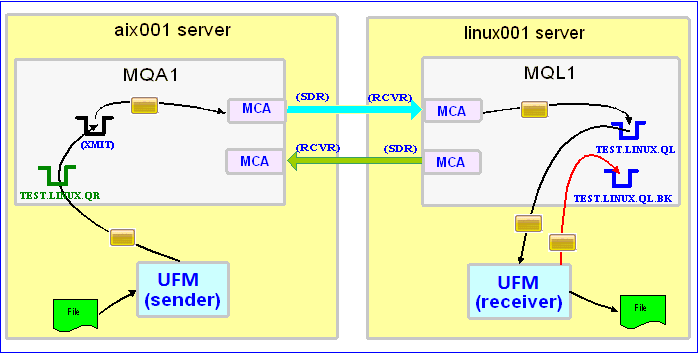

In this example, the following servers are used:
– aix001 is an AIX server with WMQ Server and UFM software installed
– linux001 is a Linux server with WMQ Server and UFM software installed

In this example, the following queue managers are used:
MQA1 is a queue manager residing on a AIX (aix001) server (sender)
MQL1 is a queue manager residing on a Linux (linux001) server (receiver)

TEST.LINUX.QL and TEST.LINUX.QL.BK are local queues defined in queue manager MQL1 (receiver)
TEST.LINUX.QR is a remote queue defined in queue manager MQA1 (sender)

If you do not know how to define/setup communication between 2 queue managers then follow the instructions in this blog posting:
https://www.capitalware.com/rl_blog/?p=509

Step #1: On the Linux server, in the UFM install directory, create a file called ufm_receive_test_1.xml and copy the following into the file:

<?xml version="1.0" encoding="ISO-8859-1"?>
<!DOCTYPE UFM_Workflow SYSTEM "UFM_Workflow.dtd">
<UFM_Workflow>

  <Actions>
    <MQReceive getwithconvert="Y" run="D">
      <MQ>
        <QMgrName>MQL1</QMgrName>
        <QueueName>TEST.LINUX.QL</QueueName>
        <BackOutQName>TEST.LINUX.QL.BK</BackOutQName>
      </MQ>
      <Default>
         <Directory override="Y">/home/roger/UFM/</Directory>
      </Default>
    </MQReceive>
  </Actions>

</UFM_Workflow>

When UFM is started, it will run as a daemon (run=”D”) and use a backout queue called TEST.LINUX.QL.BK just in case there is an issue with a message. UFM will use ‘get with convert’ option when retrieving the messages. UFM will override the message’s specified directory and use the one provided. Either create /home/roger/UFM/ directory on your Linux server or use a directory that already exist on your Linux server.

Step #2: On the Linux server, start UFM to receive the file transfers:

./ufm.sh ufm_receive_test_1.xml &

Step #3: On the AIX server, create a file in the data directory called test.txt and put a simple text message in the file (i.e. This is a test message.)

Step #4: On the AIX server, in the UFM install directory, create a file called ufm_send_test_1.xml and copy the following into the file:

<?xml version="1.0" encoding="ISO-8859-1"?>
<!DOCTYPE UFM_Workflow SYSTEM "UFM_Workflow.dtd">
<UFM_Workflow>

  <Actions>
    <MQSend delete="N" format="S">
      <File>data/test.txt</File>
      <MQ>
        <QMgrName>MQA1</QMgrName>
        <QueueName>TEST.LINUX.QR</QueueName>
      </MQ>
      <Remote>
        <Directory>/var/mqm/</Directory>
      </Remote>
    </MQSend>
  </Actions>

</UFM_Workflow>

When UFM is started, it will send the specified file and mark the message’s MQMD format as ‘string’.

Step #5: On the AIX server, start UFM to send the file:

./ufm.sh ufm_send_test_1.xml

UFM will start and put the file as a message to the specified queue then terminate.

Step #6: On the Linux server, verify that the test file (i.e. test.txt) was put into the /home/roger/UFM/ directory or whatever directory you specified in the ufm_receive_test_1.xml file.

Step #7: Finally, we need to stop UFM daemon that is running on the Linux server. In the UFM install directory, create a file called ufm_putquit_test_1.xml and copy the following into the file:

<?xml version="1.0" encoding="ISO-8859-1"?>
<!DOCTYPE UFM_Workflow SYSTEM "UFM_Workflow.dtd">
<UFM_Workflow>
  <Actions>
    <MQPutQuit>
      <MQ>
        <QMgrName>MQL1</QMgrName>
        <QueueName>TEST.Q1.QL</QueueName>
      </MQ>
    </MQPutQuit>
  </Actions>
</UFM_Workflow>

Step #8: On the Linux server, run UFM with the PutQuit action:

./ufm.sh ufm_putquit_test_1.xml

Hopefully, that will help new users of UFM to get up and running in minutes. In the future, I will post more complex UFM examples.

Regards,
Roger Lacroix
Capitalware Inc.

Capitalware, IBM i (OS/400), IBM MQ, Java, Linux, macOS (Mac OS X), Open Source, Universal File Mover, Unix, Windows 1 Comment

New Desktop PC

A year ago, I bought a new ASUS ZenBook (UX31E-DH72) and it has been a great laptop. For the last 6 months, my 5 year old desktop PC has been feeling slow, especially compared to my new laptop. The old PC is a dual display running WinXP with quad-core and 4GB of RAM. It was extremely fast when I first received it. Since, both LCD displays are older than 7 years, I thought it best to replace everything in one shot and upgrade to Windows 7 Pro 64-bit too.

So, ordered a new desktop PC with Intel Core i7-3770K, 16GB RAM, 2 SSD, Asus GTX 560Ti and 2 Samsung 24″ LED (S24A450UW) running Winows 7 Pro 64-bit from Mega Computers.

I pickup the new beast last Friday and spent the weekend copying hundreds of gigabytes of data to the new PC then installed countless programs – it was mind-numbing.

So far, everything is working well. Although, I miss “Quick Launch” from WinXP. Yes, I added it via the backdoor but I don’t like it on the far right. So far, all of the applications that I use on a daily basis work (Yeahhh!). The only odd thing is Eudora (email client) seems to flicker (or rebuild the display) when I switch between folder tabs in Eudora. I never saw this under WinXP. Eudora is a 32-bit application and it could be using an older Windows API call that is being emulating under Win7 64-bit. I might think about switching to Thunderbird.

All in all, the new PC is working very well.

Regards,
Roger Lacroix
Capitalware Inc.
Capitalware, Windows Comments Off on New Desktop PC

MQ File Mover vs Universal File Mover

What is the difference between MQ File Mover (MQFM) and Universal File Mover (UFM)?

To be honest, UFM v1.0 was originally called MQFM v5.0. There were so many things that I wanted to add/fix/change in MQFM that the more I did, the more I realized that I would have a lot of angry people when they would upgrade MQFM to the latest release. Hence, came the ‘rise of the Phoenix’ (UFM) from the ashes of MQFM.

    Items that I thought needed fixing:

  • Change Send, Receive and PutQuit Action names to MQSend, MQReceive and MQPutQuit
  • Decoupled the Watch Action from directly sending files via MQ. Now it will process 1 or more user defined actions.
  • I had a list of 14 new Actions to be added.
  • Over the years, I was not consistent in naming attributes of Actions (Bad, bad programming). This drove me crazy when creating Workflows, so that HAD to be fixed.
  • The product name – how can I have a name of MQ File Mover but MQ is just 1 of 5 ways of transferring files!

So, I decided to make a new code branch and I called it: Universal File Mover v1.0.0. So, what does this mean for MQFM? MQFM is now deprecated. It will be supported for those who purchased a support subscription but there will be no new development to MQFM.

    Summary of UFM Actions (New Actions are highlighted in blue):

  • Append – Appends a file to another file
  • Convert – Converts file format (i.e. CRLF <=> LF <=> CR and/or ASCII to EBCDIC)
  • Copy – Copies 1 or more files from a directory to another directory
  • DecryptFile – Decrypt a file using AES 128, 192 or 256-bit decryption
  • Delete – Deletes 1 or more files in a directory
  • Echo – Echo a text string to log file.
  • EncryptFile – Encrypt a file using AES 128, 192 or 256-bit encryption
  • Execute – Runs an external program / application
  • Ftp – Get and/or put files using FTP network protocol
  • HttpGetFile – Get a file using HTTP application protocol from a web server
  • HttpPutFile – Put a file to a web server using HTTP application protocol
  • If/Else – Performs a conditional test against an action’s variable
  • Launch – Invokes an UFM Workflow XML file.
  • Loop – Iterates over a group of Actions.
  • MakeDir – Create a directory
  • Merge – Merge 2 or more files to another file
  • MergeSort – Merge 2 or more files and sort the data to another file
  • Move – Moves 1 or more files from a directory to another directory
  • MQPutQuit – Puts a ‘Quit’ message on a queue (to stop the MQReceive Action running as a daemon)
  • MQReceive – Receives an incoming messages and writes them to a file.
  • MQSend – Sends 1 or more files as individual messages via MQ.
  • RemoveDir – Remove a directory
  • Rename – Renames a file
  • ReplaceText – Performs a search and replace of text in a file.
  • Schedule – Invokes an UFM Workflow XML file at a specific date and/or time.
  • Scp – Securely copy files to and/or from a remote host
  • SendEmail – Sends an email to 1 or more recipients.
  • SFtp – Get and/or put files using Secure FTP network protocol
  • Sleep – Pause the UFM Workflow for a period of time.
  • Sort – Sorts the data of a file into another file
  • SortUnique – Sorts the data of a file into another file then removes duplicate lines from the file.
  • Split – Split a file into several files
  • Tar – Combine a file(s) or a directory of files into a tar archive
  • Touch – Update a file’s the modification time or create the file if it does not exist
  • Unique – Removes duplicate lines from a file.
  • UnTar – Extract tar archive to a directory
  • UnZip – Uncompress a zip archive to a directory
  • Watch – Monitor for a particular file or monitor a directory for files to appear and then executes a series of Actions.
  • WriteText – Writes the text to a file.
  • Zip – Compresses a file(s) or a directory of files into a Zip archive

Regards,
Roger Lacroix
Capitalware Inc.

Capitalware, IBM i (OS/400), IBM MQ, Java, Linux, macOS (Mac OS X), MQ File Mover, Universal File Mover, Unix, Windows Comments Off on MQ File Mover vs Universal File Mover

New: Universal File Mover v1.0.0

Capitalware Inc. would like to announce the official release of Universal File Mover v1.0.0. It is a free open source project.

Universal File Mover (UFM) is more than a simple tool to manage the transfer of files. It allows the user to combine business processes into a workflow. The user combines a series of Action commands to create the UFM Workflow XML file. UFM is supported on AIX, HP-UX, IBM i (OS/400), Linux, Mac OS X, Solaris and Windows.

UFM currently contains 40 Action commands. The action commands are in 5 categories: WebSphere MQ Actions, Network Actions, File Actions, Control Actions and Other Actions.

UFM can transfer files in 1 of 5 ways: FTP, HTTP, SCP, SFTP and WebSphere MQ. For example, UFM can retrieve a file from a remote server via FTP and then send it via WebSphere MQ to another server. UFM can move/transfer files in any combination the user wishes.

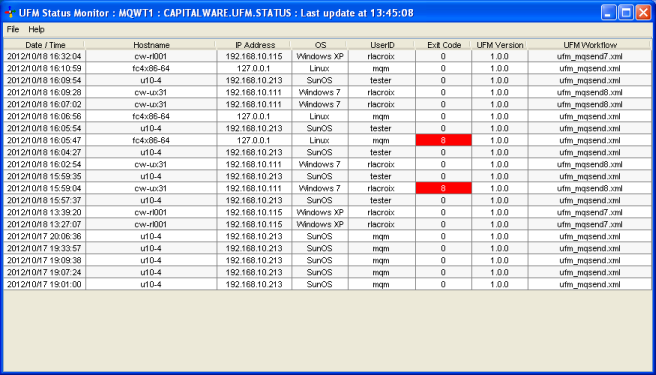
A centralized Status queue can be defined in the UFM Workflow XML, which will cause a status message to be generated with the details of each Action as they are processed. The Universal File Mover Status Monitor can be used to view the Status queue for information on the outcome of each processed UFM Workflow.

Capitalware has created Universal File Mover Status Monitor application that is designed to display the UFM Workflow status messages from the UFM status queue. The display is automatically refreshed every 60 seconds (default value). Any UFM Workflow that has a non-zero “Exit Code” will be highlighted in red, so that the user can quickly identify problem Workflows.
Universal File Mover Status Monitor

Universal File Mover and Universal File Mover Status Monitor are licensed under Apache License 2. They are free to use but support is not included. A support license may be purchased.

For more information about UFM, please go to:
https://www.capitalware.com/ufm_overview.html

Regards,
Roger Lacroix
Capitalware Inc.

Capitalware, IBM i (OS/400), IBM MQ, Java, Linux, macOS (Mac OS X), Open Source, Universal File Mover, Unix, Windows Comments Off on New: Universal File Mover v1.0.0

Security with Secret Phrases, Passwords, etc.

Over the weekend, I was reading different articles/blogs about how people think that passwords, no matter how long, are useless. These people write that their accounts (email, Apple, phone, bank, etc) were hacked even when they used long passwords.

When you reread the articles/blogs and analyze what they are saying, you realize that the password, long, short or whatever, is not the real problem. The real problem lies in several areas:.

  • Secret phrases/questions – this WAS a great idea until social web sites (FaceBook, Google+, etc.) became popular. Now people are posting everything about themselves on social web sites. Typical secret questions are “Where were you born?”, What is your favorite car?”, “What is your favorite color?”, etc. If a hacker is going to attempt to break into one of your accounts or pose as you when they call a help desk, the FIRST thing they are going to do is access ALL of your public information. If you post on your social web site that you love your Toyota Prius then anyone can guess that your favorite car is a Prius. D’oh!!
  • If you have multiple email accounts then make absolutely sure that for password resets, account “A” does not point to account “B” and account “B” does not point to account “A”. You need to an another email account that is never used except for email account resets. Why, because if a hacker can compromise one account then they will easy compromise the other email account. But if you have password resets going to a 3rd, not used email account, then you have just closed an avenue on a hacker.
  • People are using bad or easy to guess passwords. The top 2 passwords are “123456” and “password”. When I see this, all I can say is “are you kidding me!?!?”. I can’t believe that people are that lazy or “cough”, how to put this politely, that dumb!!

So what does this mean for companies, I think it is time to get rid of secret phrases/questions. What should it be replaced with? That’s the million dollar question!!

  • The first idea that pops to mind is for these companies to use picture comparison and ask you what you like better (i.e. right-brain stuff rather than left-brain stuff). The online companies could show you 3 or 5 sets of picture questions. What kind of pictures? The companies could show you 2 similar pictures of a sunset: one over water and the other over land and ask you which do you like better. Of course, you need to remember what your choices are for the future. 🙂
  • Go with revolving passwords. Make the user have 3 to 5 passwords, and when the user logs in, the user must input a specific password. i.e. What is your UserID and Password # 2?
  • Have questions related to their occupation (I don’t mean divulge job secrets). i.e. If you are a car mechanic then the question could be “At your location, what garage bay does wheel alignments?” Questions need to be more trivial, so that the information would not be posted online.

The bottom line is that the secret phrases/questions need to be more abstract (right-brain) rather than specific facts related to the user, since everybody is posting everything about themselves on social web sites (and that’s not going to stop anytime soon!!). So, by now everyone is scratching their heads and thinking, hey, you forgot about biometrics. Actually, I didn’t. I do NOT think it is wise idea to use biometrics for public accessible sites. Biometrics are prefect for controlled private settings but I would never implement it for a public site. Why? You think it is bad that your “so called” private information (SSN, credit cards, etc.) may be found on the internet, but if a scan of your finger-print or eyeball were to get on the internet then you would be FOREVER screwed. 🙁 You can change your credit cards but as of today, you cannot change your finger-prints or eyeballs.

So, how does any of this relate to Capitalware? Capitalware’s MQAUSX product authenticates the user’s UserID and Password against the server’s native OS system, LDAP server, Microsoft’s Active Directory, Quest Authentication Services, Centrify’s DirectControl or an encrypted MQAUSX FBA file.

For encrypted MQAUSX FBA (File Based Authentication) file, a program called “enc_server” is used to manage the encrypted FBA file. “enc_server” is a super-light version of Unix/Linux’s “useradd”, “userdel” and “passwd” programs combined into one program. I am not a fan of big brother but after everything I read this past weekend, I think the “enc_server” program needs some rules around what passwords the MQAdmin can use for generating entries in the encrypted FBA file. So, here are some of the rules that I am thinking of implementing in “enc_server”:

  • Passwords need to be a minimum of 8 characters
  • Passwords must contain at least 1 uppercase alphabetic character (A-Z)
  • Passwords must contain at least 1 lowercase alphabetic character (a-z)
  • Passwords must contain at least 1 numeric digit (0-9)
  • Passwords must contain at least 1 punctuation character i.e. !”#$%&'()*+,-./:;><=?@[\]^_`{|}
  • Passwords cannot contain spaces
  • Passwords cannot contain the associated UserID

The rule list may not be complete but at least it is a start.

Regards,
Roger Lacroix
Capitalware Inc.

Capitalware, IBM i (OS/400), IBM MQ, Linux, MQ Authenticate User Security Exit, Unix, Windows, z/OS Comments Off on Security with Secret Phrases, Passwords, etc.

SupportPac MS0P v7.1.0.2 Released

Mark E Taylor of IBM has released version 7.1.0.2 of SupportPac MS0P.
http://www.ibm.com/support/docview.wss?uid=swg24011617

This SupportPac provides a set of plug-ins for the WebSphere MQ Explorer, extending its capabilities for configuration of queue managers, and displaying additional information about those queue managers.

Regards,
Roger Lacroix
Capitalware Inc.

IBM MQ, Linux, Windows Comments Off on SupportPac MS0P v7.1.0.2 Released