Ubuntu 11.10 Released

Ubuntu has just released Ubuntu v11.10.
http://www.ubuntu.com/

Super-fast, easy to use and free, the Ubuntu operating system powers millions of desktops, netbooks and servers around the world. Ubuntu does everything you need it to. It’ll work with your existing PC files, printers, cameras and MP3 players. And it comes with thousands of free apps.

Regards,
Roger Lacroix
Capitalware Inc.

Linux, Open Source, Operating Systems Comments Off on Ubuntu 11.10 Released

WebSphere MQ version 7.1 Released

IBM has released WebSphere MQ versoin 7.1:
http://www.ibm.com/common/ssi/cgi-bin/ssialias?subtype=ca&infotype=an&appname=iSource&supplier=877&letternum=ENUSZP11-0483

Highlights
– Multi-version and re-locatable installation for easier install, testing, and migration
– Support for virtualized environments
– Scalability and message throughput enhancements
– Reduced complexity for enabling and checking system security
– Extensions to support for .NET APIs
– Telemetry function for lightweight connectivity to mobile and other devices now included in the package
– Distribute across multiple end-points with integrated Multicast function
– Upgrade from trial-to-production deployment

WebSphere MQ homepage
http://www.ibm.com/software/integration/wmq/

Regards,
Roger Lacroix
Capitalware Inc.

IBM i (OS/400), IBM MQ, Linux, Unix, Windows, z/OS Comments Off on WebSphere MQ version 7.1 Released

Capitalware’s Head Office has Moved

Effective immediately, Capitalware’s head office is located at the following address:

Capitalware Inc.
1673 Richmond Street, Unit 11, PMB524
London, Ontario N6G2N3
Canada

New Telephone Number: +1-226-980-7307

Regards,
Roger Lacroix
Capitalware Inc.

Capitalware Comments Off on Capitalware’s Head Office has Moved

MQAUSX without a Client-side Security Exit – Part 2

As mentioned in Part 1, I often get asked if MQAUSX can authenticate a UserID and Password without the requirement of a client-side security exit. The answer is yes.

Part 1 demonstrated how to set a UserID and Password for a client connection to a remote queue manager via code samples (i.e. C, C++, C#, Java & JMS). Part 1 can be found here.

Part 2 will show you how to configure applications like MQ Explorer, MQ Visual Edit, MQ Visual Browse, MQMon (SupportPac MO71), etc.. to send a UserID and Password in plain text to a remote queue manager for authentication by MQAUSX.

Very Important
Most people do not realize that the queue manager uses the UserID for authorization ONLY and it throws away the password. The queue manager does NOT call the Local OS (or RACF on the mainframe) for authentication. Yes, it does an authorization check of the UserID against OAM for distributed platforms or RACF (or ACF) for mainframe but not authentication. Now if there is a security exit defined (i.e. MQAUSX) then the UserID and Password are passed to it and it is up to the security exit to perform the authentication.

MQ Visual Edit/MQ Visual Browse
In MQ Visual Edit/MQ Visual Browse, open the Queue Manager Access Profile window for the particular queue manager and fill in the UserID and Password then click Save to save the information.
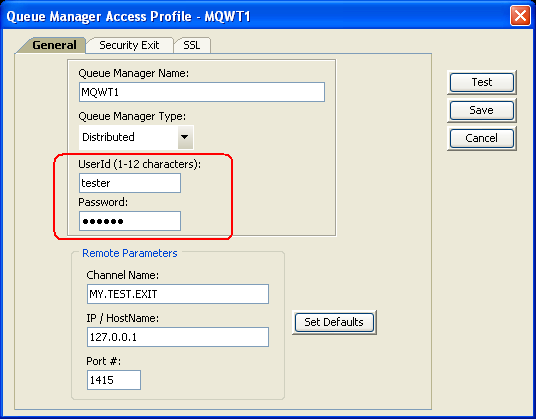
Now when the user connects to the queue manager, MQ Visual Edit/MQ Visual Browse will use the saved UserID and Password for the connection.

MQ Batch Toolkit
In MQ Batch Toolkit, the AddProfile function allows the user to specify a UserID and Pasword for the Queue Manager Access Profile or the user can use the AlterProfile function to update a profile with the UserID and Password.
i.e.
mqbt AddProfile -p MQWT1 -m MQWT1 -c MY.TEST.EXIT -h 127.0.0.1 -n 1415 -u tester -w mypwd

Now when the user connects to the queue manager, MQ Batch Toolkit will use the saved UserID and Password for the connection.

MQ Channel Monitor
In MQ Channel Monitor, follow the instructions in the manual and add the XML tags called UserID and Password to the MQ XML file.

<?xml version="1.0" encoding="ISO-8859-1"?>
<!DOCTYPE MQCM_MQ SYSTEM "MQCM_MQ.dtd">
<MQCM_MQ>
<QMgrName>MQWT1</QMgrName>
<Hostname>127.0.0.1</Hostname>
<ChannelName>MY.TEST.EXIT</ChannelName>
<Port>1415</Port>
<UserID>tester</UserID>
<Password>mypwd</Password>
<RefreshRate>10</RefreshRate>
<MonitorChannelName>*</MonitorChannelName>
</MQCM_MQ>

Now when the user connects to the queue manager, MQ Channel Monitor will use the saved UserID and Password for the connection.

MQ File Mover
In MQ File Mover, follow the instructions in the manual and add the XML tags called UserID and Password to the MQ XML file.

<?xml version="1.0" encoding="ISO-8859-1"?>
<!DOCTYPE MQFM_MQ SYSTEM "MQFM_MQ.dtd">
<MQFM_MQ>
<QMgrName>MQWT1</QMgrName>
<Hostname>127.0.0.1</Hostname>
<ChannelName>MY.TEST.EXIT</ChannelName>
<Port>1415</Port>
<UserID>tester</UserID>
<Password>mypwd</Password>
</MQFM_MQ>

Now when the user connects to the queue manager, MQ File Mover will use the saved UserID and Password for the connection.

MQ Explorer
Setting a UserID and Password in MQ Explorer, is only available in version 7.0.0.0 or higher. It is not available in version 6. In MQ Explorer v7, right click on the queue manager name, click Connection Details and click Properties. Select Userid in the left panel of the Properties window, fill in the UserID and Password then click OK to save the information.
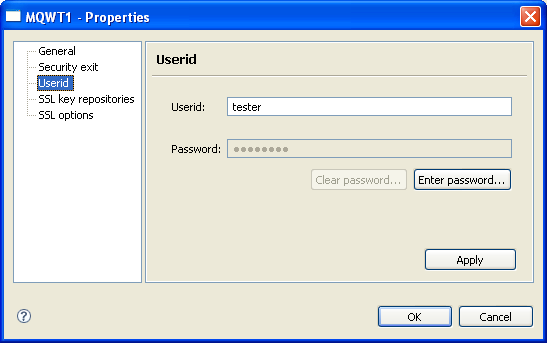
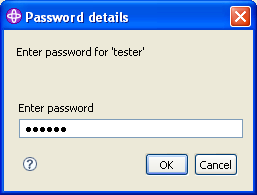
Now when the user connects to the queue manager, they will be prompted for the Password.
SupportPac MO71
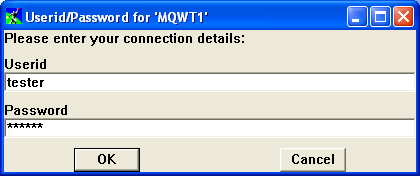
In SupportPac MO71 (aka MQMon), right click on the queue manager name and click Open Location. Make sure the Client and Userid checkboxes have been selected then click the OK to save the information.
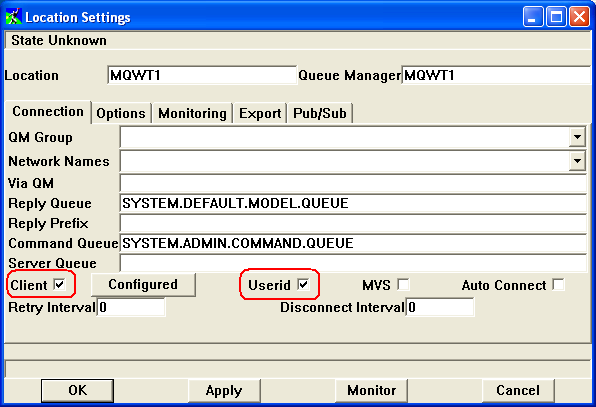
Now when the user connects to the queue manager, they will be prompted for the UserID and Password.
QueueZee
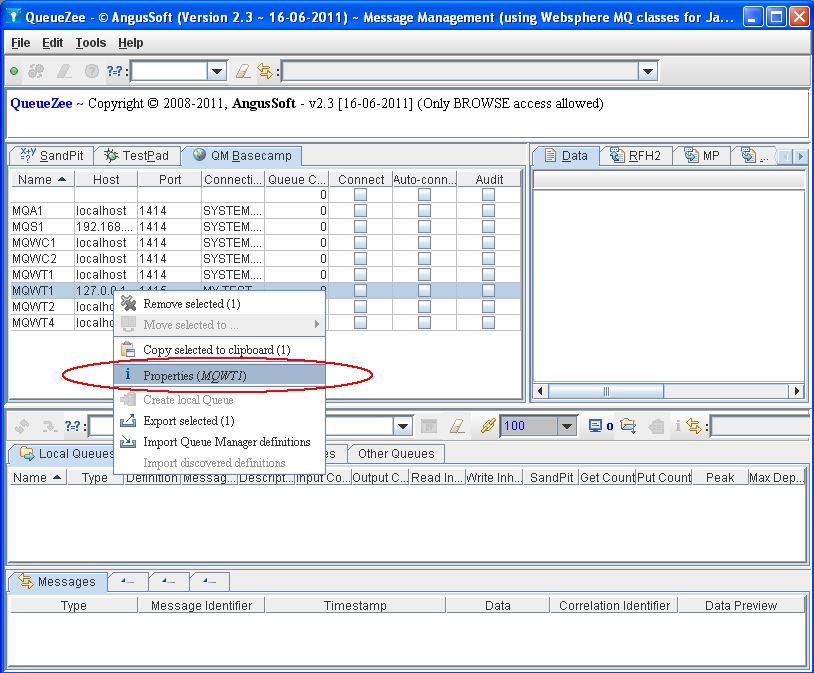
In QueueZee, right click on the queue manager name, click Properties and fill in the UserID and Password then click OK to save the information.
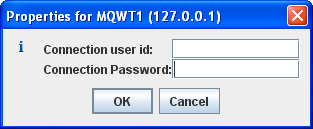
Now when the user connects to the queue manager, QueueZee will use the saved UserID and Password for the connection.

WMQTool
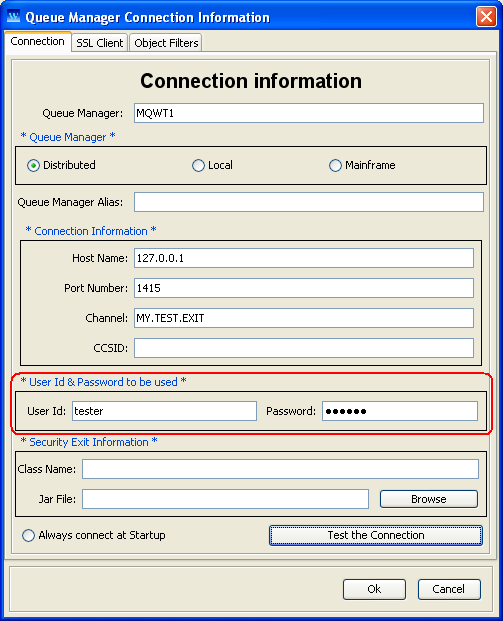
In WMQTool, right click on the Root element and select “Add Queue Manager”. On the Queue Manager Connection Information window, fillin the UserID and Password fields and then click OK. Now when the user connects to the queue manager, WMQTool will use the saved UserID and Password for the connection.
SupportPac IH03
SupportPac IH03 (aka rfhutilc) is a very popular SupportPac but I have not been able to figure out how to configure it to send a UserID and Password in plain text to a remote queue manager for authentication by MQAUSX. I followed the documentation: clicked ‘Set Conn Id’ button inputted the UserID and Password on the popup window and then clicked OK. But every time I try and use the ‘ReadQ’ button, I receive an error (RC=2538). When I checked the MQAUSX server-side component, it shows that no MQCSP structure was sent (Passwords must be sent via MQCSP structure). If anyone knows how to make this work, then please let me know.

Regards,
Roger Lacroix
Capitalware Inc.

Capitalware, IBM i (OS/400), IBM MQ, Linux, MQ Authenticate User Security Exit, Security, Unix, Windows, z/OS Comments Off on MQAUSX without a Client-side Security Exit – Part 2

New: MQ Visual Edit v1.5.2

Capitalware Inc. would like to announce the official release of MQ Visual Edit v1.5.2. This is a FREE upgrade for ALL licensed users of MQ Visual Edit. MQ Visual Edit allows users to view, manipulate and manage messages in a queue of a WebSphere MQ (formally MQSeries) queue manager and presents the data in a simplified format similar to a database utility or spreadsheet program.

For more information about MQ Visual Edit go to:
https://www.capitalware.com/mqve_overview.html

    Changes for MQ Visual Edit v1.5.2:

  • Added Password field on the Queue Manager Access Profile panel
  • Fixed various bugs

Regards,
Roger Lacroix
Capitalware Inc.

Capitalware, IBM MQ, Java, Linux, macOS (Mac OS X), MQ Visual Edit, Unix, Windows Comments Off on New: MQ Visual Edit v1.5.2

New: MQ Visual Browse v1.5.2

Capitalware Inc. would like to announce the official release of MQ Visual Browse v1.5.2. This is a FREE upgrade for ALL licensed users of MQ Visual Browse. MQ Visual Browse allows users to view messages in a queue of a WebSphere MQ (formally MQSeries) queue manager and presents the data in a simplified format similar to a database utility or spreadsheet program.

For more information about MQ Visual Browse go to:
https://www.capitalware.com/mqvb_overview.html

    Changes for MQ Visual Browse v1.5.2:

  • Added Password field on the Queue Manager Access Profile panel
  • Fixed various bugs

Regards,
Roger Lacroix
Capitalware Inc.

Capitalware, IBM MQ, Java, Linux, macOS (Mac OS X), MQ Visual Browse, Unix, Windows Comments Off on New: MQ Visual Browse v1.5.2

New: MQ Batch Toolkit v1.3.2

Capitalware Inc. would like to announce the official release of MQ Batch Toolkit v1.3.2. This is a FREE upgrade for ALL licensed users of MQ Batch Toolkit. MQ Batch Toolkit allows users to manipulate, monitor and manage messages in a queue of a WebSphere MQ (formally MQSeries) queue manager from a command-line or shell scripting environment.

For more information about MQ Batch Toolkit go to:
https://www.capitalware.com/mqbt_overview.html

    Changes for MQ Batch Toolkit v1.3.2:

  • Added Password field for AddProfile and AlterProfile functions
  • Added WMQ v7 event queues for the Event Monitor (EM) function
  • Fixed an issue with Forward function when ‘-s’ parameter is greater than 1
  • Fixed a null pointer issue with AlterProfile function
  • Fixed a bug in CheckUp function when processing ‘Process’ definitions.
  • Fully tested and supported for Windows 7 Professional

Regards,
Roger Lacroix
Capitalware Inc.

Capitalware, IBM i (OS/400), IBM MQ, Java, Linux, macOS (Mac OS X), Unix, Windows Comments Off on New: MQ Batch Toolkit v1.3.2

MQAUSX without a Client-side Security Exit – Part 1

Quite often I get asked if MQAUSX can authenticate a UserID and Password without the requirement of a client-side security exit. The answer is yes. MQAUSX is actually 3 products in one:

1. If the client application is configured with the client-side security exit then the user credentials are encrypted and sent across the wire to the remote queue manager. This is the best level of security.

2. If the client application is not configured with the client-side security exit then the user credentials are sent in plain text to the remote queue manager. This feature is available for Java/JMS, Java and C# DotNet client applications. For native applications (i.e. C/C++), then the application must use and populate the MQCSP structure with the UserID and Password.

3. If the MQAdmin sets the MQAUSX IniFile parameter NoAuth to Y then it functions just like MQSSX. MQSSX does not authenticate. It filters the incoming connection based on UserID, IP address and/or SSL DN.

Here are some simple programming examples where MQ will send the client supplied UserID and Password to the remote queue manager in plain text:

1. WebSphere MQ base Java

MQEnvironment.hostname = "10.10.10.10(1414)";
MQEnvironment.channel = "SYSTEM.DEF.SVRCONN";
MQEnvironment.userID = "roger";
MQEnvironment.password = "mypswd";
MQQueueManager _qMgr = new MQQueueManager("TESTQM");

2. WebSphere MQ base JMS

mqQCF = new MQQueueConnectionFactory();
mqQCF.setQueueManager("TESTQM");
mqQCF.setHostName("10.10.10.10(1414)");
mqQCF.setChannel("SYSTEM.DEF.SVRCONN");
mqQCF.setTransportType(JMSC.MQJMS_TP_CLIENT_MQ_TCPIP);
conn = mqQCF.createQueueConnection("roger", "mypswd");

3. C# .Net

MQEnvironment.Hostname = "10.10.10.10(1414)";
MQEnvironment.Channel = "SYSTEM.DEF.SVRCONN";
MQEnvironment.UserId = "roger";
MQEnvironment.Password = "mypswd";
MQQueueManager _qMgr = new MQQueueManager("TESTQM");

4. C

char QMName[MQ_Q_MGR_NAME_LENGTH+1] = "TESTQM";
char UserId[64] = "roger";
char Password[64] = "mypswd";

strncpy(ClientConn.ConnectionName, "10.10.10.10(1414)", MQ_CONN_NAME_LENGTH);
strncpy(ClientConn.ChannelName, "SYSTEM.DEF.SVRCONN", MQ_CHANNEL_NAME_LENGTH);
mqCSP.AuthenticationType = MQCSP_AUTH_USER_ID_AND_PWD;
mqCSP.CSPUserIdPtr = &UserId;
mqCSP.CSPUserIdLength = strlen(UserId);
mqCSP.CSPPasswordPtr = &Password;
mqCSP.CSPPasswordLength = strlen(Password);
ConnectOptions.SecurityParmsPtr = &mqCSP;
ConnectOptions.ClientConnPtr = &ClientConn;
ConnectOptions.Version = MQCNO_VERSION_2;
MQCONNX (QMName, &ConnectOptions, &HConn, &CompCode, &Reason);

5. C++

pchannel = new ImqChannel;
pchannel -> setConnectionName("10.10.10.10(1414)");
pchannel -> setChannelName("SYSTEM.DEF.SVRCONN");
pchannel -> setTransportType( MQXPT_TCP );
pchannel -> setUserId( "roger" );
pchannel -> setPassword( "mypswd" );
mgr.setName(QMName);
mgr.setChannelReference( pchannel );
if ( mgr.connect( ) )
{
}

As you can see, it is easy to set a UserID and Password for a client connection to a remote queue manager. When the MQAUSX server-side component receives a plain text UserID and Password, it is authenticated against whatever target the MQAdmin has setup (i.e. Local OS, LDAP, etc..)

In part 2, I will show you how to configure applications like MQ Explorer, MQMon (SupportPac MO71), etc.. to send a UserID and Password in plain text to a remote queue manager for authentication by MQAUSX.

Regards,
Roger Lacroix
Capitalware Inc.

.NET, C, C#, C++, Capitalware, IBM MQ, Java, JMS, MQ Authenticate User Security Exit, Programming, Security Comments Off on MQAUSX without a Client-side Security Exit – Part 1

The NHL Responded to my Letter

For those of you who may remember, I sent the NHL’s Commissioner Gary Bettman a letter on March 12th, 2011 complaining about the vicious hit on Max Pacioretty by Zdeno Chara.
https://www.capitalware.com/rl_blog/?p=435

This week I (finally) received a reply from Mr. Bettman.
https://www.capitalware.com/dl/docs/Response_letter_from_NHL.pdf

It looks like a form letter sent to hundreds (or thousands) of people who may have complained about vicious hits in the NHL. Mr. Bettman if you are going to take the time to have your secretary print-off (mail-merge) a form letter, the least you (your secretary) could do is GET MY NAME RIGHT. My name is Roger Lacroix and not Richard Lacroix!!! (They even had it wrong on the envelope!)

The good part of the letter is point # 3: making teams and coaches accountable for repeat offenders. That’s a step in the right direction. The whole vicious hit issue could easily be fixed with one simple rule: the attacking player cannot play hockey until the person who was hit returns to playing hockey again. It is simple and it would be extremely effective. Yes, I know, people will cry that it is “an eye for an eye” but what is wrong with that?

Regards,
Roger Lacroix
Capitalware Inc.

Capitalware, General Comments Off on The NHL Responded to my Letter

HP Discontinues WebOS Devices

Yesterday, HP announced the discontinuation of the TouchPad, Veer, Pixi and Pre WebOS devices.
http://news.yahoo.com/palm-largely-dead-hp-shuts-phone-tablet-unit-234202196.html

Wow, I’m surprised. HP spent over a billion dollars to buy Palm just over a year ago and they must have spent hundreds of millions on development costs for the hardware (and software). The TouchPad only launched last month!! Talk about not giving a product a chance to succeed (or even try to succeed).

Since, HP will be having a fire sale for WebOS, hopefully, Amazon will buy it for their ereader devices. Or maybe RIM should buy it for their PlayBook “2” instead of using QNX (WebOS is supposedly a far better OS than QNX). Or better, HP should open source WebOS!! Make the world think you are a wonderful company!!

Regards,
Roger Lacroix
Capitalware Inc.

General Comments Off on HP Discontinues WebOS Devices