Enhancement to MQMR

Capitalware has an MQ solution called MQ Message Replication (MQMR).

MQ Message Replication will clone messages being written (via MQPUT or MQPUT1 API calls) to an application’s output queue and MQMR will write the exact same messages to ‘n’ target queues (‘n’ can be up to 100). When MQMR replicates a message both the message data and the message’s MQMD structure will be cloned. This means that the fields of the MQMD structure (i.e. PutTime, MessageId, CorrelId, UserId, etc..) will be exactly the same as the original message’s MQMD structure.

MQMR includes 2 auxiliary programs:

  • MQ Queue To SQLite DB (MQ2SDB) program will offload MQ messages to an SQLite database.
  • SQLite DB To MQ Queue (SDB2MQ) program will load SQLite database rows into messages in an MQ queue.

The SQLite databases, created by the MQ2SDB program, can grow to be extremely large when thousands or tens of thousands of messages are offloaded to it. A quick solution would be to run a nightly job and compress/zip the previous day’s SQLite databases to free up disk space. Or the SQLite databases can be moved to a different file system.

I had a thought, why not add an option to the MQ2SDB program to compress the message data before it is written to the SQLite database. And add code in SDB2MQ program to decompress the data when it is put to a queue.

I did a bunch of research and compression algorithms are almost as complex as encryption algorithms. The compression algorithms are far, far more dependent on the data than encryption algorithms. What I mean is that the type of data and the structure of the data dictate how well and how fast the compression algorithms will perform.

I decided it was best to add a variety of lossless compression algorithms, so that end-users can select the compression algorithm that best fits their data.

The MQ2SDB program supports the following 8 lossless compression algorithms:

  • LZ1 (aka LZ77) – I used Andy Herbert’s modified version with a pointer length bit-width of 5.
  • LZ4 – It is promoted as extremely fast (which it is).
  • LZW – I used Michael Dipperstein’s implementation of Lempel-Ziv-Welch.
  • LZMA Fast – I used the LZMA SDK from 7-Zip with a Level set to 4.
  • LZMA Best – I used the LZMA SDK from 7-Zip with a Level set to 5.
  • RLE – Run Length Encoding – I wrote the code from pseudo code – very basic stuff.
  • ZLIB Fast – I used Rich Geldreich’s miniz implementation of ZLIB with a Level of Z_BEST_SPEED.
  • ZLIB Best – I used Rich Geldreich’s miniz implementation of ZLIB with a Level of Z_BEST_COMPRESSION.

So, how do you know what is the best compression algorithm for the end-user’s data? Well, to take the guess work out of it, I wrote a simple program called TESTCMPRSN. It applies all 8 compression algorithms against a file and display the results.

Here’s an example of TESTCMPRSN program being run against a 2.89MB XML file:

C:\test>testcmprsn.exe msg5.xml
testcmprsn version 0.0.1 (Windows64) {Sep  2 2020}

msg5.xml size is 3034652 (2.89MB)
Time taken to perform memcpy() is 1.0757ms

Algorithm               Compressed      Compression     Compression     Decompression
                           Size         Time in ms        Ratio           Time in ms
LZ1                 375173 (366.38KB)     541.6782       8.09 to 1          5.6972
LZ4                 140692 (137.39KB)       4.9557      21.57 to 1          1.3401
LZMA Fast            75967 (74.19KB)       49.4750      39.95 to 1         10.7603
LZMA Best            71453 (69.78KB)      463.8315      42.47 to 1         10.7566
LZW                 186484 (182.11KB)      76.0163      16.27 to 1         19.8878
RLE                4054366 (3.87MB)         8.1609       0.75 to 1          9.4421
ZLIB Fast           151404 (147.86KB)      15.3561      20.04 to 1          6.8379
ZLIB Best            84565 (82.58KB)       60.6147      35.89 to 1          6.0363
testcmprsn is ending.

Clearly, LZMA Best crushed it. It reduced a 2.89MB file to just 69.78KB but at a cost of 467.498 milliseconds. A better option for that type of data is to use LZMA Fast but if speed is what you want then LZ4 is by far the better choice.

As a benchmark, the TESTCMPRSN program performs a memcpy() of the data, so that the end-user can compare the compression algorithms compression time against the memcpy() time.

As they say: your mileage will vary. The only way to know which compression algorithm will work best for your data is to test it. Note: RLE should only be used with alphanumeric data (plain text) that has repeating characters and never with binary data.

I have completed a wide variety of tests and everything looks good.

If anyone would like to test out the latest release then send the email to support@capitalware.com

Regards,
Roger Lacroix
Capitalware Inc.

Capitalware, Compression, IBM i (OS/400), IBM MQ, Linux, MQ Message Replication, Unix, Windows Comments Off on Enhancement to MQMR

IBM CECC – Flawed Platform for ISVs, Developers, Vendors, etc.

Earlier this year, IBM shutdown its IBM PDP (Power Development Platform), originally called IBM VLP (Virtual Loaner Program), and replaced it with IBM CECC (Client Experience Centers Cloud). IBM does loves their acronyms!

I appreciate IBM supplying virtual VMs for developers to use to port their applications to AIX, IBM i and Linux on POWER, so I will try and be polite with my criticism of IBM CECC but IBM is making it really hard for developers to use CECC.

Since this is a (very) long blog post, I’ll get to the point early on and you can continue to read the posting if you want to. My opinion of IBM PDP would be an ‘A-’ (great except for getting LDAP/PAM libraries installed). My opinion of IBM CECC so far is ‘D+’. If you are also a ISV, developer, vendor, etc. using IBM CECC, please lodge your complaints with IBM CECC support, so that IBM will fix the issues especially considering the fact that you can no longer save and restore VMs. It almost makes using CECC pointless because who wants to spend a week setting up the VMs only to have them deleted when the reservation is done.

History: I was introduced to IBM VLP back in 2005 when I took an IBM PartnerWorld course on administration of Linux on POWER at IBM’s head office/training facility in Markham, Ontario, Canada.

At the time, I had my own AIX servers (5.1 & 5.3) and knew next to nothing about IBM i. A couple of years later, I started to use an AIX v6 VM on IBM VLP rather than purchasing my own AIX v6 server.

In late 2008, a customer purchased licenses for MQAUSX for AIX but said they wanted to also secure MQ on IBM i and asked for MQAUSX to be ported to IBM i. I thought, “how hard can it be, I already knew Unix, Linux, Windows and z/OS”. Well, IBM i is truly a very strange beast. I spent several weeks trying to figure it out and was about to quit when I saw a course at Seneca College called “IBM i System Administration”. So, I figured I better take it. It was the best $600 I have spent. By no means am I an IBM i expert but at least now I have a basic understanding of this strange beast and can compile, link and test my applications on IBM i.

The really nice thing about IBM VLP later renamed to IBM PDP is that once you installed the software you need, the VM image can be saved and redeployed in a future reservation. To setup and configure 3 brand new reservations in IBM PDP (AIX, IBM i and Linux on POWER) takes about a week of my time. That is why saving the images and reusing them in future reservations is EXTREMELY important to developers, ISVs, vendors, etc. like me. But in IBM’s infinite wisdom, they no longer offer the ability to save and restore a VM image in CECC. This is truly one of the most developer ‘unfriendly’ things I have ever seen.

Here’s a snippet of the work I do when starting with a blank/default VM image with the goal of building and testing Capitalware products:

Task AIX IBM i Linux on POWER
Upload IBM MQ 9.2 software Required Task Required Task Required Task
Upload Quest Authentication Services software Required Task   Required Task
Upload Centrify’s DirectControl software Required Task   Required Task
Install compiler Required Task   Required Task
Install IBM MQ 9.2 Required Task Required Task Required Task
Install LDAP development libraries & modules Required Task   Required Task
Install Quest Authentication Services development libraries & modules Required Task   Required Task
Install Centrify’s DirectControl development libraries & modules Required Task   Required Task
Install PAM development libraries & modules     Required Task
Create 2 queue managers for different scenarios Required Task Required Task Required Task
Define channels, queues and topics for the 2 queue managers Required Task Required Task Required Task
Create build/staging framework Required Task Required Task Required Task
Create deployment/packaging framework Required Task Required Task Required Task
Upload Capitalware source code Required Task Required Task Required Task
Compile and link all Capitalware products Required Task Required Task Required Task
Perform testing scenarios for the various products Required Task Required Task Required Task
Package products Required Task Required Task Required Task

Legend:
– Green check marks are tasks I had to do
– Orange filled squares are tasks include in the VM image
– Gray filled squares are not applicable tasks
– Red flags are tasks that I could not do and CECC refused to do.

Note: IBM i already has a compiler and LDAP libraries ALREADY installed. It is actually developer friendly!!! Woo Hoo!

The first image I started with was AIX on IBM CECC and quickly discovered it was missing a compiler and LDAP development libraries, so I opened a help desk ticket and requested that they be installed (including a list of LDAP filesets needed). Here is the response I received:

Please use the below link to download and install xlc compiler, which will be available for 60 days of trial.
https://www.ibm.com/us-en/marketplace/xl-cpp-aix-compiler-power
Also, go through the user guide which is available below and search for nfs and mount the ISO which will help you to get the LDAP client packages.
https://www.ibm.com/it-infrastructure/services/cecc-portal/static/docs/CECC-Portal-User-Guide.pdf
And step by step installation guide for LDAP – https://www.ibm.com/support/pages/ldap-aix-step-step-instructions-installing-ldap-client-filesets-aix

Say what?!? I am a developer who spends 99% of their time writing, debugging and testing code. I am not an AIX SysAdmin. I know next to nothing about smit or installp on AIX. They want me to download, install and use a trial version of the compiler for AIX. WTF!!

Oh yeah, when I went to follow the instructions on page 12 to mount the NFS share, I get errors. When I complained to CECC support about getting errors by using the commands from their document, I got the following reply:

We suspect you had done a copy and paste and may have had some residual data when you tried to mount NFS. Here is a successful NFS mount for reference.

Dah! Of course, I copied & pasted the commands, that is how you avoid typos!!

Command in manual:

nfso –o nfs_use_reserved_ports=1

Command in email:

nfso -o nfs_use_reserved_ports=1

Can you tell the difference? I had to clean my glasses then I noticed that the hyphens (‘-’) were different. Whoever created the CECC User Guide was not very careful and changed the hyphen. This is something that DEFINITELY should be fixed in the CECC User Guide.

So, I started smit and it took me probably 5 tries to get the directory correct so that smit would read the package information. I found the LDAP fileset but I also found AIX compiler XLC v9. First, I was surprised then mad because the CECC support made me go off and download (and upload) a trial version of XLC. WTF!! What kind of support is that?

I finished up on AIX then moved on to Linux on POWER. Again, no compiler and no LDAP development libraries (nor PAM development libraries). So, I opened another ticket and requested a compiler and LDAP development libraries. This was the CECC support response:

We would like to inform you that we have installed C compiler on your reservation. To install LDAP development libraries, you should download the rpm package and install it manually. Use below link to download the rpm’s
https://rpmfind.net/linux/rpm2html/search.php?query=openldap2-devel-static&submit=Search+…&system=&arch=

Yeah, a compiler but you want me to hunt and peck for individual rpm packages when the Linux SysAdmin already has the SUSE development DVD or image and could easily use YaST to perform the install which would tell you about all of the required prerequisites. I downloaded the 5 rpms that I know about which required more rpms which I downloaded, which required more rpms which I downloaded, which required more rpms which I downloaded, which required more rpms which I downloaded, etc. and I just gave up. There is only so many hours that you can go around and around wasting time.

I didn’t even bother asking for the PAM development libraries because I know I’m not going to get any support from CECC.

So I finally moved on to IBM i. Surprise, surprise!! It has a compiler installed and as an added bonus, it has the LDAP development libraries already installed. Surprisingly, I had the least amount of problems with my IBM i VM.

On Monday, I extended my 3 reservations for AIX, IBM i and Linux on POWER to the weekend because I could not figure out how to save the 3 VM images for future use. I spent a lot of valuable time setting up these images that I could have spent doing my regular work of writing, debugging and testing code. I opened a ticket regarding about where the option is to save the images. And CECC support responded with:

a decision was made when it was created not to support the save image functionality.

there is no “save image” functionality. We provide “persistent storage” in the form of a NFS share that you can store files on. There is a separate persistent storage user that owns the storage and must be used for copying files to / from it. The automounter is setup to mount it and in the persister user home directory there is a symlink to the mount point.

WTF!!!!!!!! I spent probably 40 hours (a full week) setting up these 3 VM images. What a total waste of time!!

Clearly, IBM has a case of the left hand does know what the right hand is doing!!! (referring to CECC and PartnerWorld) I constantly get emails from IBM PartnerWorld and IBM POWER people about porting and/or testing applications to/on IBM POWER platforms. i.e. AIX, IBM i & Linux. And on the IBM CECC overview page it says:
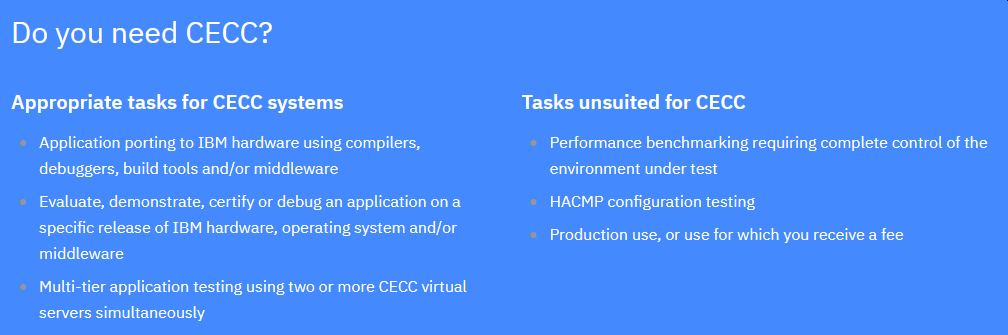
IBM CECC
The first item is “application porting” but it would seem that IBM CECC prefers to frustrate the crap out of developers because I don’t know any ISV, developer, vendor, etc. that wants to spend days installing software every time you need to compile and debug a program.

Capitalware has created and sells 16 programs. At least once a week, I get a bug report for a product. So, how am I suppose to support AIX, IBM i and Linux on POWER, if I have to spend so much time installing software every single time I start an image. It is ridiculous. Why would I even bother supporting AIX, IBM i and Linux on POWER??????

Does IBM PartnerWorld want ISVs, developers, vendors, etc. to use IBM CECC to bring their applications to AIX, IBM i and Linux on POWER or NOT!!! Because clearly, the management at IBM CECC is NOT actually interested in providing a useful platform for ISVs, developers, vendors, etc. who WANT to bring their applications to AIX, IBM i and Linux on POWER.

I’m calling on all ISVs, developers, vendors, etc.. Please lodge your complaints with IBM CECC support, so that IBM will fix the issues and in particular, fix the issue that you can no longer save and restore VMs.

Regards,
Roger Lacroix
Capitalware Inc.

Capitalware, IBM i (OS/400), IBM MQ, Linux, Operating Systems, Programming, Unix 4 Comments

IBM MQ 9.2 for z/OS Availability

IBM has announced the availability IBM MQ 9.2 for z/OS:
https://www.ibm.com/common/ssi/ShowDoc.wss?docURL=/common/ssi/rep_sm/9/877/ENUS5655-MQ9/index.html

IBM MQ 9.2 for z/OS will be available for electronic download on September, 11, 2020.

Regards,
Roger Lacroix
Capitalware Inc.

IBM MQ, z/OS Comments Off on IBM MQ 9.2 for z/OS Availability

Redbooks on IBM MQ

I have created a new section on Capitalware’s IBM MQ Documentation Library page called Redbooks on IBM MQ.

I searched the internet and IBM’s Redbook site and found 20 redbooks on the subject of IBM MQ (formally WebSphere MQ, MQSeries). I have listed them in chronologically order.

Note: Some of them may be old but the concepts and information are still relevant in 2020!!

Enjoy.

Regards,
Roger Lacroix
Capitalware Inc.

.NET, C, C#, C++, Capitalware, E-Book, Education, IBM i (OS/400), IBM MQ, IBM MQ Appliance, Java, JMS, Linux, Programming, Security, Unix, Windows, z/OS Comments Off on Redbooks on IBM MQ

Stackoverflow tag for MQ Visual Edit

There are many ways for end-users to ask for help with MQ Visual Edit. You can:

Now on Stackoverflow, there is a tag called mq-visual-edit that you can add to your question. I am monitoring the mq-visual-edit tag and will be notified when a question is posted with that tag.

Regards,
Roger Lacroix
Capitalware Inc.

Capitalware, IBM MQ, Linux, macOS (Mac OS X), MQ Visual Edit, Windows Comments Off on Stackoverflow tag for MQ Visual Edit

Capitalware Products 2020 Release Train

Here is a summary of all the recent releases that Capitalware Inc. has published:

    Updated ‘License as Free’ products:

  • MQ Channel Auto Creation Manager v1.0.6
  • MQ Channel Auto Creation Manager for z/OS v1.0.6
  • MQ Set UserID v1.0.5
  • MQ Set UserID for z/OS v1.0.5
  • Client-side Security Exit for Depository Trust Clearing Corporation v1.0.5
  • Client-side Security Exit for Depository Trust Clearing Corporation for z/OS v1.0.5

All Capitalware products support the newly released IBM MQ v9.2.

Finally, all product manuals now have a “Last Updated” (i.e. July 2020) declaration on the bottom left of the second page (i.e. page ii) of each manual.

Regards,
Roger Lacroix
Capitalware Inc.

Capitalware, IBM i (OS/400), IBM MQ, Licensed As Free, Linux, MQ Auditor, MQ Authenticate User Security Exit, MQ Channel Connection Inspector, MQ Channel Encryption, MQ Channel Throttler, MQ Enterprise Security Suite, MQ Message Encryption, MQ Message Replication, MQ Standard Security Exit, Unix, Windows, z/OS Comments Off on Capitalware Products 2020 Release Train

New: MQ Standard Security Exit v2.6.0

Capitalware Inc. would like to announce the official release of MQ Standard Security Exit v2.6.0. This is a FREE upgrade for ALL licensed users of MQ Standard Security Exit. MQ Standard Security Exit is a solution that allows a MQAdmin to control and restrict who is accessing an IBM MQ resource.

For more information about MQ Standard Security Exit go to:
https://www.capitalware.com/mqssx_overview.html

    Changes for MQ Standard Security Exit v2.6.0:

  • Enhanced the code for dumping the pointers passed into exit.
  • Fixed an issue in the subroutine that removes trailing blanks
  • Fixed issue when an invalid or expired license key is used
  • Fixed an issue with default exit path

Regards,
Roger Lacroix
Capitalware Inc.

Capitalware, IBM i (OS/400), IBM MQ, Linux, MQ Standard Security Exit, Unix, Windows Comments Off on New: MQ Standard Security Exit v2.6.0

New: MQ Standard Security Exit for z/OS v2.6.0

Capitalware Inc. would like to announce the official release of MQ Standard Security Exit for z/OS v2.6.0. This is a FREE upgrade for ALL licensed users of MQ Standard Security Exit for z/OS. MQ Standard Security Exit for z/OS is a solution that allows a MQAdmin to control and restrict who is accessing an IBM MQ resource.

For more information about MQ Standard Security Exit for z/OS go to:
https://www.capitalware.com/mqssx_zos_overview.html

    Changes for MQ Standard Security Exit for z/OS v2.6.0:

  • Enhanced the code for dumping the pointers passed into exit.
  • Fixed an issue in the subroutine that removes trailing blanks
  • Fixed issue when an invalid or expired license key is used

Regards,
Roger Lacroix
Capitalware Inc.

Capitalware, IBM MQ, MQ Standard Security Exit, z/OS Comments Off on New: MQ Standard Security Exit for z/OS v2.6.0

New: MQ Message Replication v2.2.0

Capitalware Inc. would like to announce the official release of MQ Message Replication v2.2.0. This is a FREE upgrade for ALL licensed users of MQ Message Replication. MQ Message Replication (MQMR) will clone messages being written (via MQPUT or MQPUT1 API calls) to an application’s output queue and MQMR will write the exact same messages to ‘n’ target queues (‘n’ can be up to 100). When MQMR replicates a message both the message data and the message’s MQMD structure will be cloned.

For more information about MQMR, please go to:
https://www.capitalware.com/mqmr_overview.html

    Changes for MQ Message Replication v2.2.0:

  • Fixed a bug handling MQPUT1 calls not correctly opening target queues
  • Fixed a bug handling MQPUT1 calls and ForMQPut1DoMQPut1 = Y not setting ObjectName correctly.
  • Fixed an issue in the subroutine that removes trailing blanks
  • Fixed an issue with the logging framework
  • Enhanced the code for dumping the pointers passed into exit.
  • Fixed a bug in mq2sdb not correctly resetting prepared statement after use.
  • Add 2 new columns to the IBM_MQ_MESSAGES table: Source_QMgr_Id & Source_Queue_Id.
  • Add 2 new tables to the database: SOURCE_QMGR_NAMES & SOURCE_QUEUE_NAMES.
  • Added new keyword ‘IncludeSourceInfo’ for mq2sdb that will cause the source QMgr & queue names to be written to database.
  • Added new keyword ‘UseSelect’, ‘SelectQMgrName’ & ‘SelectQName’ for sdb2mq that will control which messages are loaded into the queue.
  • Fixed issue when an invalid or expired license key is used
  • Fixed an issue with default exit path

Regards,
Roger Lacroix
Capitalware Inc.

Capitalware, IBM i (OS/400), IBM MQ, Linux, MQ Message Replication, Unix, Windows Comments Off on New: MQ Message Replication v2.2.0

New: MQ Message Encryption v4.2.0

Capitalware Inc. would like to announce the official release of MQ Message Encryption v4.2.0. This is a FREE upgrade for ALL licensed users of MQ Message Encryption. MQME provides encryption for MQ message data while it resides in a queue and in the MQ logs (i.e. all data at rest).

For more information about MQME, please go to:
https://www.capitalware.com/mqme_overview.html

    Changes for MQ Message Encryption v4.2.0:

  • Added keyword EncryptRFH2Header to handle encrypting the MQRFH2 header or not
  • Added code check if an MQRFH2 message on an XMITQ only has payload data encrypted.
  • Fixed an issue with MQPUT1 not correctly handling the ExcludeQueue.
  • Fixed a buffer overrun condition on MQCALLBACK that would cause the MCA (amqrmppa) process to crash.
  • Fixed an issue in the subroutine that removes trailing blanks
  • Fixed an issue with the logging framework
  • Enhanced the code for dumping the pointers passed into exit.
  • Fixed issue when an invalid or expired license key is used
  • Fixed an issue with default exit path

Regards,
Roger Lacroix
Capitalware Inc.

Capitalware, IBM i (OS/400), IBM MQ, Linux, MQ Message Encryption, Unix, Windows Comments Off on New: MQ Message Encryption v4.2.0