
IBM has just released Fix Pack 9.2.0.1 for IBM MQ V9.2 LTS:
https://www.ibm.com/support/pages/downloading-ibm-mq-version-9201
Regards,
Roger Lacroix
Capitalware Inc.
IBM has just released Fix Pack 9.2.0.1 for IBM MQ V9.2 LTS:
https://www.ibm.com/support/pages/downloading-ibm-mq-version-9201
Regards,
Roger Lacroix
Capitalware Inc.
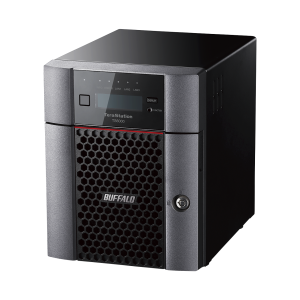
If you read my old blog posting, you know I like and use Buffalo TeraStation as my NAS (Network Attached Storage). It supports Windows and macOS (Mac OS X) without any issues.
My current Buffalo TeraStation III 4TB (Terabyte) has been nearly full for at least a year. I have been selectively deleting files and zipping/compressing directories to maximize what space I have left on it. I even switched to using 7z format rather than zip because 7z can give a better compression ratio than zip. But its like trying to stop water going over a waterfall. The data just keeps coming!!
So, I decided to take the plunge and purchase a new NAS. Since the current and previous Buffalo TeraStations have worked well for me, I decided to check out what Buffalo has for the current generation of TeraStations for SMB (small and midsize business). The Buffalo TeraStation 6000 Series looked like exactly what I needed. They offer it in 4 configurations:
|
|
I want a NAS with 4 HDDs, so that I can configure it to use Raid 5. I decided on the 16TB 4 drive configuration. I checked the prices on amazon.ca and bestbuy.ca (Canadian sites). BestBuy didn’t have it but Amazon did for $2100 CAD (roughly $1500 USD) which is comparable to amazon.com’s pricing. I thought, what the hell, I’ll check the price of the 32TB configuration. Amazon.ca had it for $3500 CAD (roughly $2700 USD) but the amazon.com had it for $1986 USD. The amazon.ca listing was through a 3rd party seller that was clearly overcharging for it.
So, I sent an email to Mega Computer (local small retailer) and asked for pricing for both the 16TB and 32TB configurations. They reply with a quote of 16TB (4x4TB) $2099.99 CAD (roughly $1500 USD) and 32TB (4x8TB) $2699.99 CAD (roughly $2000 USD). I thought “excellent” and ordered the 32TB configuration. It might be overkill now but I’ll (actually my data) will grow into it. 🙂

It arrived yesterday (Sept. 29). I have set it up, added the UserIds, Groups and created the shares I want on it. Late last night, I started copying the backup files from the old NAS to the new NAS and it is still copying the files 12 hours later. Right now, it says just over 19 million files to go!! So, I think its going to take awhile!! 🙂
Regards,
Roger Lacroix
Capitalware Inc.
This is take-two. The hardware upgrade was scheduled for Tuesday night but it was delayed about an hour before it was to happen.
HostGator, Capitalware’s web hosting company, will be upgrading our web server tonight with new hardware (new unit with new SSDs).
So, if you find there are issues with our web sites, blog, emails, etc. please be patient and hopefully everything will be resolved by morning.
Regards,
Roger Lacroix
Capitalware Inc.
I have been doing a lot of a testing of various messages types (i.e. Fixed-width, CSV, XML, JSON, PDF, PNG, JPG, etc.). I’ll post the results in the next blog posting. I have decided to drop support for LZ1 compression algorithm from MQ Message Compression (MQMC) for the following reasons:
Nobody will choose a super slow compression algorithm with average compression results. That is why I decided to drop support for it.
Therefore, MQ Message Compression will support the following 7 lossless compression algorithms going forward:
I plan on building MQMC for AIX, HP-UX, IBM i (OS/400), Linux (x86, x86_64, POWER & zSystem), Solaris (SPARC & x86_64) and Windows. MQMC will support IBM MQ v7.1, v7.5, v8.0, v9.0, v9.1 and v9.2.
Beta testing MQ Message Compression is absolutely free including support (no strings attached).
If you interesting in trying it out, please send an email to support@capitalware.com to request a trial of MQ Message Compression.
Regards,
Roger Lacroix
Capitalware Inc.
On Tuesday, Windows 10 Pro said that my current release of Windows 10 (I believe it was 1904) was going out of support and I needed to upgrade to release 2004. Against my better judgment, I allowed it to proceed when I went to bed Tuesday night then the problems started on Wednesday (yesterday).
What dumb-ass developer or team or management at Microsoft allows an update to go around deleting settings and breaking a user’s environment. Yes, Microsoft Windows people, I’m calling you all a bunch of dumb-asses.
So far, I have found that the Windows 10 update has broken or deleted the following:
(1) Broke MQ – I could no longer use amqmdain command. When I run it, I get the following error:
AMQ6509E: Unable to update registry value.
After some internet searches, I found that I needed to run the following command to fix the issue:
crtmqdir -f -a
(2) Deleted a registry entry that set my ALT-Tab to WinXT style ALT-Tab:
After some internet searches, I found I had to do the following
– Create a DWORD Value called AltTabSettings in HKEY_CURRENT_USER/Software/Microsoft/Windows/CurrentVersion/Explorer and set it to 1.
– Rebooted
(3) Broke connection to Buffalo TeraStation – it disabled SMB
After some internet searches, I found this page and did the following:
– Open Control Panel.
– Click on Programs & Features
– Click on Turn Windows features on or off.
– Expand the SMB 1.0/CIFS File Sharing Support option.
– Check/Select all 3 SMB 1.0/CIFS entries
– Click the OK button.
– Rebooted
Because of this, last nights backups ALL FAILED. What if I had an emergency because of some sort of issue or corruption or ransomware? I would be using 2 day old data!!! And not the previous day!!
(4) Broke 8GadgetPack
I had to perform a repair of the package and then it worked again.
This is what I have found and fixed so far. Microsoft, I don’t have time for your dumb-ass stupidity. What the hell is wrong with you people?!?! I’m in the middle of helping customers test a new product and I don’t have time for this shit!!!
There. I feel better after venting.
Regards,
Roger Lacroix
Capitalware Inc.
One thing always leads to another!
In my house (and home office), I had an ASUS RT-AC68U router (on main floor) and a Tenda W150M router (in basement). Once in a while, someone would complain that the ‘internet is not working’ or ‘internet sucks’! Sometimes it would be as simple as being on the wrong router (i.e. being on the main floor but connected to Tenda in the basement). Other times, I would just reboot the router.
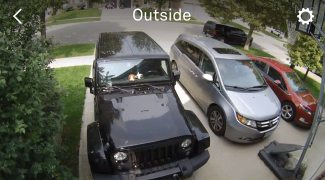
A couple of weeks ago, our neighbor, directly across from us, had their SUV stolen in the middle of the night. Cynthia (my wife) said she now wanted a camera in front to cover our drive. We have a Nest doorbell camera but it only shows the view down our side walk to the street.
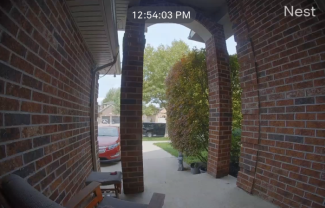
She found that Best Buy had a 2 pack of Google Nest WiFi outdoor 1080p cameras on sale. So, I went to Best Buy and purchased it. She also signed up for the Google Nest subscription to store the video in the cloud. The next day installed one on each side of the garage. Mounting them wasn’t to difficult but doing the WiFi setup is really slow. I guess it double and triple checks for WiFi signals which takes a very long time.
 |
 |
Kyle setup a PS4 and a 32” monitor on a tray in the family room, so that he could play Fall Guys using WiFi during intermission when we were watching NHL and NBA playoff games. After I added the cameras to the network, he complained that he was losing games because the router was dropping the PS4 connection. And my wife and other kids were complaining about a slow internet.
My ISP allows the customer to have 2 IP addresses. I have an extra router called: CradlePoint MBR95. So, I had the bright idea of putting the CradlePoint router at the front window and running a cable back to the modem and have the 2 Nest cameras and doorbell connect to the CradlePoint router. I offloaded the Nest traffic to a different router, problem solved, so I thought. But it didn’t seem to make a difference. When I logged into CradlePoint router, under WiFi connection, it was showing 50%-70% channel conflict. I tried to manually set the channel to reduce the conflict with the other routers but I could only get it down to 30%. People were still complaining about a slow internet plus the far Nest camera kept going online-offline-online-offline.
I got fed up with it and since I had noticed that ASUS supported a mesh network called AiMesh, I thought why not. I looked at the instructions and it seemed pretty straightforward. If you want an indepth review then read Dong Ngo’s AiMesh Review: Asus’s Ongoing Journey to Excellent Wi-Fi Coverage post.
I decided to use my existing ASUS RT-AC68U router as a node and purchase another ASUS RT-AC68U router to be used as another node. As the primary router, I decided to purchase ASUS RT-AC86U router.
I checked Amazon, Best Buy on pricing and sent an email to Mega Computer (local small retailer). Mega Computer didn’t have ASUS RT-AC86U in stock but had ASUS GT-AC2900 in stock. He offered $20 off to make it the same price as RT-AC86U for $249 CAD (roughly $190 USD) and ASUS RT-AC68U for $179 CAD (roughly $135 USD). So, I bought the items from Mega Computer.
I decided on the following setup: the primary router would be at the very front of the house (main floor), a node at the very back of the house (main floor) and a node in the basement. The ASUS AiMesh can use both wired and wireless for back-hauling. I have partially hard-wired my house with cat 6 Ethernet cable. I have cabling in my office to the server room in the basement and wired the kids game room in the basement. Hence, the node in the basement would use wired backhaul. For the node at the back of the house (kitchen), I decided to run cabling along the baseboards into the kitchen and up on top of the kitchen cabinets. The cabinets don’t go all the way to the ceiling, so I ran the cabling until I ran out of cabinets. The cabinets have a thick top molding, so all you see is 3 little antennas sticking up.
Next, I followed the instructions and upgrade the firmware on all 3 routers. On the primary router (ASUS GT-AC2900), setup the usual stuff: LAN IP address, DHCP server starting and ending range, SSID name for 2.4GHz and SSID name for 5GHz (I use different names i.e. Speedy_2.4 and Speedy_5.0). Make sure everything is setup regardless if you are using the AiMesh or not.
I followed the instructions for resetting the nodes but getting the nodes to be recognized by the primary for AiMesh was impossible. I tried over and over but wasted an hour of my time. I decided to do the setup manually. It is really easy if you have 2 PCs/laptops otherwise you will be doing a lot of cable swapping. Or download the ASUS Router app to your smart phone and use 1 PC.
Next, connect the node to the primary router. Plug the Ethernet cable into a LAN (Yellow or Black) port of the primary router and plug the other end of the cable into the WAN (Blue) port of the node. On your PC log into the node’s administration panel and then click Administration tab and then select AiMesh Node radio button.
You should see the following:
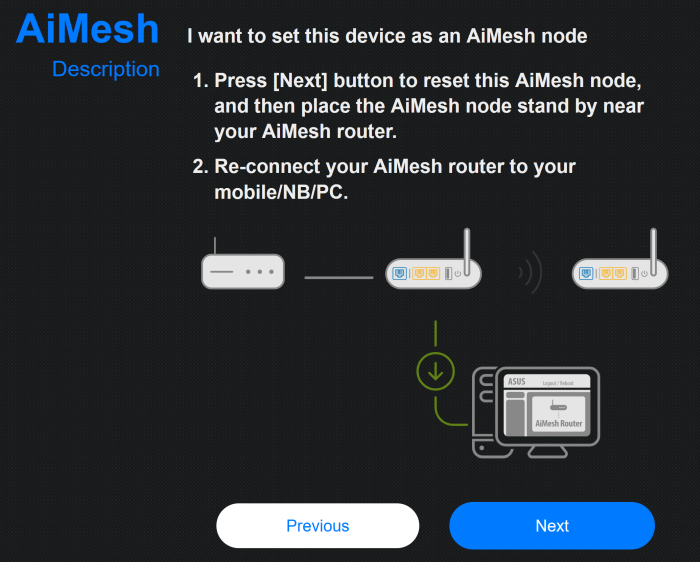
Click the Next button to proceed. And it will begin:
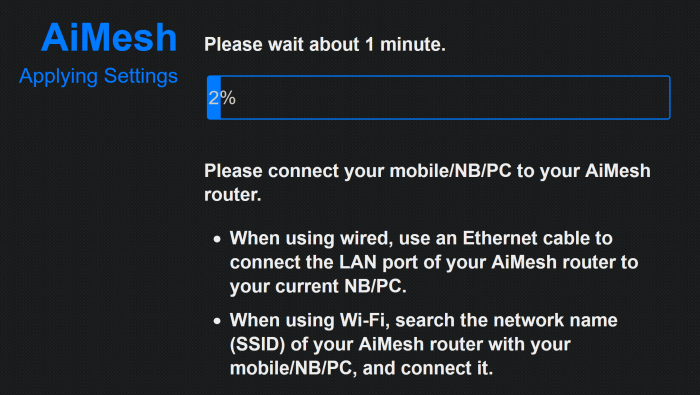
This will take several minutes to complete. You just have to wait it out. When it is done, you will see the following screen:
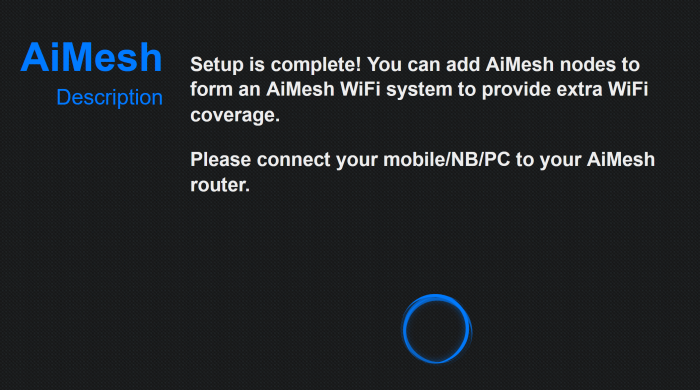
Now go to your primary router and do the following: click Network Map tab, next click the AiMesh Node icon then click the Search button:
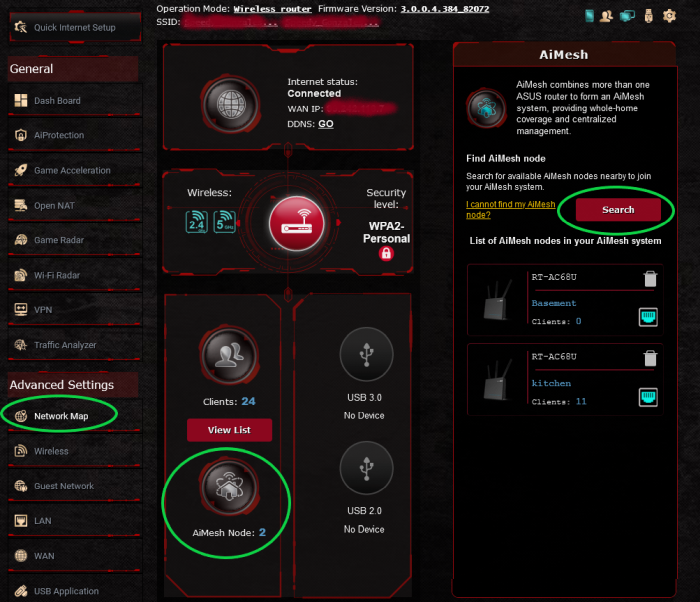
It will popup a window of the found node, simply accept it and you are done. 🙂
The manual process may require 2 PCs/laptops or 1 PC and a smart phone but it is not complicated and works!! If you have more nodes to add, just repeat the process. As you can see, I have 2 nodes. If you click on a node in the list then you can change the name of it and see a list of connected users.
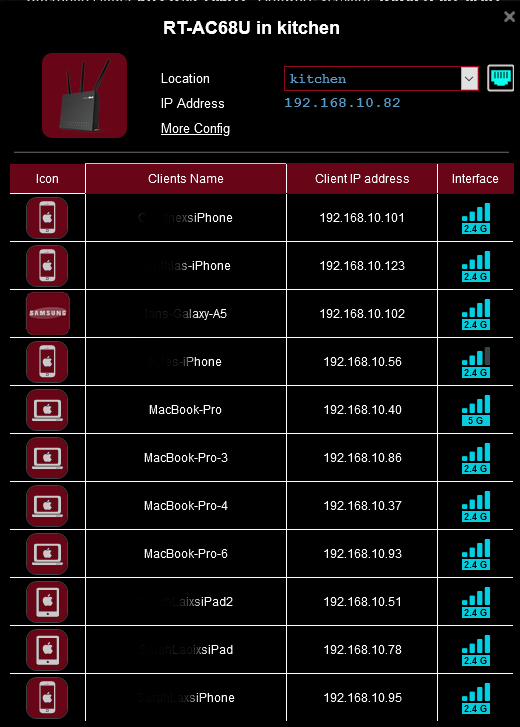
Now people in the house can wander from upstairs to main floor to the basement without switching their WiFi settings on their device. So far, I haven’t heard ‘internet is not working’ or ‘internet sucks’. 🙂
Finally, both the Tenda and CradlePoint routers have been disconnected and put away, as they are no longer needed. In the future, I may add a 3rd node in hallway upstairs but I’ll wait and see if there any complaints about reception in the bedrooms. 🙂
Regards,
Roger Lacroix
Capitalware Inc.
Capitalware is ready for beta testers for a new solution called: MQ Message Compression (MQMC). MQMC is an MQ API Exit.
Question: Would you trade a little CPU time to drastically reduce the disk I/O time?
I have written a long blog posting on the internals of queue manager logging (with help from Chris Frank) and why you might want to use message compression to speed up message processing time.
The MQMC supports the following 8 lossless compression algorithms:
I plan on building MQMC for AIX, HP-UX, IBM i (OS/400), Linux (x86, x86_64, POWER & zSystem), Solaris (SPARC & x86_64) and Windows. MQMC will support IBM MQ v7.1, v7.5, v8.0, v9.0, v9.1 and v9.2.
Beta testing MQ Message Compression is absolutely free including support (no strings attached).
If you interesting in trying it out, please send an email to support@capitalware.com to request a trial of MQ Message Compression.
Regards,
Roger Lacroix
Capitalware Inc.
Most users have to deal with many different queue managers in their MQ environment.
If you are browsing a queue with large messages on a remote queue manager in MQ Visual Edit and have updated the “Maximum size of each message to retrieve” property on MQ Queue tab of the Preferences window to a number larger than 4MB (i.e. 4194304) then you may receive MQ reason code of 2010 when connecting to another remote queue manager.
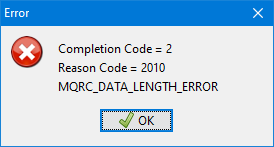
The reason this may happen is because each channel (SVRCONN) has an attribute called MAXMSGL (maximum message length) with a default value of 4MB.
Hence, if you set MQ Visual Edit’s “Maximum size of each message to retrieve” property to a value larger than the channel’s MAXMSGL attribute then MQ will return a reason code of 2010 (MQRC_DATA_LENGTH_ERROR) when attempting to retrieve messages from a queue.
The solution is to either lower “Maximum size of each message to retrieve” property in your Preferences to 4MB or set the channel’s MAXMSGL attribute to a large number like 100MB.
Also, there is really no reason to increase MQ Visual Edit’s “Maximum size of each message to retrieve” property. If you have the property “Automatically retrieve the entire message data when opening the ‘Message Edit’ window” selected on the MQ Queue tab of the Preferences window then MQ Visual Edit will automatically get the whole message from the queue if it has already not done so.
Note: This blog posting also applies to MQ Visual Browse.
Regards,
Roger Lacroix
Capitalware Inc.
Well, to answer my own question, you want Netflix, Hulu, etc. to use compression when you stream movies or TV shows. Or compress files to free up disk space. There are a variety of reasons to use compression.
I’ve been doing a lot of testing using large files and it got me thinking about the disk I/O (Input/Output), throughput and overall performance of messages traveling through a queue manager.
There is a lot going on under the covers in a queue manager as it relates to disk I/O. There are queue buffers for each queue, queue files (aka queue backing files) and of course, the recovery log files.
Each queue in the queue manager is assigned two buffers to hold messages (one for persistent messages and one for non-persistent messages). The persistent queue buffer size is specified using the tuning parameter DefaultPQBufferSize. The non-persistent queue buffer size is specified using the tuning parameter DefaultQBufferSize.
Note: You can read the MQ Knowledge Center to learn how to change these values (it’s a little complicated).
Here’s the process of the queue manager handling an application putting a message to a queue:
When the consumer (non-waiting) gets a message from a queue, the queue manager will retrieve it from the queue buffer, if available, otherwise from the queue file. If the consumer was waiting for a message then the queue manager will attempt to write it directly to the applications buffer. In theory, it is all about performance.
If you ever went to MQ Technical Conference (MQTC), you may have attended one of Chris Frank’s excellent sessions (he’s an IBMer) on queue manager logging. Here is a screen-shot from Chris Frank’s MQTC 2016 More Mysteries of the MQ Logger (page 9) that provides a high-level view of disk I/O.
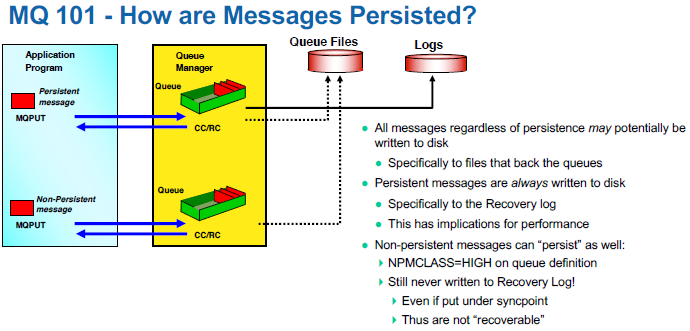
In the picture, the solid line shows the queue manager writing the messages to the recovery log files. The dotted lines means that the message may or may not be written to the queue file. See the above for the scenarios of when/why the queue manager would write a message to the queue file.
Here’s an example for a 64-bit queue manager:
That’s all well and good, if the message size is small but what about 300KB or 2MB message sizes? They do not fit in the queue buffers (persistent nor non-persistent). What if a number of applications send messages between 5MB and 20MB (without a consumer waiting to get it)? Unless the MQAdmin has drastically increased the DefaultPQBufferSize and DefaultQBufferSize parameters, then the messages will always be written to the queue file.
So, lets take a moment to think about large, say 10MB, persistent messages and the DefaultPQBufferSize parameter is set at its default value with no consumers waiting to receive the message. First, the queue manager writes the message to the recovery log file and then it will write it to queue file. When the consumer finally performs a get, the queue manager will need to read the message from the queue file. What if your application is sending thousands of 10MB messages per day. The amount of disk I/O is huge. i.e. 2 writes of 10MB and 1 read of 10MB per message.
Question: Would you trade a little CPU time to drastically reduce the disk I/O time?
I had the bright idea of using lossless compression to help speed things up. So, I created a new product called MQ Message Compression (MQMC). MQMC is an MQ API Exit. My thought was if you can reduce (compress) a message by a factor of 3 or 4 (sometimes far, far more), then there would be much less disk I/O which would speed up the whole throughput of the message.
The MQMC supports the following 8 lossless compression algorithms:
So, how do you know what is the best compression algorithm for the end-user’s data? Well, to take the guess work out of it, I wrote a simple program called TESTCMPRSN. It applies all 8 compression algorithms against a file and display the results.
The important thing to remember is that disk I/O reads or writes are substantially slower than CPU processing.
Here’s an example of TESTCMPRSN program being run against a 9.17MB XML file (really large file):
~/test> ./testcmprsn very_lrg_msg.xml
testcmprsn version 0.0.1 (Linux64) {Sep  3 2020}

very_lrg_msg.xml size is 9614354 (9.17MB)
Time taken to perform memcpy() is 4.8770ms

Algorithm               Compressed      Compression     Compression     Decompression
                           Size         Time in ms        Ratio           Time in ms
LZ1                 924233 (902.57KB)     915.9610       10.40 to 1         13.9510
LZ4                 112253 (109.62KB)       3.4830       85.65 to 1         2.9540
LZMA Fast            32872 (32.10KB)      108.4230      292.48 to 1        11.0730
LZMA Best            27675 (27.03KB)     1152.6960      347.40 to 1        10.6730
LZW                 287184 (280.45KB)     203.0840       33.48 to 1        80.8820
RLE               13213500 (12.60MB)       28.1200        0.73 to 1        26.2680
ZLIB Fast           240612 (234.97KB)      28.3140       39.96 to 1        11.2530
ZLIB Best            83375 (81.42KB)       88.5010      115.31 to 1         8.4590
testcmprsn is ending.
Clearly, LZMA Best crushed it. It reduced a 9.17MB file to just 27.03KB (347 fold reduction) but at a cost of 1152.696 milliseconds. A better option for that type of data is to use LZMA Fast (or ZLIB Fast) but if speed is what you want then LZ4 is by far the better choice.
Here is another example but this time the file is a CSV message with 100,000 rows (5.34MB):
~mqm/> ./testcmprsn lrg_msg.csv
testcmprsn version 0.0.1 (Linux64) {Sep  3 2020}

lrg_msg.csv size is 5596526 (5.34MB)
Time taken to perform memcpy() is 2.7790ms

Algorithm               Compressed      Compression     Compression     Decompression
                           Size         Time in ms        Ratio           Time in ms
LZ1                2259971 (2.16MB)      3323.3470        2.48 to 1        13.5200
LZ4                  46756 (45.66KB)        1.8300      119.70 to 1         1.5910
LZMA Fast            16135 (15.76KB)       69.0080      346.86 to 1         6.1620
LZMA Best            14292 (13.96KB)     1039.6830      391.58 to 1         6.1660
LZW                 875214 (854.70KB)     188.9970        6.39 to 1        51.0490
RLE               11009430 (10.50MB)       12.7800        0.51 to 1        13.7960
ZLIB Fast          1976970 (1.89MB)        62.2680        2.83 to 1        33.9510
ZLIB Best          1417225 (1.35MB)      1205.1500        3.95 to 1        26.6710
testcmprsn is ending.
Again, LZMA Best crushed it. It reduced a 5.34MB file to just 13.96KB (391 fold reduction) but at a cost of 1039.683 milliseconds. A better option for that type of data is to use LZMA Fast but if speed is what you want then LZ4 is by far the better choice.
As a benchmark, the TESTCMPRSN program performs a memcpy() of the data, so that the end-user can compare the compression algorithms compression time against the memcpy() time.
As they say: your mileage will vary. The only way to know which compression algorithm will work best for your data is to test it. Note: RLE should only be used with alphanumeric data (plain text) that has repeating characters and never with binary data.
Beta testing MQ Message Compression is absolutely free including support (no strings attached).
If you interesting in trying it out, please send an email to support@capitalware.com to request a trial of MQ Message Compression.
Regards,
Roger Lacroix
Capitalware Inc.
 IBM MQ WebSphere MQ IBM Developer Messaging Blog T.Rob’s Store and Forward Mark Taylor’s Blog Lyns Random Thoughts Leif Davidsen’s Blog Colin Paice on MQ StackOverflow MQ Questions StackOverflow MQTT Questions