MySQL v5.6 Released

The Oracle has just released MySQL v5.6.
http://dev.mysql.com/downloads/mysql/5.6.html

MySQL is the world’s most used open source relational database management system (RDBMS) as of 2008 that runs as a server providing multi-user access to a number of databases.

Regards,
Roger Lacroix
Capitalware Inc.

Database, Linux, macOS (Mac OS X), Open Source, Unix, Windows Comments Off on MySQL v5.6 Released

Again MS Visual C++ 2010 bites me in the …

I really hate MS Visual C++ 2010. I have had so many problems since I installed it a couple of weeks ago that it is driving me crazy.

I have an MQ API Exit built for Windows 64-bit (via a script) with /Release /x64.

setlocal
CALL "D:\Program Files\Microsoft SDKs\Windows\v7.1\Bin\SetEnv.cmd" /Release /x64
nmake -f makefile.vc64.nt %1
endlocal

And in the makefile I use the parameter /LD for the cl command to build the DLL:

$(cc) $(cflags) $(cvarsdll) /LD $(scall) -Fo$@ $(MYSRC)$(@B).c

This has worked fine for many years and different Microsoft compilers but not with Visual C++ 2010.

A customer was running a 64-bit application on their server but MQ would not load the 64-bit version of the mqa.dll. Here is what was in the MQ trace file:

FullPathLibName(C:\Program Files (x86)\IBM\WebSphere MQ\exits64\mqa.dll) RC(24948) WindowsErrorNumber(126) WindowsErrorString(The specified module could not be found.)

The customer verified many times that the 64-bit version of mqa.dll was indeed in the correct location. Hence, a PMR was opened with IBM.

IBM had the customer run the Process Monitor program against it and output the data to a file. In the file, there were many occurrences of “MSVCR100D.dll NAME NOT FOUND”. MSVCR100D.dll is the debug version of MSVCR100.dll (note the extra “D” in the file name of the debug version).

I reviewed my makefile to make sure that I was not using either “_DEBUG” or “/LDd” (or /Debug /x64 for the environment) that would cause the “cl” command to build the DLL for a debug environment but everything was correct.

I even checked Microsoft’s MSDN regarding /LD parameter:
http://msdn.microsoft.com/en-us/library/2kzt1wy3(v=vs.100).aspx

I rebuild the DLL several times and when I checked the DLL, it pointed to MSVCR100D.dll and not MSVCR100.dll.

After a bunch of Google searches and finding other people with the same problem using Visual C++ or Visual Studio 2010, I changed /LD to /MD and rebuild the DLL. When I checked the DLL, it now points to msvcr100.dll – which is correct.

I do not understand it. Microsoft’s documentation says that parameter /LD creates a dll and parameter /LDd creates a dll for debugging. There must be some sort of bug in MS Visual C++. 🙁 All I can do is shake my head in frustration.

I REALLY wish IBM would officially support GCC on Windows, so that I could get away from Microsoft’s Visual C++ 2010. I don’t have these stupid headaches on Linux!! I do have GCC 32-bit and 64-bit for Windows on my PC and do successfully build MQ applications and DLLs with it – I just don’t give them to customers (I don’t want GCC to get blamed when an issue shows up).

Regards,
Roger Lacroix
Capitalware Inc.

C, Capitalware, IBM MQ, Programming, Windows Comments Off on Again MS Visual C++ 2010 bites me in the …

Super Bowl

Small Sliding scale picks for Super Bowl (least probable to most probable):

U1   Baltimore Ravens     F4.5       at      San Francisco 49ers

Fibonacci Sliding scale picks for Super Bowl (least probable to most probable):

U1   Baltimore Ravens     F4.5       at      San Francisco 49ers

So what does it mean?

U1   Baltimore Ravens     F4.5       at      San Francisco 49ers

U1 means the underdog team will beat the spread (favorite will not cover the spread) with the highest probability of success.

Enjoy. 🙂 As they say in the stock market, past perform is no indication of future performance.

Regards,
Roger Lacroix

Football 1 Comment

Updated MMX and MRTR Load-Modules for z/OS

Yesterday afternoon while doing some z/OS MQ testing, I discovered that both Message Multiplexer (MMX) and Message Router (MRTR) had been linked with the wrong MQ stub. Oy vey!!

I relinked both MMX and MRTR with the correct MQ stub (CSQBSTUB) then posted the both download archives to Capitalware’s web site.

Note: The source did not change. If you downloaded, compiled and linked MMX or MRTR on z/OS, you would have been fine. If you attempted to use either MMX or MRTR load-modules as given in the download archive, then the load modules would have failed on the MQCONN API call. Sorry about that. It is now fixed.

Regards,
Roger Lacroix
Capitalware Inc.

C, Capitalware, IBM MQ, Open Source, Programming, z/OS Comments Off on Updated MMX and MRTR Load-Modules for z/OS

Using Universal File Mover on Mac OS X (How To #6)

In this blog posting, I will discuss the prerequisites and issue related to using UFM on Mac OS X. First, as with any other platform that you run UFM on, Mac OS X must have Java v1.5.0 or higher installed.

Second, follow the “Unix and Linux” instructions from the UFM Installation and Operation manual for installing UFM on Mac OS X.

Third, you will need WebSphere MQ (WMQ) to be installed on Mac OS X. This is where everyone gets stumped. IBM does not release either WMQ Server or WMQ Client for Mac OS X, although Willow Technology does have a port of WMQ for Mac OS X but it is extremely old (v5.3) and it is NOT free. I do not understand why IBM does not release a current version of WMQ for Mac OS X, as Mac OS X is a popular platform.

So, how do you get around this issue? You simply copy the MQ Java JAR files from an existing installation of WMQ to the “libs” directory of UFM on Mac OS X.

1) If you only have WMQ v6 then copy the following 2 MQ Java JAR files to Mac OS X:

com.ibm.mq.jar
connector.jar

2) If you have WMQ v7 then copy the following 5 MQ Java JAR files to Mac OS X:

com.ibm.mq.jar
com.ibm.mq.commonservices.jar
com.ibm.mq.headers.jar
com.ibm.mq.jmqi.jar
connector.jar

That’s it. You are now ready to use UFM on Mac OS X.

Note: If you want to use UFM on BSD or any other OS variant then simply follow the above steps and you will be good to go.

Regards,
Roger Lacroix
Capitalware Inc.

Capitalware, IBM MQ, Java, macOS (Mac OS X), Open Source, Universal File Mover Comments Off on Using Universal File Mover on Mac OS X (How To #6)

Scheduling a Simple File Transfer using Universal File Mover (How To #5)

At mqseries.net, a user asked the following question:

I’m using MQ FTE version 7.0.4.1 , and I’d like to make a File Transfer to occur from Tuesday to Saturday , is it possible?

Since this is very easy to do in UFM, I thought I would make a ‘UFM How To’ from the question. I will show how to schedule a simple file transfer in “client mode” when UFM connects to the queue managers. Client mode connectivity means that the queue manager resides on a different server than the client application (i.e. UFM).
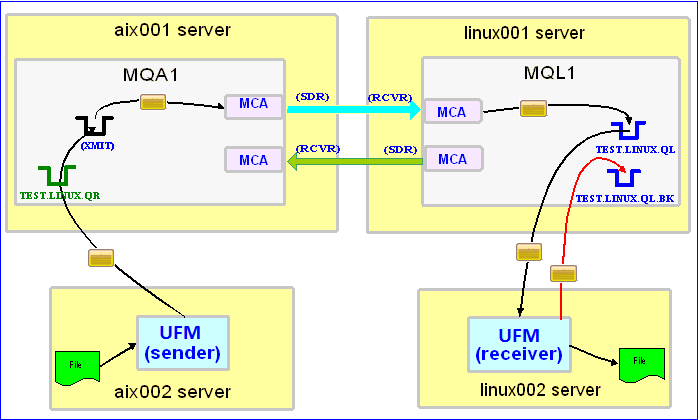

In this example, the following servers are used but they only have WebSphere MQ (WMQ) Client installed (no queue managers):
– aix002 is an AIX server with WMQ Client and UFM software installed
– linux002 is a Linux server with WMQ Client and UFM software installed

In this example, the following queue managers are used:
MQA1 is a queue manager residing on a AIX (aix001) server (sender)
MQL1 is a queue manager residing on a Linux (linux001) server (receiver)

TEST.LINUX.QL and TEST.LINUX.QL.BK are local queues defined in queue manager MQL1 (receiver)
TEST.LINUX.QR is a remote queue defined in queue manager MQA1 (sender)

If you do not know how to define/setup communication between 2 queue managers then follow the instructions in this blog posting:
https://www.capitalware.com/rl_blog/?p=509

Step #1: On the linux002 server, create a file in the mq directory called mql1.xml and copy the following into the file:

<?xml version="1.0" encoding="ISO-8859-1"?>
<!DOCTYPE UFM_MQ SYSTEM "UFM_MQ.dtd">
<UFM_MQ>
    <QMgrName>MQL1</QMgrName>
    <QueueName>TEST.LINUX.QL</QueueName>
    <Hostname>linux001</Hostname>
    <ChannelName>SYSTEM.DEF.SVRCONN</ChannelName>
    <Port>1414</Port>
    <UserID>tester</UserID>
</UFM_MQ>

The mql1.xml (UFM_MQ XML) file describes how to connect to the remote MQL1 queue manager on server linux001. The connection will use UserID of tester. If you do not have that UserID defined on the linux001 server then use a UserID that is defined.

Step #2: On the linux002 server, in the UFM install directory, create a file called ufm_receive_test_5.xml and copy the following into the file:

<?xml version="1.0" encoding="ISO-8859-1"?>
<!DOCTYPE UFM_Workflow SYSTEM "UFM_Workflow.dtd">
<UFM_Workflow>

  <Actions>
    <MQReceive getwithconvert="Y" run="D">
      <MQ>
        <MQFile>mql1.xml</MQFile>
        <BackOutQName>TEST.LINUX.QL.BK</BackOutQName>
      </MQ>
      <Default>
         <Directory override="Y">/home/roger/UFM/</Directory>
      </Default>
    </MQReceive>
  </Actions>

</UFM_Workflow>

When UFM is started, it will run as a daemon (run=”D”) and use a backout queue called TEST.LINUX.QL.BK just in case there is an issue with a message. UFM will use ‘get with convert’ option when retrieving the messages. UFM will override the message’s specified directory and use the one provided. Either create /home/roger/UFM/ directory on your Linux server or use a directory that already exist on your Linux server.

Step #3: On the linux002 server, start UFM to receive the file transfers:

./ufm.sh ufm_receive_test_5.xml &

Step #4: On the aix002 server, create a file in the mq directory called mqa1.xml and copy the following into the file:

<?xml version="1.0" encoding="ISO-8859-1"?>
<!DOCTYPE UFM_MQ SYSTEM "UFM_MQ.dtd">
<UFM_MQ>
    <QMgrName>MQA1</QMgrName>
    <QueueName>TEST.LINUX.QR</QueueName>
    <Hostname>aix001</Hostname>
    <ChannelName>SYSTEM.DEF.SVRCONN</ChannelName>
    <Port>1414</Port>
    <UserID>tester</UserID>
</UFM_MQ>

The mqa1.xml (UFM_MQ XML) file describes how to connect to the remote MQA1 queue manager on server aix001. The connection will use UserID of tester. If you do not have that UserID defined on the aix001 server then use a UserID that is defined.

Step #5: On the aix002 server, create a file in the data directory called test.txt and put a simple text message in the file (i.e. This is a test message.)

Step #6: On the AIX server, in the UFM install directory, create a file called ufm_send_test_5.xml and copy the following into the file:

<?xml version="1.0" encoding="ISO-8859-1"?>
<!DOCTYPE UFM_Workflow SYSTEM "UFM_Workflow.dtd">
<UFM_Workflow>

  <Actions>
    <MQSend delete="N" format="S">
      <File>data/test.txt</File>
      <MQ>
        <MQFile>mqa1.xml</MQFile>
      </MQ>
      <Remote>
        <Directory>/var/mqm/</Directory>
      </Remote>
    </MQSend>
  </Actions>

</UFM_Workflow>

When UFM is started, it will send the specified file and mark the message’s MQMD format as ‘string’.

Step #7: On the aix002 server, create a file in the schedule directory called schedule_5.xml and copy the following into the file:

<?xml version="1.0" encoding="ISO-8859-1"?>
<!DOCTYPE UFM_Schedule SYSTEM "UFM_Schedule.dtd">
<UFM_Schedule>
  <Schedule xmlfile="ufm_send_test_5.xml">
    <Minute>0</Minute>
    <Hour>5</Hour>
    <DayOfWeek>2,3,4,5,6</DayOfWeek>
  </Schedule>
</UFM_Schedule>

The schedule_5.xml (UFM_Schedule XML) file describes a scheduling event that will happen on Tuesday, Wednesday, Thursday, Friday and Saturday at 5:00AM each day. When the scheduling event fires, UFM will launch the specified UFM Workflow XML (i.e. ufm_send_test_5.xml). For the DayOfWeek XML element, the user can use numbers (i.e. 2, 3, etc.) or use the day of the week names (i.e. TUESDAY, WEDNESDAY, etc.).

Note: UFM_Schedule XML also supports a HolidayFile element that contains holidays when the scheduling event should NOT be handled.

Step #8: On the AIX server, in the UFM install directory, create a file called ufm_schedule_test_5.xml and copy the following into the file:

<?xml version="1.0" encoding="ISO-8859-1"?>
<!DOCTYPE UFM_Workflow SYSTEM "UFM_Workflow.dtd">
<UFM_Workflow>

  <Actions>
    <Schedule xmlfile="schedule_5.xml">
  </Actions>

</UFM_Workflow>

The UFM Workflow XML (i.e. ufm_schedule_test_5.xml) contains the Schedule action that the user wants UFM to process and the xmlfile attribute contains the UFM_Schedule XML file that holds all of the scheduling events.

Step #9: On the aix002 server, start UFM to handle the scheduling of events:

./ufm.sh ufm_schedule_test_5.xml

UFM will start and run forever processing scheduling events.

Step #10: On the linux002 server, verify that the test file (i.e. test.txt) was put into the /home/roger/UFM/ directory or whatever directory you specified in the ufm_receive_test_5.xml file.

Step #11: Finally, we need to stop UFM daemon that is running on the linux002 server. In the UFM install directory, create a file called ufm_putquit_test_5.xml and copy the following into the file:

<?xml version="1.0" encoding="ISO-8859-1"?>
<!DOCTYPE UFM_Workflow SYSTEM "UFM_Workflow.dtd">
<UFM_Workflow>
  <Actions>
    <MQPutQuit>
      <MQ>
        <MQFile>mql1.xml</MQFile>
      </MQ>
    </MQPutQuit>
  </Actions>
</UFM_Workflow>

Step #12: On the linux002 server, run UFM with the MQPutQuit action:

./ufm.sh ufm_putquit_test_5.xml

This blog demonstrates how to use UFM at both the sender and receiver ends as MQ clients that connect to remote queue managers. The client-side uses UFM scheduling action to manage the sending of files via MQ.

Regards,
Roger Lacroix
Capitalware Inc.

Capitalware, IBM i (OS/400), IBM MQ, Java, Linux, macOS (Mac OS X), Open Source, Universal File Mover, Unix, Windows Comments Off on Scheduling a Simple File Transfer using Universal File Mover (How To #5)

O’Reilly Giving Away Open Government Book

O’Reilly is giving away electronic copies of the ‘Open Government’ book as a tribute to Aaron Swartz:
http://radar.oreilly.com/2013/01/open-government-files-released.html

In a world where web services can make real-time data accessible to anyone, how can the government leverage this openness to improve its operations and increase citizen participation and awareness? Through a collection of essays and case studies, leading visionaries and practitioners both inside and outside of government share their ideas on how to achieve and direct this emerging world of online collaboration, transparency, and participation.

Regards,
Roger Lacroix
Capitalware Inc.
E-Book, Education, Open Source Comments Off on O’Reilly Giving Away Open Government Book

3 Hours of Wasted Time That I’ll Never Get Back

I have some code for outputting a buffer as a HEX dump like this:

000000: 00000000 00000000 00000000 00000000 ................
000010: 00000000 00000000 00000000 00000000 ................
000020: 00000000 00000000 00000000 00000000 ................

I have used this code for years on AIX, HP-UX, IBM i (OS/400), Linux, Solaris, Windows and z/OS without issue. I have compiled it for both 32-bit and 64-bit on various platforms without issue.

I recently purchased a new PC and last week I install Microsoft’s Visual C# and Visual C++ 2010 Express followed by Microsoft’s Windows SDK for Windows 7 and .NET Framework 4.

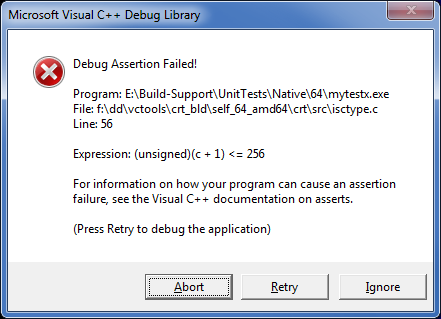
Today, I wanted to do some Windows 64-bit testing, so I rebuild the application using VS C++ 2010 and started testing. Everything was running along fine then I decided to turn on logging in a MQ exit and bam, I get the following error:

I scratched my head and thought, I do not have any source code called ‘isctype.c’ and the code is not using a C function called ‘ isctype’. So, I did the same test with the 32-bit version of the program it was fine. After swearing for a while, I started adding debug statements through the code and finally narrow it down to the following:

for (i=0; i < lenSrc; i++) pTgt[j+i] = isprint(pSrc[i]) ? pSrc[i] : '.';[/sourcecode] After some more debugging, I noticed that it crashed when the high-order bit was set. i.e. pSrc[i] is 'AA'. The VS C++ runtime was treating pSrc[i] as a signed integer. pSrc is typed as 'char *', so technically is it a signed char but who in the world deals with signed chararcters. So, after some searching on the internet, I found many other people with similar issue. The simplest solution is to cast pSrc[i] to unsigned char. [sourcecode language="c"]for (i=0; i < lenSrc; i++) pTgt[j+i] = isprint((unsigned char)pSrc[i]) ? pSrc[i] : '.';[/sourcecode] I don't know what's up with Microsoft's runtime for VS C++ 2010 but I wasted 3 hours of my life that I will never get back. Regards, Roger Lacroix Capitalware Inc.

C, Programming, Windows Comments Off on 3 Hours of Wasted Time That I’ll Never Get Back

Football Conference Championship Games

Small Sliding scale picks for Conference Championship games (least probable to most probable):

F1   San Francisco 49ers  F3.5       at      Atlanta Falcons
F2   Baltimore Ravens                at      New England Patriots   F9.0

Fibonacci Sliding scale picks for Conference Championship games (least probable to most probable):

F1   San Francisco 49ers  F3.5       at      Atlanta Falcons
F2   Baltimore Ravens                at      New England Patriots   F9.0

So what does it mean?

F2   Baltimore Ravens                at      New England Patriots   F9.0

F2 means the favorite team will cover the spread with the highest probability of success.

Enjoy. 🙂 As they say in the stock market, past perform is no indication of future performance.

Regards,
Roger Lacroix

Football 1 Comment

CentOS 5.9 Released

The CentOS Project has just released CentOS v5.9.
http://wiki.centos.org/Manuals/ReleaseNotes/CentOS5.9

CentOS is an Enterprise Linux distribution based on a rebuild of the freely available sources from Red Hat Enterprise Linux.

Regards,
Roger Lacroix
Capitalware Inc.

Linux, Open Source, Operating Systems Comments Off on CentOS 5.9 Released