Fedora 18 Released

Fedora Project Contributors has just released Fedora v18.
http://docs.fedoraproject.org/en-US/Fedora/18/html/Release_Notes/index.html

Fedora is a Linux-based operating system, a suite of software that makes your computer run. You can use the Fedora operating system to replace or to run alongside of other operating systems such as Microsoft Windows or Mac OS X. The Fedora operating system is 100% free of cost for you to enjoy and share.

Regards,
Roger Lacroix
Capitalware Inc.

Linux, Open Source, Operating Systems Comments Off on Fedora 18 Released

Middleware Messaging FUD

I was reading various articles today and I stumbled upon this article: AMQP: The new king of middleware messaging at SD Times. When I first read it, I started laughing so hard because I thought it was a joke. Then I realized it was not some sort of time-warped joke but rather just straight FUD (Fear, Uncertainty and Doubt).

I have been doing middleware messaging for businesses since 1989, yup, 24 years. This article is AT LEAST 2 decades too late to be relevant. The author, Angus Telfer, clearly has limited or no knowledge of the middleware messaging market for businesses and I do not know why he would write the article except for FUD or advertising.

Now for the full disclosure … I am a co-chair of the OASIS AMQP 1.0 Technical Committee, and the CTO of a company that uses AMQP in its main product

So, Angus Telfer is doing some self promotion. Here are some other gems:

The standardization of AMQP marks a turning point in the industry, a turning point from the past, consisting of a small number of enterprise-capable proprietary systems plus numerous, specific-purpose “roll your own” protocols, to the future, consisting of a standard messaging protocol used to interconnect products and services from a large number of vendors.

This is the sentence that made me laugh. This would be like me saying that I have launched a new social networking web site and claim that the small players have nothing on me but totally ignoring the 800 pound gorilla (Facebook). Yes, I am calling WebSphere MQ the 800 pound gorilla in the business middleware messaging market place. So, let’s talk about the 800 pound gorilla:

  • Gartner says that WebSphere MQ has roughly 72% of the middleware messaging software market
  • IBM has stated that over 15,000 customers worldwide are using WebSphere MQ
  • A couple of years ago, a senior IBM MQ person told me that 95% of the fortune 500 companies use WebSphere MQ.
  • IBM claims that WebSphere MQ now supports 80 different environments
  • What are the other 2 big proprietary middleware messaging products? Oracle AQ and MSMQ

Active support by JPMorgan, Bank of America, Deutsche Börse, Goldman Sachs, Credit Suisse, the US Department of Homeland Security, and other large end users guarantees it’s a standard that will be seen in the enterprise at the very least.

The standardization of AMQP signals the death knell for proprietary messaging systems. Large end users have signaled by their participation in the AMQP standards group-and their use of products developed with the protocol-that they are tired of being held hostage to proprietary messaging systems.

Yes, I have heard rumors that several of those companies are tired of paying fees to IBM for WebSphere MQ, so this is their revolution.

There are currently no competing standards that offer similar capabilities, enjoy similar support, and are application/broker independent.

Really!! Now that’s seriously funny. Angus Telfer doesn’t think that the 800 pound gorilla (WebSphere MQ) has more features, greater 3rd party vendor support and larger customer base? I have been helping Financial Services companies interconnect business applications (internally and externally) using WebSphere MQ since the 90’s and I have no clue what planet Angus Telfer is on.

So, where does that leave us? If you need a good laugh then have a read of this article. It is FUD just don’t get too bothered by it.

Am I a WebSphere MQ only guy – no. I follow both ActiveMQ and RabbitMQ closely. Both ActiveMQ and RabbitMQ appear to be the market leaders in the open source middleware messaging market and RabbitMQ seems to be gaining momentum.

I’m surprised that a technology magazine like SD Times would publish such FUD. As always with the internet, take what you read on the internet with a grain of salt.

Regards,
Roger Lacroix
Capitalware Inc.

IBM MQ, Open Source Comments Off on Middleware Messaging FUD

New: MQ Message Encryption v2.0.0

Capitalware Inc. would like to announce the official release of MQ Message Encryption v2.0.0.

MQ Message Encryption (MQME) provides encryption for MQ message data while it resides in a queue and in the MQ logs (i.e. all data at rest). In cryptography, encryption is the process of transforming information into an unreadable form (encrypted data). Decryption is the reverse process. It makes the encrypted information readable again. Only those with the key (PassPhrase) can successfully decrypt the encrypted data. MQME uses Advanced Encryption Standard (AES) to encrypt the data. AES is a data encryption scheme, adopted by the US government, that uses three different key sizes (128-bit, 192-bit, and 256-bit).

One of the features that MQME offers is the ability to control who accesses protected queues. Normally, the ‘mqm’, ‘QMQM’ or ‘MUSR_MQADMIN’ MQ UserIDs or any UserID in the ‘mqm’ group get full access to all messages in all queues. For queues protected by MQME, those privileged UserIds do NOT get access to the messages in the protected queues unless they are explicitly added to the authorized list of users or groups.

Another feature of MQME is its ability to generate and validate the message via a digital signature. MQME uses the SHA-2 to create a cryptographic hash function (digital signature) for the message data. The digital signature provides verification that the message data has not been altered.

MQME is an MQ API Exit that operates with WebSphere MQ v6.0, v7.0, v7.1 or v7.5 in Windows, Unix, IBM i (OS/400) and Linux platforms.

For more information about MQME, please go to:
https://www.capitalware.com/mqme_overview.html

Regards,
Roger Lacroix
Capitalware Inc.

Capitalware, IBM i (OS/400), IBM MQ, Linux, MQ Message Encryption, Security, Unix, Windows Comments Off on New: MQ Message Encryption v2.0.0

Football Divisional Playoff Games

Small Sliding scale picks for divisional playoff games (least probable to most probable):

U1   Green Bay Packers    F3.5       at      San Francisco 49ers
U2   Houston Texans       F9.5       at      New England Patriots
F3   Seattle Seahawks     F2.5       at      Atlanta Falcons
U4   Baltimore Ravens     F9.5       at      Denver Broncos

Fibonacci Sliding scale picks for divisional playoff games (least probable to most probable):

U1   Baltimore Ravens     F9.5       at      Denver Broncos
U2   Green Bay Packers    F3.5       at      San Francisco 49ers
U3   Houston Texans       F9.5       at      New England Patriots
F4   Seattle Seahawks     F2.5       at      Atlanta Falcons

So what does it mean?

U1   Green Bay Packers    F3.5       at      San Francisco 49ers

U1 means that underdog team will beat the spread with the lowest probability of success (don’t bet on it).

F4   Seattle Seahawks     F2.5       at      Atlanta Falcons

F4 means the favorite team will cover the spread with the highest probability of success.

Enjoy. 🙂 As they say in the stock market, past perform is no indication of future performance.

Regards,
Roger Lacroix

Football 1 Comment

Rogers internet was broken on Wednesday

Once again Rogers Communication totally screws its paying customers.
Yahoo article: Rogers Internet back online after outage.

Around 6:40PM on Wednesday, I started getting errors in FireFox and Eudora (email client) around domain name resolution. Usually, resetting the cable modem box fixes the issue but not last night. I checked the internet on my iPhone via Rogers LTE and it received the same error.

I tried calling customer service but after waiting on hold for 45 minutes, I hung up out of frustration.

I happened to try and connect to a couple of servers where I had the IP address (not domain name) and they worked just fine. So, the internet pipe was okay, but it appeared that DNS servers were not functioning.

A little after 11:00PM last night, everything got back to normal. It took Rogers’ technical support more than 4 hours to bring a backup DNS server online!!!

In the Yahoo article it says: “network experts were continuing to investigate the root cause of the service interruptions, but provided no further detail”.

What someone unplugged the server or spilled coffee on it or did “rm -R *” etc… The real question that will never get answered is “Why didn’t Rogers have a redundant DNS server in another location?”.

Capitalware is a small company but I am willing to bet that I have implemented more backup and fail-safe measures than Rogers have. So, everything is working and I will wait for next day for Rogers Communication incompetence to shine again. 🙁

Regards,
Roger Lacroix
Capitalware Inc.

General, iPhone, iPad & iPod Touch, Mobile Comments Off on Rogers internet was broken on Wednesday

Football Wild Card Playoff Games

Small Sliding scale picks for wild card playoff games (least probable to most probable):

F1   Indianapolis Colts   F6.5       at      Baltimore Ravens
F2   Minnesota Vikings    F8.5       at      Green Bay Packers
F3   Cincinnati Bengals   F4.5       at      Houston Texans
U4   Seattle Seahawks                at      Washington Redskins    F2.5

Fibonacci Sliding scale picks for wild card playoff games (least probable to most probable):

F1   Indianapolis Colts   F6.5       at      Baltimore Ravens
F2   Minnesota Vikings    F8.5       at      Green Bay Packers
F3   Cincinnati Bengals   F4.5       at      Houston Texans
U4   Seattle Seahawks                at      Washington Redskins    F2.5

So what does it mean?

F1   Indianapolis Colts   F6.5       at      Baltimore Ravens

F1 means the favorite team will cover the spread with the lowest probability of success (don’t bet on it).

U4   Seattle Seahawks                at      Washington Redskins    F2.5

U4 means that underdog team will beat the spread (favorite will not cover the spread) with the highest probability of success.

Enjoy. 🙂 As they say in the stock market, past perform is no indication of future performance.

Regards,
Roger Lacroix

Football 1 Comment

End-To-End Encryption with Universal File Mover (How To #4)

In the Universal File Mover (UFM) How To #2 blog posting, UFM ran in “client mode” when it connected to the queue managers. In this blog posting, I will show how to implement a simple file transfer using End-To-End encryption when connecting to the queue manager in “client mode”.

UFM’s MQSend Action uses Advanced Encryption Standard (AES) to encrypt the data. The MQReceive Action can decrypt the incoming data before it is written to the target file. UFM supports the use of 128, 192 and 256-bit AES encryption/decryption.

US export restrictions limit the Java AES support to 128-bits. If the user wishes to use AES 192 or 256-bit encryption then “Java Cryptography Extension (JCE) Unlimited Strength Jurisdiction Policy Files 6” needs to be downloaded (and installed) from Oracle’s Java web page: http://www.oracle.com/technetwork/java/javase/downloads/index.html
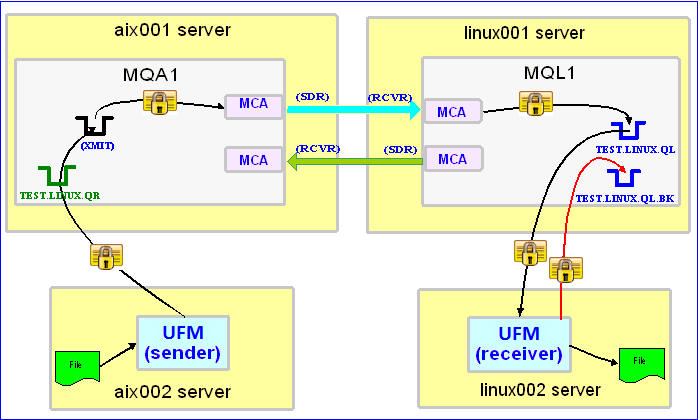

In this example, the following servers are used but they only have WebSphere MQ (WMQ) Client installed (no queue managers):
– aix002 is an AIX server with WMQ Client and UFM software installed
– linux002 is a Linux server with WMQ Client and UFM software installed

In this example, the following queue managers are used:
MQA1 is a queue manager residing on a AIX (aix001) server (sender)
MQL1 is a queue manager residing on a Linux (linux001) server (receiver)

TEST.LINUX.QL and TEST.LINUX.QL.BK are local queues defined in queue manager MQL1 (receiver)
TEST.LINUX.QR is a remote queue defined in queue manager MQA1 (sender)

If you do not know how to define/setup communication between 2 queue managers then follow the instructions in this blog posting:
https://www.capitalware.com/rl_blog/?p=509

Step #1: On the linux002 server, create a file in the mq directory called mql1.xml and copy the following into the file:

<?xml version="1.0" encoding="ISO-8859-1"?>
<!DOCTYPE UFM_MQ SYSTEM "UFM_MQ.dtd">
<UFM_MQ>
    <QMgrName>MQL1</QMgrName>
    <QueueName>TEST.LINUX.QL</QueueName>
    <Hostname>linux001</Hostname>
    <ChannelName>SYSTEM.DEF.SVRCONN</ChannelName>
    <Port>1414</Port>
    <UserID>tester</UserID>
</UFM_MQ>

The mql1.xml (UFM_MQ XML) file describes how to connect to the remote MQL1 queue manager on server linux001. The connection will use UserID of tester. If you do not have that UserID defined on the linux001 server then use a UserID that is defined.

Step #2: On the linux002 server, in the UFM install directory, create a file called ufm_receive_test_4.xml and copy the following into the file:

<?xml version="1.0" encoding="ISO-8859-1"?>
<!DOCTYPE UFM_Workflow SYSTEM "UFM_Workflow.dtd">
<UFM_Workflow>

  <Actions>
    <MQReceive run="D" keysize="128" passphrase="this is the secret">
      <MQ>
        <MQFile>mql1.xml</MQFile>
        <BackOutQName>TEST.LINUX.QL.BK</BackOutQName>
      </MQ>
      <Default>
         <Directory override="Y">/home/roger/UFM/</Directory>
      </Default>
    </MQReceive>
  </Actions>

</UFM_Workflow>

When UFM is started, it will run as a daemon (run=”D”) and use a backout queue called TEST.LINUX.QL.BK just in case there is an issue with a message. For decrypting the data, UFM will use a key size of 128-bit and a PassPhrase of ‘this is the secret’. UFM will override the message’s specified directory and use the one provided. Either create /home/roger/UFM/ directory on your Linux server or use a directory that already exist on your Linux server.

Step #3: On the linux002 server, start UFM to receive the file transfers:

./ufm.sh ufm_receive_test_4.xml &

Step #4: On the aix002 server, create a file in the mq directory called mqa1.xml and copy the following into the file:

<?xml version="1.0" encoding="ISO-8859-1"?>
<!DOCTYPE UFM_MQ SYSTEM "UFM_MQ.dtd">
<UFM_MQ>
    <QMgrName>MQA1</QMgrName>
    <QueueName>TEST.LINUX.QR</QueueName>
    <Hostname>aix001</Hostname>
    <ChannelName>SYSTEM.DEF.SVRCONN</ChannelName>
    <Port>1414</Port>
    <UserID>tester</UserID>
</UFM_MQ>

The mqa1.xml (UFM_MQ XML) file describes how to connect to the remote MQA1 queue manager on server aix001. The connection will use UserID of tester. If you do not have that UserID defined on the aix001 server then use a UserID that is defined.

Step #5: On the aix002 server, create a file in the data directory called test.txt and put a simple text message in the file (i.e. This is a test message.)

Step #6: On the AIX server, in the UFM install directory, create a file called ufm_send_test_4.xml and copy the following into the file:

<?xml version="1.0" encoding="ISO-8859-1"?>
<!DOCTYPE UFM_Workflow SYSTEM "UFM_Workflow.dtd">
<UFM_Workflow>

  <Actions>
    <MQSend delete="N" format="N" keysize="128" passphrase="this is the secret">
      <File>data/test.txt</File>
      <MQ>
        <MQFile>mqa1.xml</MQFile>
      </MQ>
      <Remote>
        <Directory>/var/mqm/</Directory>
      </Remote>
    </MQSend>
  </Actions>

</UFM_Workflow>

When UFM is started, first it will encrypt the data using a key size of 128-bit and a PassPhrase of ‘this is the secret’ then UFM will send the encrypted data.

Step #7: On the aix002 server, start UFM to send the file:

./ufm.sh ufm_send_test_4.xml

UFM will start, encrypted the data and put the encrpyted message to the specified queue then terminate.

Step #8: On the linux002 server, verify that the test file (i.e. test.txt) was put into the /home/roger/UFM/ directory or whatever directory you specified in the ufm_receive_test_4.xml file.

Step #9: Finally, we need to stop UFM daemon that is running on the linux002 server. In the UFM install directory, create a file called ufm_putquit_test_4.xml and copy the following into the file:

<?xml version="1.0" encoding="ISO-8859-1"?>
<!DOCTYPE UFM_Workflow SYSTEM "UFM_Workflow.dtd">
<UFM_Workflow>
  <Actions>
    <MQPutQuit>
      <MQ>
        <MQFile>mql1.xml</MQFile>
      </MQ>
    </MQPutQuit>
  </Actions>
</UFM_Workflow>

Step #10: On the linux002 server, run UFM with the MQPutQuit action:

./ufm.sh ufm_putquit_test_4.xml

This blog demonstrates how to perform End-To-End encryption using UFM at both the sender and receiver ends as MQ clients that connect to remote queue managers. You do NOT need to implement SSL or purchase SSL certificates to have secure End-To-End encryption of your data. Besides the headache of implementing SSL, SSL does absolutely nothing for messages sitting in the queue because SSL is only for encrypting data as it crosses the channel (i.e. over the air). UFM provides true End-To-End encryption of the data.

Regards,
Roger Lacroix
Capitalware Inc.

Capitalware, IBM i (OS/400), IBM MQ, Java, Linux, macOS (Mac OS X), Open Source, Security, Universal File Mover, Unix, Windows Comments Off on End-To-End Encryption with Universal File Mover (How To #4)

Football Week # 17

Well, week # 16 was a great week. Small Sliding scale picks were 11-5 and Fibonacci Sliding scale picks were 11-5.

Small Sliding scale picks for week #17 (least probable to most probable):

F1   Miami Dolphins                  at      New England Patriots   F10.0
U2   Jacksonville Jaguars            at      Tennessee Titans       F4.0
U3   New York Jets                   at      Buffalo Bills          F3.5
F4   Philadelphia Eagles             at      New York Giants        F9.0
F5   Oakland Raiders                 at      San Diego Chargers     F7.0
U6   Cleveland Browns                at      Pittsburgh Steelers    F3.0
F7   Chicago Bears        F3.0       at      Detroit Lions
U8   Carolina Panthers               at      New Orleans Saints     F4.5
F9   Arizona Cardinals               at      San Francisco 49ers    F16.5
F10  Dallas Cowboys                  at      Washington Redskins    F3.0
F11  Tampa Bay Buccaneers            at      Atlanta Falcons        F7.0
U12  Green Bay Packers    F3.5       at      Minnesota Vikings
F13  Houston Texans       F4.0       at      Indianapolis Colts
F14  Baltimore Ravens                at      Cincinnati Bengals     F3.0
F15  St. Louis Rams                  at      Seattle Seahawks       F10.5
F16  Kansas City Chiefs              at      Denver Broncos         F16.0

Fibonacci Sliding scale picks for week #17 (least probable to most probable):

U1   Green Bay Packers    F3.5       at      Minnesota Vikings
F2   Jacksonville Jaguars            at      Tennessee Titans       F4.0
F3   Philadelphia Eagles             at      New York Giants        F9.0
U4   New York Jets                   at      Buffalo Bills          F3.5
U5   Cleveland Browns                at      Pittsburgh Steelers    F3.0
F6   Carolina Panthers               at      New Orleans Saints     F4.5
F7   Oakland Raiders                 at      San Diego Chargers     F7.0
F8   Houston Texans       F4.0       at      Indianapolis Colts
F9   Dallas Cowboys                  at      Washington Redskins    F3.0
F10  Kansas City Chiefs              at      Denver Broncos         F16.0
F11  Chicago Bears        F3.0       at      Detroit Lions
F12  Miami Dolphins                  at      New England Patriots   F10.0
F13  Arizona Cardinals               at      San Francisco 49ers    F16.5
F14  Tampa Bay Buccaneers            at      Atlanta Falcons        F7.0
F15  Baltimore Ravens                at      Cincinnati Bengals     F3.0
F16  St. Louis Rams                  at      Seattle Seahawks       F10.5

Enjoy. 🙂 As they say in the stock market, past perform is no indication of future performance.

Regards,
Roger Lacroix

Football 1 Comment

Merry Christmas and Happy New Year

I would like to wish everyone a Merry Christmas, Happy Hanukkah, Happy Kwanzaa, etc… and a Happy New Year. 🙂

Regards,
Roger Lacroix
Capitalware Inc.

General Comments Off on Merry Christmas and Happy New Year

GSS Chat Starter Edition v1.0.0 Released

Grail Software Solutions has just released GSS Chat Starter Edition v1.0.0 (aka SupportPac MA99).
http://www.grailsoftwaresolutions.co.uk/chatse.html

GSS Chat Starter Edition is a set of Eclipse features which can be used to enable real-time conversations between the administrator and end-users of applications and systems using an IBM WebSphere MQ.

Regards,
Roger Lacroix
Capitalware Inc.

IBM MQ, Java, Linux, Windows Comments Off on GSS Chat Starter Edition v1.0.0 Released